


Picture launching a quiz contest with a prize on the line. Then your top scorer turns out to be someone who retook the quiz nine times. Two people tie for first, and nobody knows who wins.
A bad quiz leaderboard does more damage than having none. It makes honest players feel cheated, and they do not come back.
I have studied how quiz leaderboards are built across WordPress plugins and hosted tools. One decision separates leaderboards people trust from ones they argue about, and most guides never mention it. I will show you that decision, plus the exact steps to set up a fair board in WordPress.
Quick Answer
A quiz leaderboard is a ranked list of players ordered by quiz score, and the ranking rules matter more than the design. QuizPress is the best WordPress option for a free quiz maker with a leaderboard, because its per-quiz and global leaderboards, attempt limits, timer, and question shuffling all come in the free plan. Other plugins sell leaderboards as separate paid add-ons. One honest note: QuizPress’s leaderboard lives in your WordPress dashboard, not on a public page. I explain what that means for you below.
What a Quiz Leaderboard Is (and the Three Kinds)
A quiz leaderboard ranks people by how well they did. It usually shows a rank, a name, and a score. Some add time taken or number of attempts.
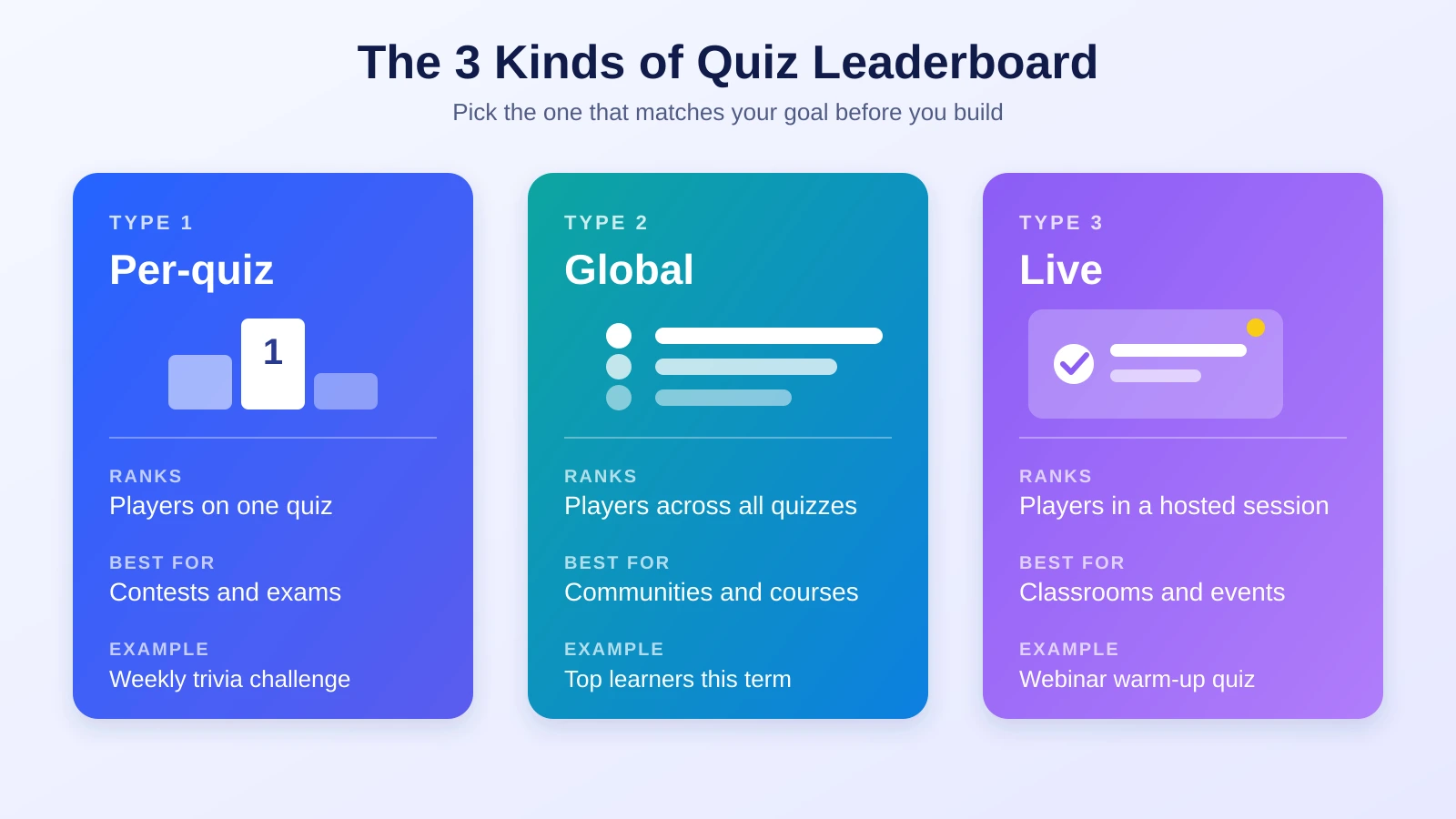
People search for an online quiz leaderboard with three different goals, so it helps to separate them:
|
Type |
What it ranks |
Best for |
|
Per-quiz leaderboard |
Players on one quiz |
Contests, exams, a single challenge |
|
Global leaderboard |
Players across all quizzes |
Communities, courses, long-term learning |
|
Live leaderboard |
Players during a hosted session |
Classrooms, events, webinars |
Live boards update after each question in tools built for presentations. WordPress plugins focus on the first two. This guide covers those.
Do Quiz Leaderboards Actually Work?
Before you build one, you should know what the research says. It is more mixed than most blogs admit.
One eight-week study of 159 engineering students reported a positive link between adding a leaderboard to online formative quizzes and better achievement and engagement. The authors also noted that gamification may not hold attention over the long term.
A second study compared 48 students on leaderboard quizzes with 48 on plain quizzes. It found no significant difference in learning or course engagement. The leaderboard group did finish more quizzes, but quiz completion dropped after week three in both groups.
What I take from this:
That last point shapes the “seasons” idea later in this guide.
The Leaderboard Rulebook: Six Decisions Before You Build
This is the part most guides skip. A leaderboard is a set of rules wearing a table. If the rules are fuzzy, players will find the cracks.
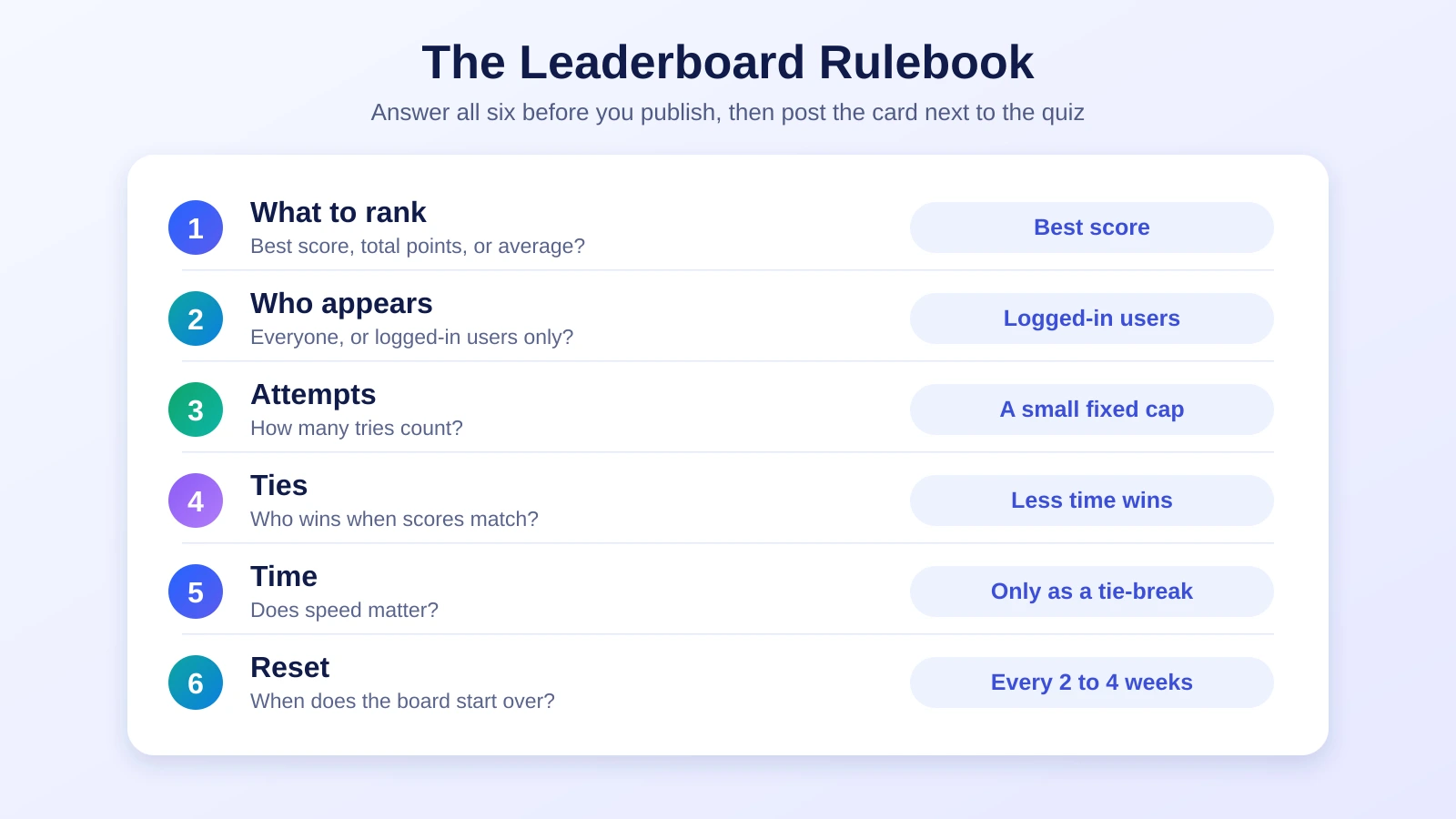
I use a six-question rulebook. Answer all six before you publish.
|
Decision |
The question |
A safe default |
|
1. What to rank |
Best score, total points, or average? |
Best score for contests |
|
2. Who appears |
Everyone, or only logged-in users? |
Logged-in users |
|
3. Attempts |
How many tries count? |
A small fixed number |
|
4. Ties |
Who wins when scores match? |
Earlier finish or less time |
|
5. Time |
Does speed matter? |
Only as a tie-break |
|
6. Reset |
When does the board start over? |
Every 2 to 4 weeks |
Write your answers on one card and put it next to the quiz. Players read rules. They only complain about rules they could not find.
The volume trap: why “what to rank” comes first
Ranking by total points rewards people who play the most, not the best. Ranking by best score rewards skill.
Here is a made-up example to show the gap. The numbers are invented for illustration.
|
Player |
Quizzes taken |
Best score |
Total points |
|
Maya |
3 |
95 |
270 |
|
Ben |
12 |
70 |
780 |
Maya is clearly stronger. On a total-points board, Ben ranks far above her.
QuizPress uses both on purpose. Its global board adds up marks across all quizzes, so it rewards activity. Its per-quiz board uses each person’s best score, so it rewards skill. I use the global board to spot my most active people and the per-quiz board to pick contest winners.
Ties, time, and attempts
Ties will happen on short quizzes. Decide the rule before they do. A time tie-break is common, and some tools break ties by who finished fastest. If you use it, say so on the rulebook card.
Attempts need a cap. Without one, your leaderboard becomes a test of patience. Cap attempts and decide whether the best attempt or the latest one counts.
How to Create a Quiz With a Leaderboard in WordPress
Want to create a quiz with a leaderboard without code? Here is the exact flow I use in QuizPress. It works on the free plan. If you have never built a quiz in WordPress, the step-by-step quiz guide covers the basics first.
Step 1: Build the quiz
Create a new quiz and pick the quiz type. Leaderboards rank scored quizzes by best score. For surveys and polls, the board shows participation counts instead. The survey guide and the poll guide explain those modes.
Step 2: Add questions you can reuse
Pull questions from your question bank so you can run a fresh round next month in minutes. The quiz question bank guide shows how to import and reuse them. Mix formats, since the full range of quiz question types affects how much a good guess can help.
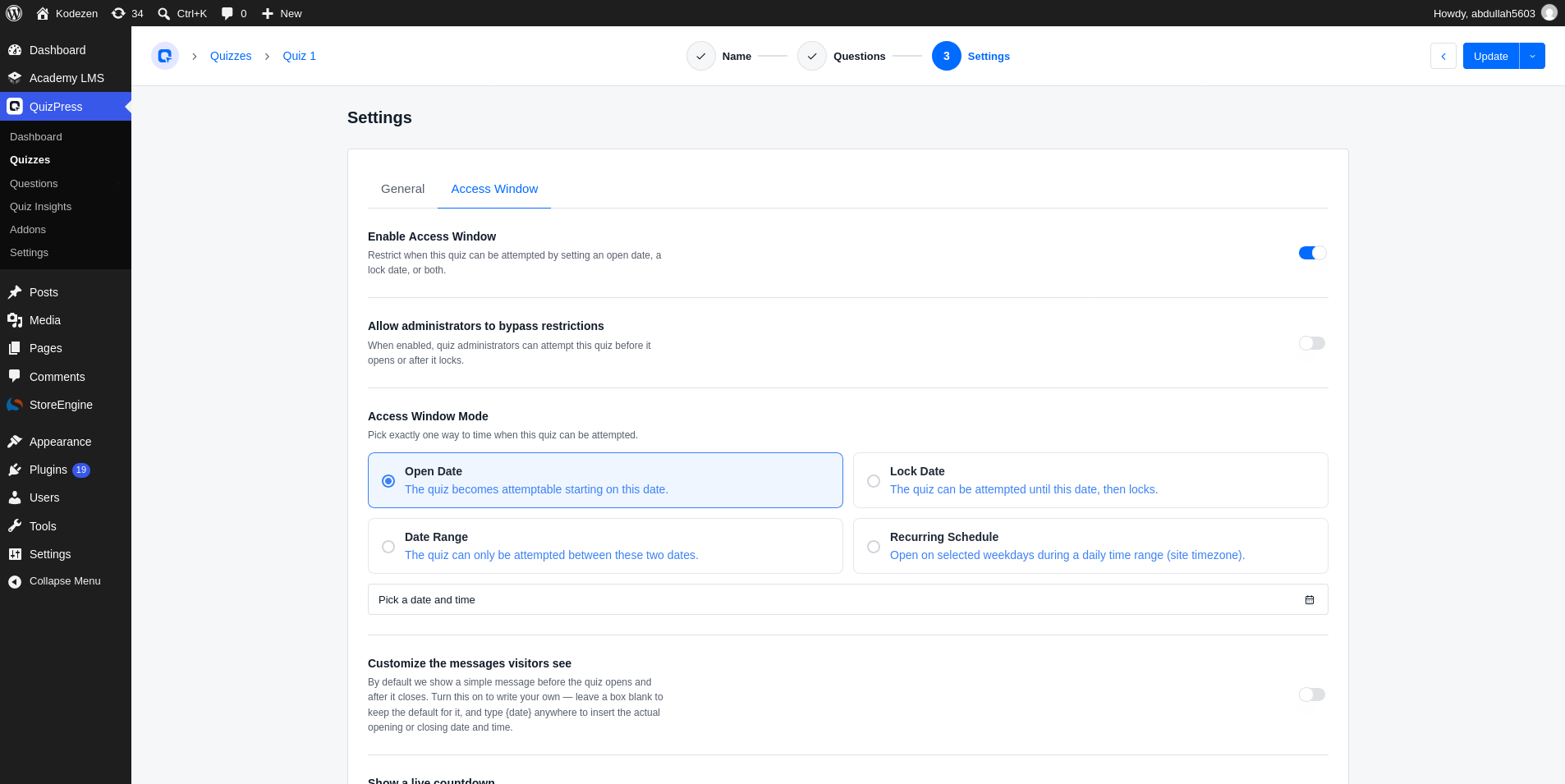
Step 3: Turn on the fair-play settings
This step is where trust is built. In the quiz settings I switch on:
The same timer logic powers the online exam with a timer setup.
Step 4: Ask players to log in
The board is built from user accounts. Guest attempts do not appear on it. Use a member page or a login-required page so every score belongs to a real person.
Step 5: Publish the quiz
Paste the quiz shortcode into any page or post. The shortcode takes the quiz ID, like [quizpress_quiz quiz_id="123"]. The quiz show doc covers placement.
Step 6: Reading your leaderboard
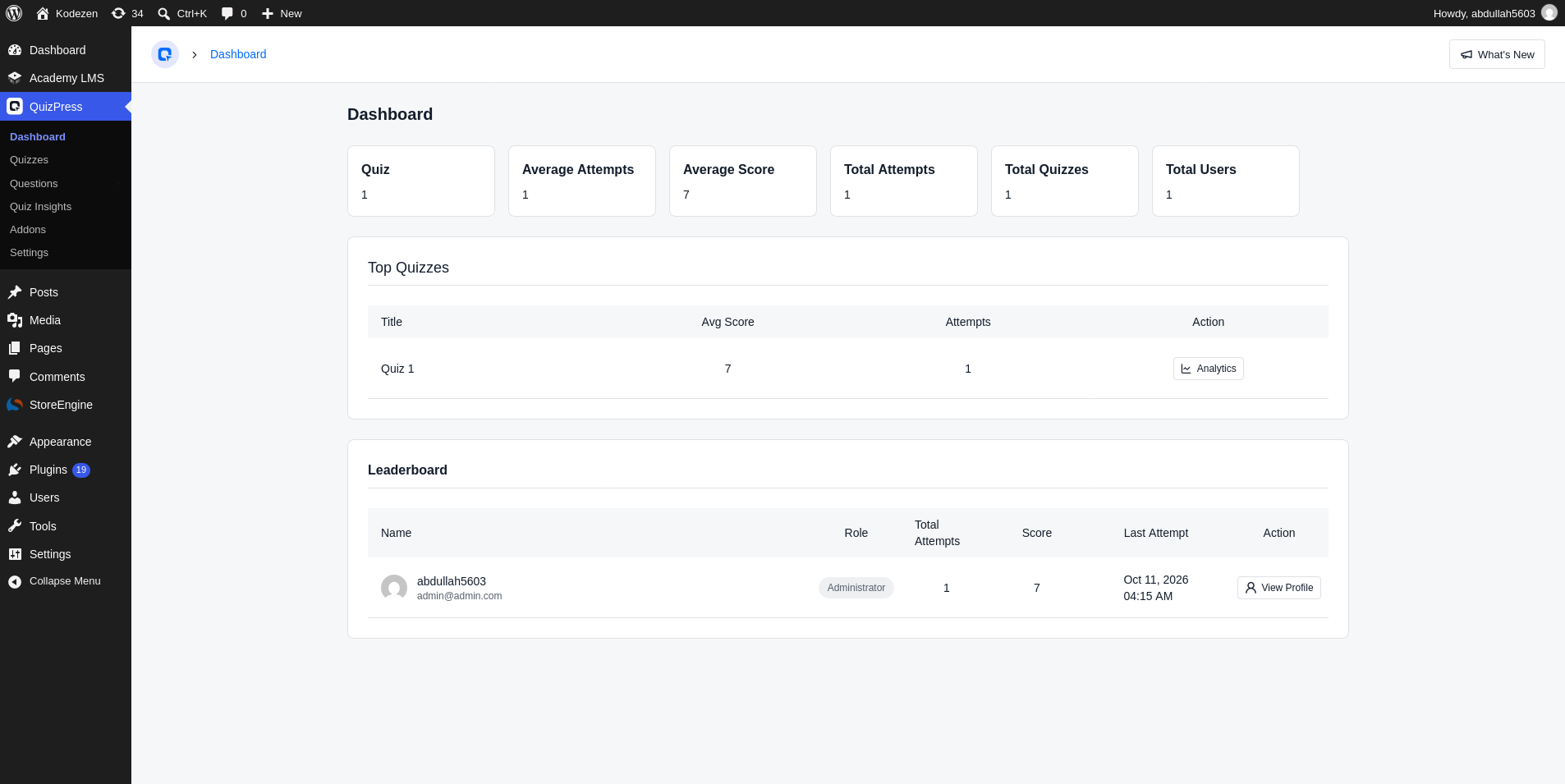
Open the QuizPress Dashboard to see the global Leaderboard widget with your top 10 users. For one quiz, open that quiz’s analytics view to see its ranking, attempts, and last attempt date.
What the QuizPress Leaderboard Does and Doesn’t Do
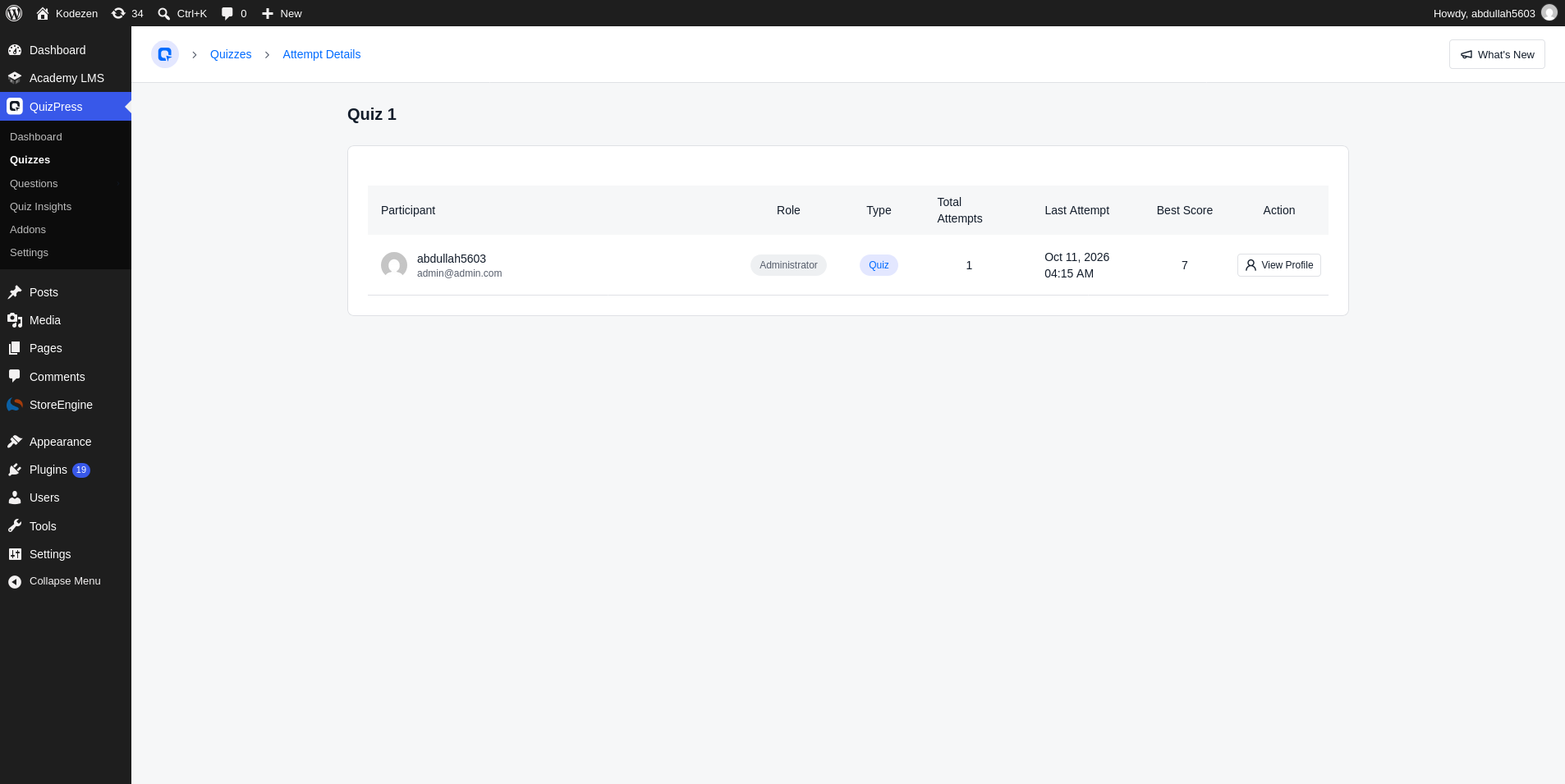
I have spent real time inside QuizPress’s dashboard, and I want you to know exactly what you get.
What it does:
What it doesn’t do:
There is an upside to the admin-only design. Player emails stay private, because only you see the board. That suits employee training, course cohorts, and contests where you pick the winner yourself.
If a public board is your top need, the comparison below shows where other plugins fit. Also, the engagement analytics guide shows how to use leaderboard data alongside completion and score trends, and the quiz analytics guide goes through the rest of the dashboard.
WordPress Quiz Leaderboard Options Compared: Which Quiz Maker With Leaderboard Fits?
Not every quiz maker with leaderboard support works the same way. Here is how three approaches stack up on the features that decide a WordPress quiz leaderboard.
|
Feature |
QuizPress |
Quiz and Survey Master |
LearnDash |
|
Leaderboard included without an add-on |
Yes, free plan |
No, paid add-ons |
Included in the paid LMS |
|
Public front-end display |
No, dashboard only |
Yes (results page, shortcode, widget) |
Yes (results page, shortcode) |
|
Per-quiz leaderboard |
Yes |
Yes |
Yes |
|
Cross-quiz or global leaderboard |
Yes, top 10 |
Yes, in the Advanced add-on |
Not found in docs |
|
Time used as a ranking rule |
No |
Not found in docs (shows a Time Taken column) |
Not found in docs |
|
Guests or anonymous entries |
No |
Not found in docs |
Yes (name and email) |
|
Date-range boards |
No |
Yes, in the Advanced add-on |
Not found in docs |
|
Graph view |
No |
Yes, in the Advanced add-on |
Not found in docs |
Based on each vendor’s own documentation at the time of writing. Plans and add-ons change, so confirm on the vendor’s page.
I dug into the Quiz and Survey Master and LearnDash documentation to build this table. I did not install either, so treat it as research, not a hands-on test.
Three patterns stand out:
If you want to explore other plugins in depth, the WordPress quiz plugin comparison and the Quiz and Survey Master alternatives round-up cover more ground. The full best WordPress quiz plugin guide ranks them overall.
Free Online Quiz With Leaderboard: What “Free” Really Gets You
“Free” means different things here. Some hosted quiz tools, such as Woobox, say their free plan includes a leaderboard, but you build on their site, not yours. Your players, data, and branding live on someone else’s platform.
On WordPress, “free” often means a quiz with no board, and the board arrives as a paid add-on. QuizPress’s free plan includes the dashboard leaderboard, a timer, attempt limits, a question bank, and manual grading. The top free WordPress quiz plugins post compares what each free plan includes.
If you later want to charge for a contest or sell access to quizzes, Can You Sell Quizzes on WordPress? explains the options, and the certificates guide shows how to add a reward players keep.
What to Show on a Leaderboard (and What to Hide)
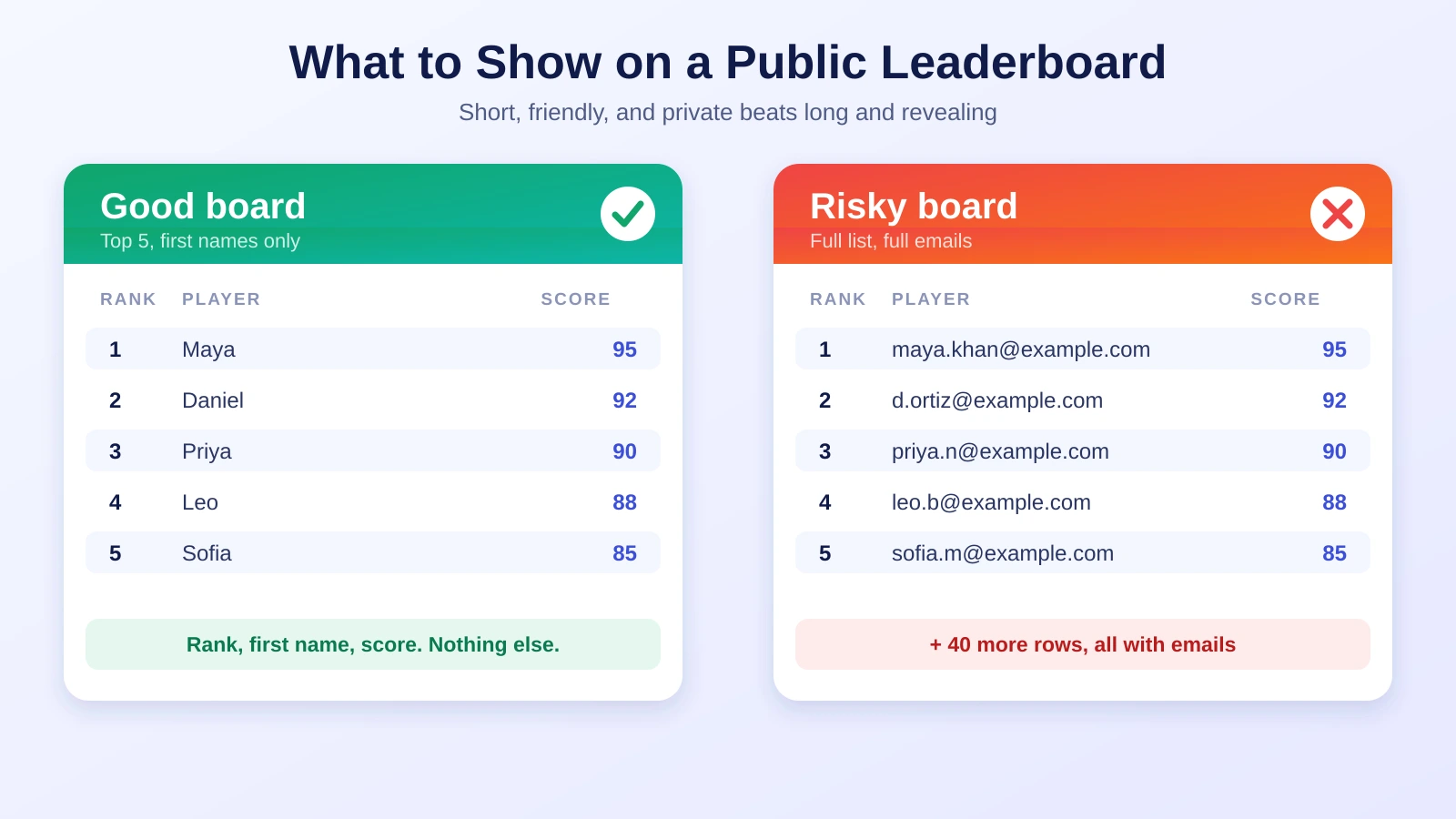
Whether you read the board yourself or share the results, choose the columns on purpose. Every extra column adds noise or risk.
For public results, I post the top five or ten, not the full list. The people at the bottom never asked to be ranked in public.
Run Your Leaderboard in Seasons
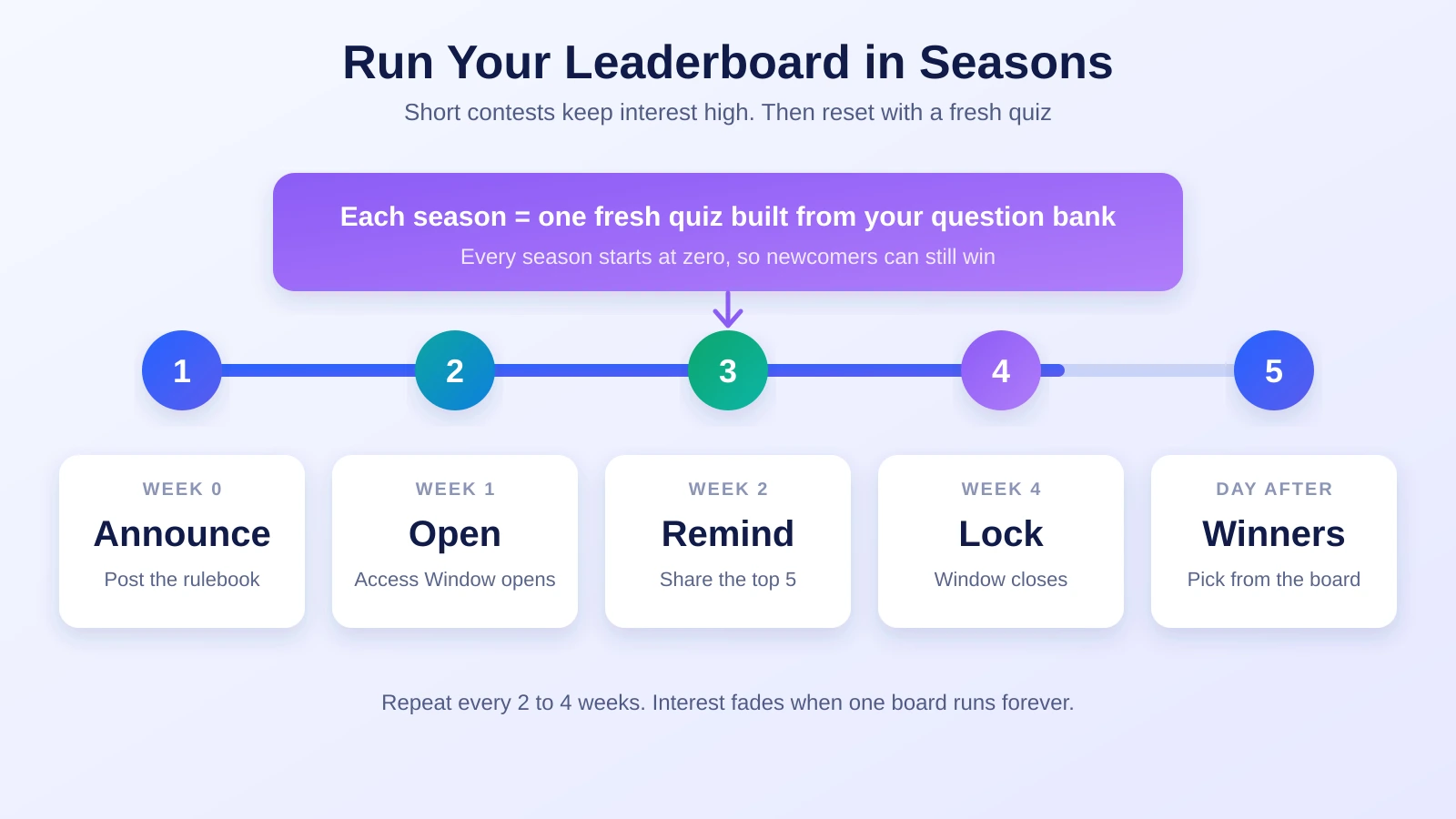
Remember the studies: interest fades after about three weeks. So I do not run one board forever. I run seasons.
A season is a short contest, usually two to four weeks, with a clear start and end.
Each new quiz has its own board, so every season starts at zero. That keeps newcomers in the race, and it makes the top spot feel reachable.
If a player disputes a score, open their attempt and review it. The quiz attempt management guide shows how to filter and review attempts, and the manual grading guide covers open-ended answers.
When a Leaderboard Backfires
A leaderboard is not right for every quiz. I skip it in these cases:
A good test is this: would the bottom player feel motivated or embarrassed? If you are unsure, show only the top five.
Leaderboard Ideas by Use Case
Build a Fairer Quiz Leaderboard Today
A trusted quiz leaderboard comes from clear rules, fair-play settings, and short seasons, not from fancy design. Write your rulebook, cap attempts, set a timer, and run a two-to-four week contest.
QuizPress gives you a quiz maker with a leaderboard on the free plan. The full feature list shows what else is included, and pricing starts at a one-time $79 for Pro with a 14-day money-back guarantee.
The one place QuizPress is weaker is public display. If your players must see the board on a page, pick a plugin that does that. If you are the one reading the rankings, it is one of the easiest ways to run a fair contest.
Frequently Asked Questions
What is a quiz leaderboard?
A quiz leaderboard is a ranked list of quiz takers ordered by score. It can also show attempts, time taken, or last attempt date. It turns a quiz into a friendly competition.
How do I create a quiz with a leaderboard in WordPress?
Use a quiz plugin with a built-in leaderboard. In QuizPress, you build the quiz, add questions, set attempt limits and a timer, and publish it with a shortcode. The leaderboard fills in as logged-in users submit attempts.
Is there a free online quiz maker with a leaderboard?
Yes. Hosted tools like Woobox say their free plan includes one, and QuizPress’s free WordPress plan includes a dashboard leaderboard. Plan limits change, so confirm them before you commit.
Can players see the QuizPress leaderboard?
No. In QuizPress the leaderboard is a dashboard view for site owners, and it is not published as a public page. If players must see the board, a plugin with a front-end leaderboard display fits better.
How does QuizPress rank players?
Each quiz’s board ranks by best score. The global board ranks by total marks across all quizzes. Survey and poll boards rank by number of attempts.
Does a quiz leaderboard include guests?
Not in QuizPress. Guest attempts do not appear on its leaderboard. LearnDash documents an anonymous option where guests enter a name and email.
How do I stop cheating on a leaderboard?
Cap attempts, add a time limit, and shuffle question order. Use an access window so the quiz only runs on set dates. Review suspicious attempts by hand.
Do leaderboards improve engagement?
Sometimes. One study reported better engagement and achievement, and another found no significant difference. Short seasons work better than endless boards.