


Retyping the same forty exam questions into a new quiz for the third semester in a row is not a small annoyance. It is hours of unpaid, repetitive work.
It also gets worse the longer it goes on. Typos creep in. One class ends up with a question worded slightly differently from another. Then someone accidentally overwrites the spreadsheet that held the master list, and a year of question-writing is gone.
This is not only a teacher’s problem. A marketing team running a dozen “which product is right for you” lead quizzes ends up rebuilding the same core questions inside every new campaign. An HR team re-types the same compliance questions into a fresh onboarding quiz every time a policy changes.
Quick answer: WordPress can maintain a genuine, reusable question bank. QuizPress builds one into its free plan — every question created lives in a single shared library that any quiz, survey, or exam can pull from — and the same free plan includes native CSV import and export, so that library can be built in bulk instead of one question at a time.
The rest of this guide covers what a question bank actually is, how QuizPress’s version works step by step, how to import and export questions in bulk, and how that compares to what a handful of other WordPress quiz and course plugins charge for the same thing.
What Is a Question Bank, Really?
A question bank, in plain terms, is a single storage location for quiz or exam questions that is not tied to any one quiz.
Instead of writing a question directly inside “Quiz A” and having it live only there, a question bank keeps it in a shared pool. Quiz A can use it. So can Quiz B, Quiz C, or an exam built eight months from now.
That single change solves three problems at once: questions get written once instead of many times, edits to a question apply everywhere it is used instead of needing to be repeated by hand, and a library of questions builds up over time instead of scattering across a dozen unrelated quizzes.
The term shows up in a second, older context too, which is worth separating out clearly.
Question Bank vs. Test Bank: Same Idea, Different Origin
“Test bank” is the term textbook publishers and academic instructors have used for decades, usually referring to a large, pre-written set of exam questions that ships alongside a textbook or course curriculum.
A publisher’s test bank questions are typically supplied as a document or a spreadsheet, meant to be loaded into whatever testing system a school or professor already uses.
A software question bank, the kind covered in this guide, is the feature inside a quiz plugin that stores and organizes questions after they exist — whether they were typed in one at a time or brought in from somewhere else, including a publisher’s test bank file.
The two ideas meet at exactly the point this guide is built around: getting an existing set of test bank questions into a plugin’s own question bank without retyping every single one.
Why Reusing Quiz Questions Actually Matters
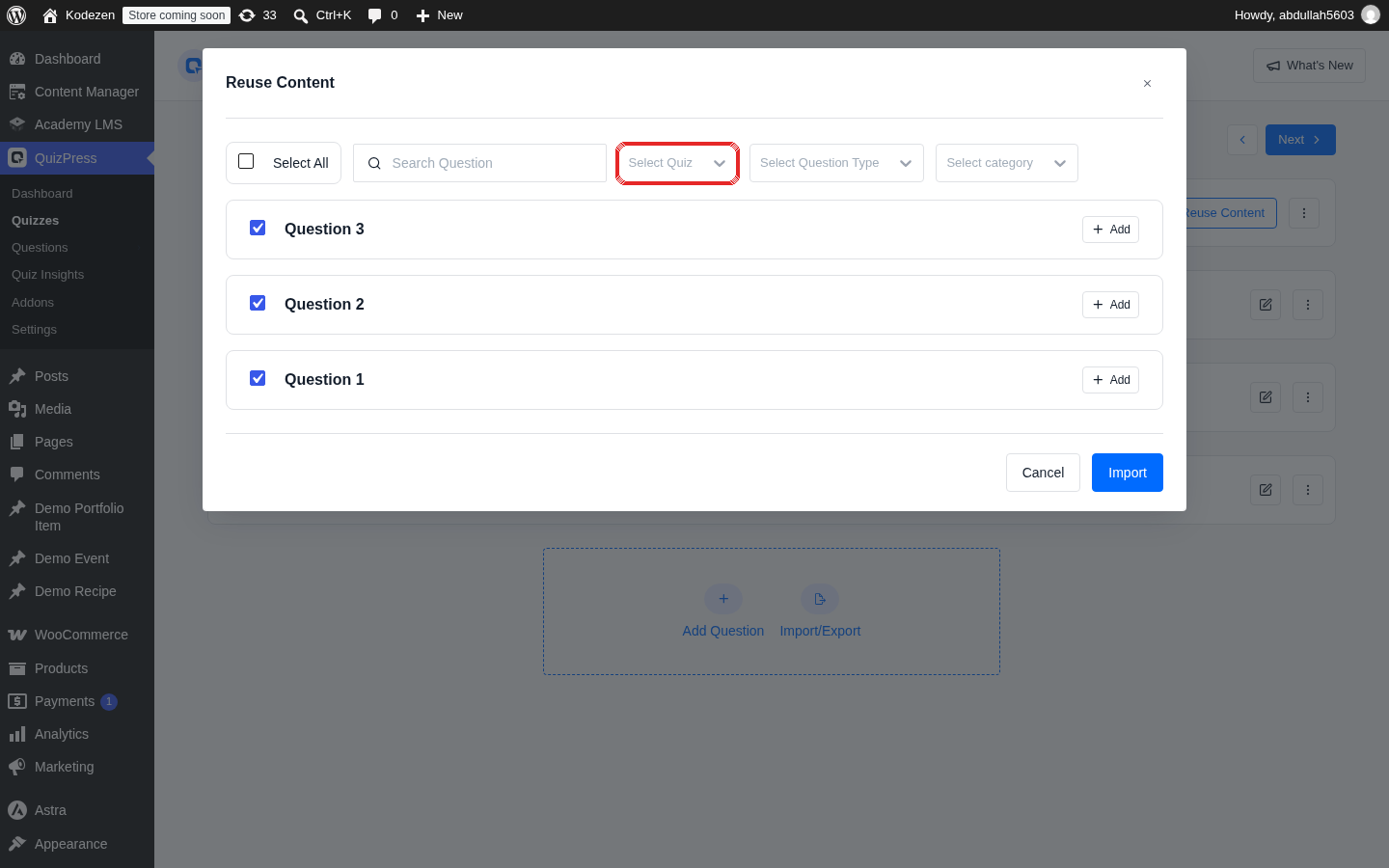
Three practical reasons come up again and again once a question bank gets used seriously.
Consistency. The same question, worded the same way, appears in every quiz that needs it. There is no risk of two versions drifting apart over time.
Time. Writing a good question — one with clear wording and answer choices that are not accidentally ambiguous — takes real effort. Writing it once and reusing it dozens of times is a far better use of that effort than rewriting it.
A growing library. Every question written stays available for the next quiz, the next semester, or the next campaign, instead of disappearing the moment one specific quiz gets archived or deleted.
There is a fourth benefit that shows up specifically in testing and exam contexts: a large enough bank makes it possible to pull a random subset of questions into each quiz attempt, so two people taking the same exam do not necessarily see the same questions in the same order. That only works, though, if the bank has enough well-organized questions in it to begin with — which is exactly why bulk import matters as much as the bank itself.
How QuizPress’s Global Question Bank Works
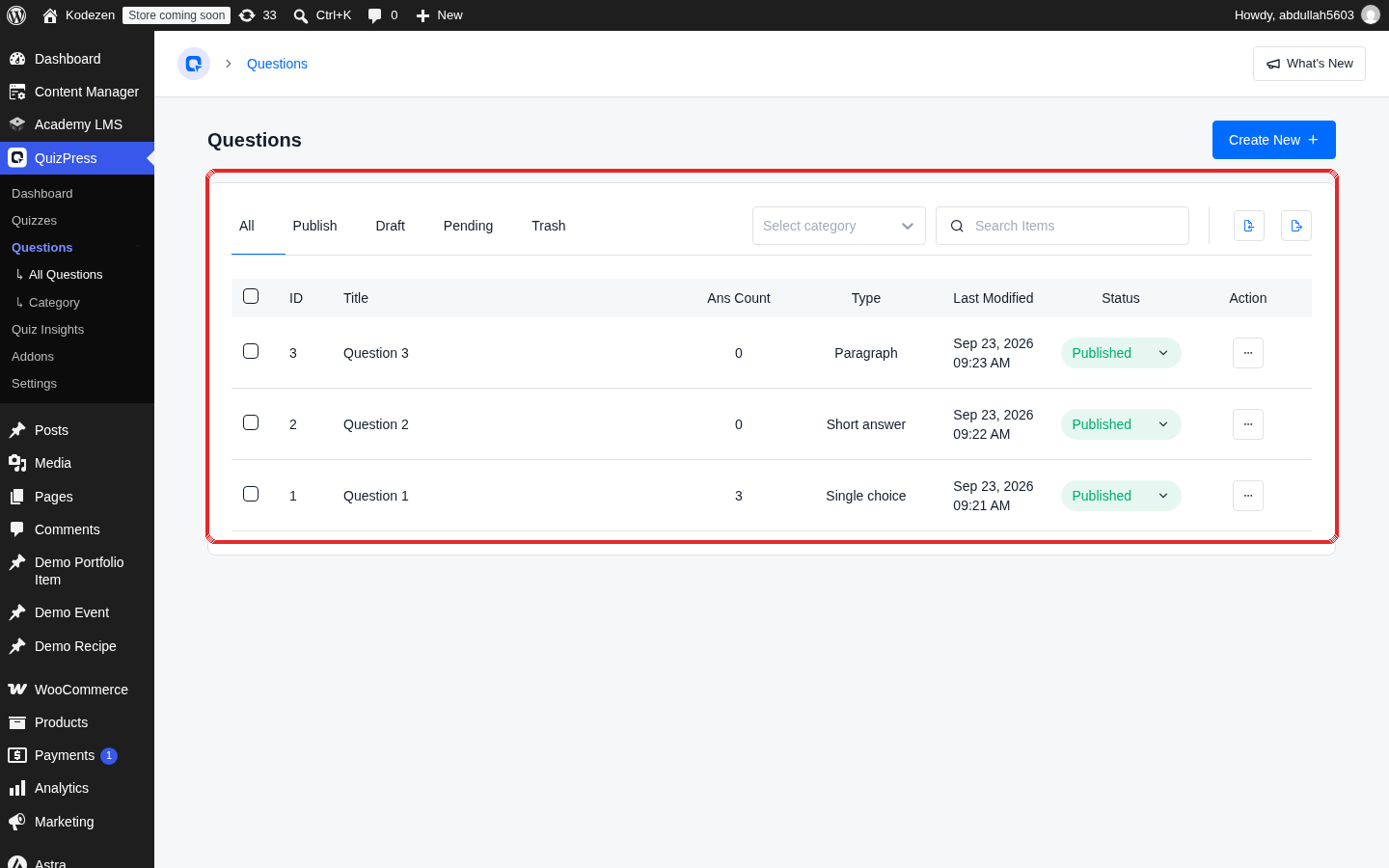
QuizPress does not put the question bank behind a separate, hidden screen. The bank is the plugin’s existing Questions list — every question created anywhere in the account lives there by default, independent of which specific quiz it was first written for.
That list can be organized with question categories, which work like folders or tags for grouping related questions together — all the biology questions in one group, all the onboarding-policy questions in another.
Reusing a question inside a new quiz happens from a Reuse Content button inside the quiz builder’s Questions step. Clicking it opens a picker with four filters:
Checking a question in that picker adds it to the quiz being built, without creating a duplicate copy — it is the same underlying question, now attached to a second (or third, or tenth) quiz.
This is a genuinely free-tier feature. It is not part of a paid add-on, and it is not gated behind a license check — it ships in the same free version covered in the step-by-step guide to creating a quiz in WordPress without coding, which already leans on the bank during its own walkthrough of building a first quiz.
How to Reuse Quiz Questions Across Multiple Quizzes
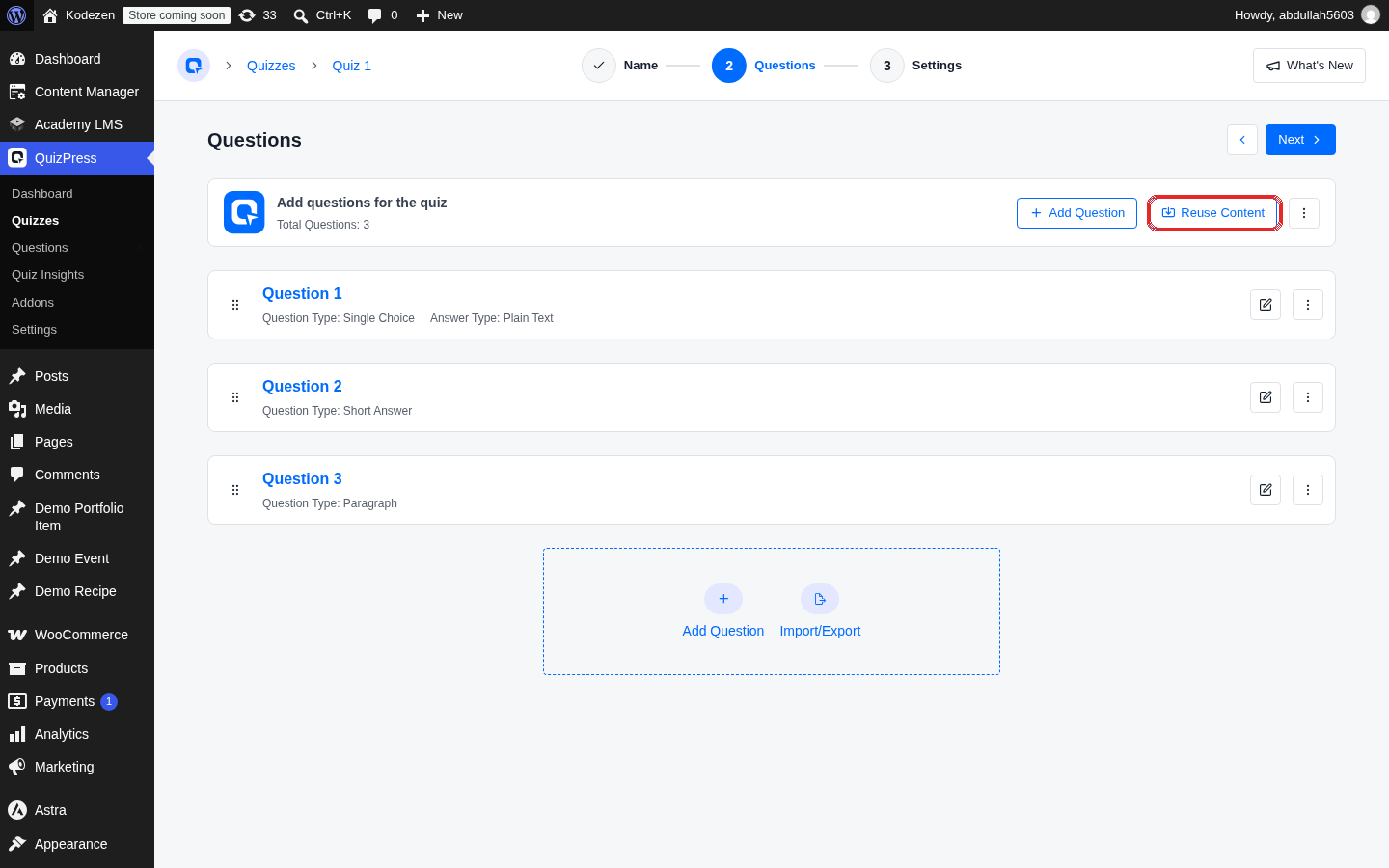
Putting the bank to work follows the same short sequence every time:
For a bank to be genuinely useful this way, it needs enough questions in it to filter through — which is the exact problem bulk import solves.
How to Import Quiz Questions in Bulk in WordPress
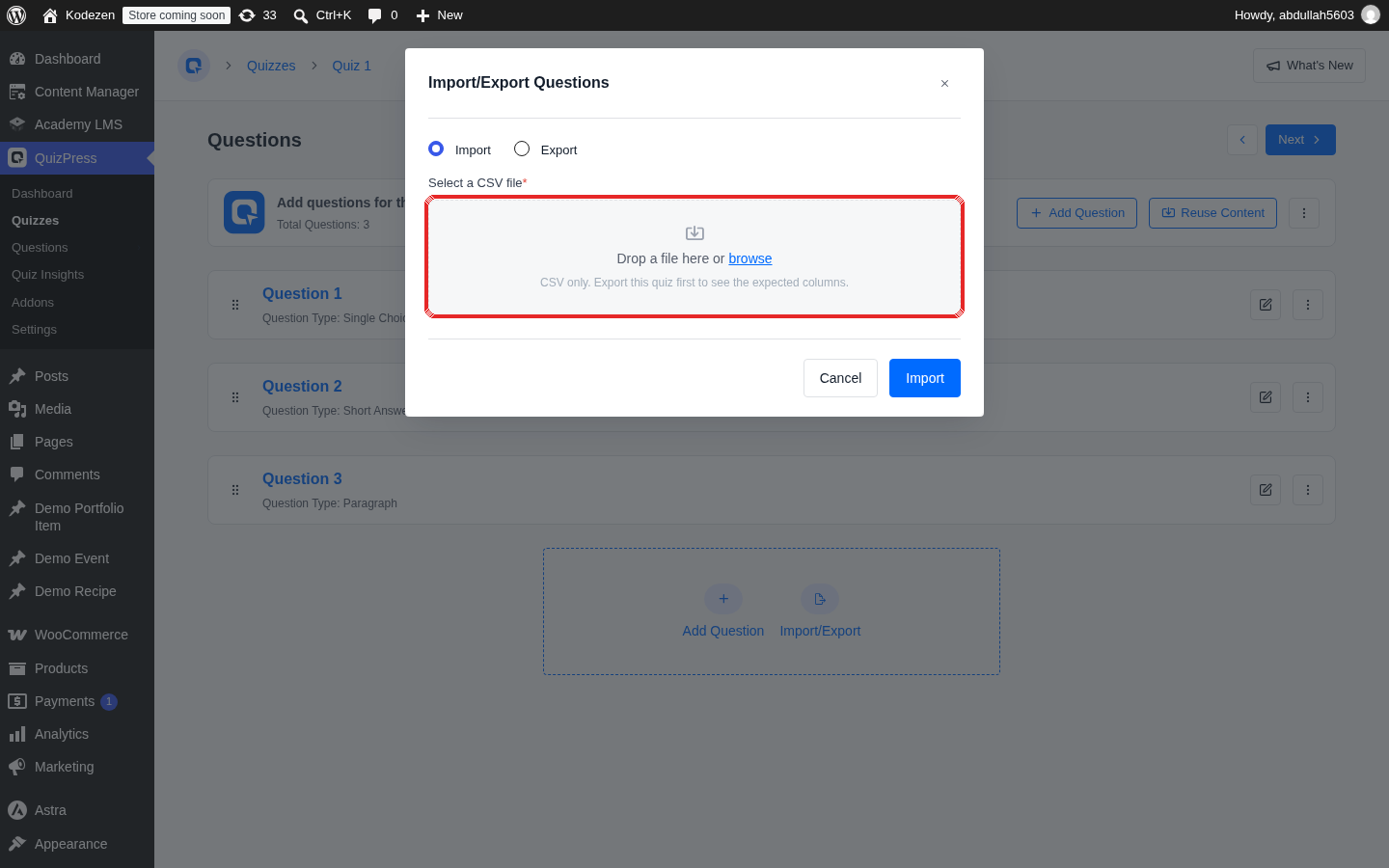
Typing in fifty, a hundred, or several hundred questions by hand defeats the entire purpose of a question bank. Bulk import is the practical way an existing set of questions — whether it came from an old plugin, a spreadsheet, or a publisher’s test bank file — gets into that bank in one pass.
QuizPress’s import lives on the Questions screen in the WordPress admin, using a CSV file as the source format.
The structure is a repeating block: a row that starts a new question, followed by the answer rows that belong under it, with the correct answer marked so QuizPress knows which one to grade as right. On upload, QuizPress checks each question’s title against what already exists and skips anything that matches, which keeps a re-upload of the same file from quietly duplicating an entire bank.
At a high level, importing looks like this:
This is worth stating plainly since it is easy to miss on a quiz plugin’s pricing page: import and export are both included in QuizPress’s free plan. That is not universal across quiz and course plugins, covered in the comparison further down.
One honest limitation is worth flagging here too: QuizPress currently supports CSV only, not JSON or Excel-native formats. For most spreadsheet-based test bank files that is not a real obstacle — CSV is the most universally exportable format from Excel, Google Sheets, and Numbers alike — but anyone working from a JSON export of another platform’s quiz data will need to convert it to CSV first.
How to Export Quiz Questions From WordPress
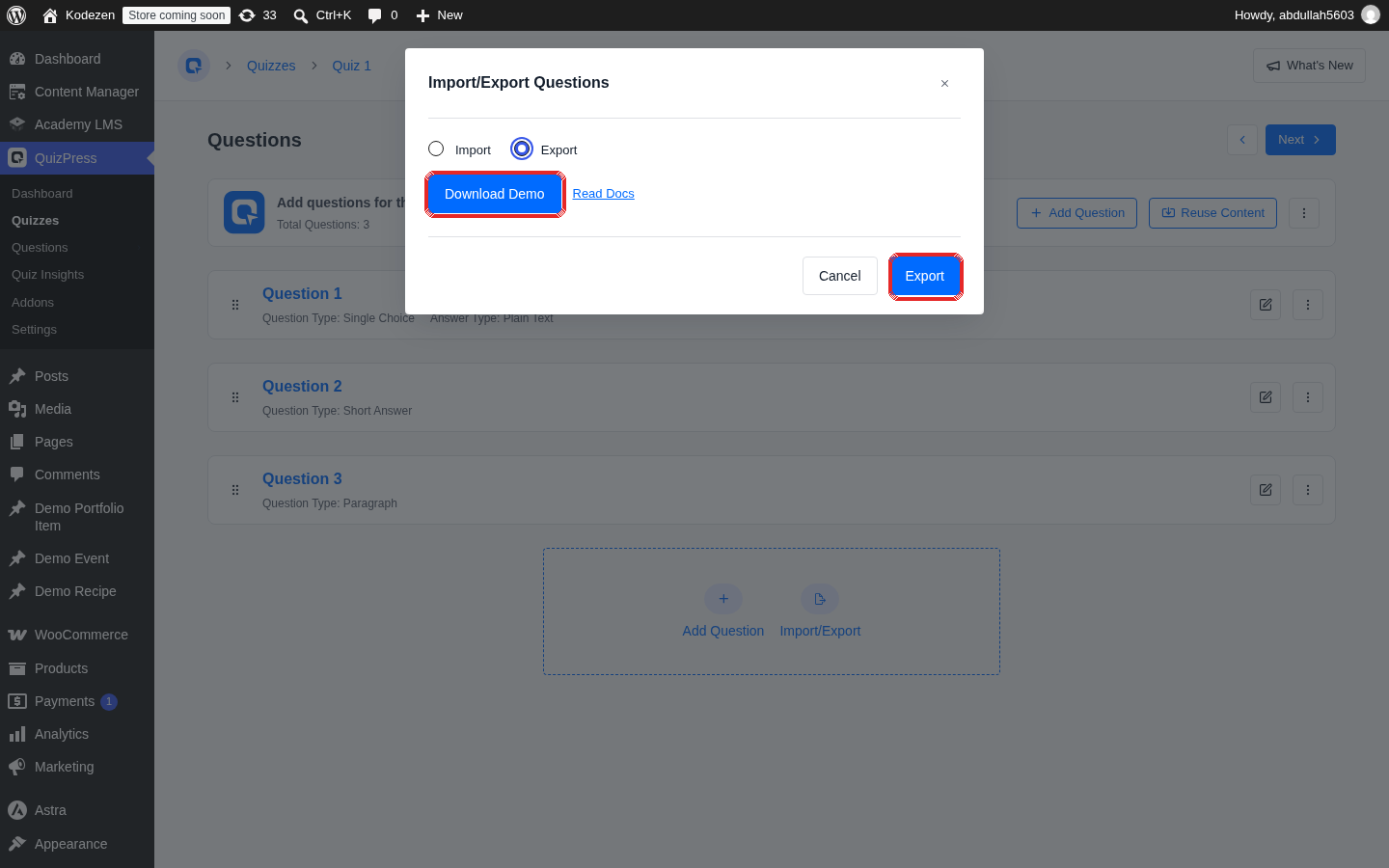
Export is the mirror image of import, and it exists for two main reasons: backing up a question bank, and moving questions to a different WordPress install.
From the Questions screen, the export option pulls every published question and its answers into a single downloadable CSV file, dated at the time it was generated.
A few situations where this matters in practice:
Because export and import use the same CSV structure, a file pulled out of one QuizPress site can be dropped straight into the import tool on another.
A Quick Look at Who Actually Needs This
Teachers and course creators building a semester’s (or a program’s) worth of exams benefit the most directly — a bank built once at the start of a term saves the same rework every time a new module or cohort starts.
Membership and training sites migrating off an older quiz plugin can use import to move an existing question set over in one pass instead of rebuilding it inside a new tool.
Marketing teams running several lead-generation quizzes can keep a shared pool of qualifying questions instead of writing a near-identical set inside every new campaign — a workflow that ties naturally into the broader quiz monetization options available once quizzes are collecting real engagement data.
HR and compliance teams refreshing the same onboarding or policy quiz year after year can update one bank question instead of hunting down every quiz that used it.
Anyone assembling questions across several question types — mixing straightforward multiple-choice and true/false items with more advanced interactive formats — gets more value from a shared bank the more those question types mix and repeat across quizzes.
How This Compares to Other WordPress Quiz and Course Plugins
A feature-by-feature look at how five widely used WordPress quiz and course tools handle reuse and bulk import/export, based on each vendor’s own documentation:
|
Plugin |
Question bank / reuse |
Import format |
Export format |
Cost to unlock |
|
QuizPress |
Built into the free plan (shared Questions list + Reuse Content filters) |
CSV |
CSV |
Free |
|
Quiz and Survey Master (QSM) |
QSM’s own tutorials describe pulling questions from a bank inside the standard builder |
CSV or JSON (questions); JSON only (full quiz) |
CSV or JSON |
Import/export requires a separate paid add-on |
|
MemberPress Quizzes |
Tag-based bank with randomization blocks |
Not found in MemberPress’s own docs |
Not found in MemberPress’s own docs |
Requires the Growth plan or higher |
|
LifterLMS |
Question Bank feature for pulling a random subset into a quiz |
Not found in LifterLMS’s own docs |
Not found in LifterLMS’s own docs |
Requires the Advanced Quizzes add-on (or the Infinity bundle) |
|
LearnDash |
No dedicated “bank” screen; reuse happens by exporting/importing whole quizzes |
Native XML (full quizzes only); CSV/Excel via a third-party add-on |
Native XML (full quizzes only); CSV/Excel via a third-party add-on |
Native XML export/import is free; question-level CSV needs a paid third-party plugin |
|
Quiz Maker (AYS) |
Not framed around a dedicated bank concept |
CSV, XLSX, Simple XLSX, or JSON |
Same formats |
Requires the paid Export and Import Quizzes add-on |
Pricing and add-on structures were checked against each vendor’s own site at the time of writing and can change — confirm current terms on the vendor’s own page before deciding based on price alone.
A pattern is worth calling out directly: of the five other plugins checked, not one offers both a real question bank and bulk import/export inside its free tier at the same time. Some have one or the other. Getting both usually means a paid plan, a paid add-on, or — in LearnDash’s case — accepting that native reuse only works at the whole-quiz level, not the individual-question level, unless a separate paid plugin is added.
That gap is not a coincidence. Question banks and bulk import both take real engineering work, and most plugins treat them as the kind of “power user” feature that belongs behind a paywall. QuizPress not gating either one is a deliberate free-tier decision, not an oversight — and it is also the honest reason this comparison exists: it is one of the areas where the free version does more than a first glance at a pricing page would suggest, a pattern also covered in the broader free vs. paid WordPress quiz plugin comparison.
How This Was Checked
QuizPress’s own bank, import, and export behavior described above came from direct, hands-on use inside its Questions screen and quiz builder, cross-checked against its plugin changelog and codebase to confirm exactly which version each feature shipped in and whether it carries any license restriction.
Every competitor claim came from that vendor’s own documentation or product pages, found through direct search rather than assumption. Where a vendor’s docs did not clearly state whether a feature was free or paid, that uncertainty is reflected in the wording above rather than guessed at either way.
Common Mistakes to Avoid
Skipping a backup before a big import. Export the current bank first. If an import file has a formatting mistake, having a clean backup to fall back on turns an afternoon of damage control into a two-minute re-upload.
Assuming JSON or Excel files will work directly. QuizPress’s importer reads CSV. A file exported as JSON or a native .xlsx from another platform needs to be converted to CSV first.
Reusing a near-duplicate question instead of the original. If a question was slightly reworded and saved as a new entry instead of edited in place, the bank ends up with two versions of the same question — which defeats the consistency benefit reuse is supposed to provide.
Leaving categories unorganized. A bank with fifty uncategorized questions is only marginally easier to work with than fifty separate quizzes. A few minutes spent tagging questions by topic pays off every time the Reuse Content filters get used later.
Final Thoughts
A question bank is only as useful as the effort it takes to fill it, and that is where most quiz plugins quietly draw a line — a bank on one side of a paywall, bulk import on the other, or both bundled into a plan several tiers up from free.
Building a real question library inside WordPress does not have to start with retyping everything by hand. The full feature list and pricing page cover exactly where the Global Question Bank and CSV import/export sit relative to everything else QuizPress includes — and, as covered above, that is squarely inside the free plan, not behind it.
Frequently Asked Questions
What is a question bank in a WordPress quiz plugin?
It is a shared storage location for quiz questions that is not tied to any single quiz. A question saved to the bank can be reused across as many quizzes, surveys, or exams as needed, instead of being rewritten each time.
Is QuizPress’s question bank free?
Yes. The Global Question Bank, along with the Reuse Content picker used to pull questions into a new quiz, ships in QuizPress’s free plan.
Can I reuse the same quiz question in more than one quiz?
Yes. Inside the quiz builder’s Questions step, the Reuse Content button opens a filterable list of every existing question, and any of them can be added to the quiz currently being built.
How do I import quiz questions in bulk in WordPress?
With QuizPress, a CSV file structured as question rows followed by their answer rows can be uploaded from the Questions screen. Existing questions are matched by title and skipped, so re-uploading the same file will not create duplicates.
What file format does QuizPress use for import and export?
CSV. JSON and Excel-native formats are not currently supported, so files from another platform need to be converted to CSV first.
Can I export my quiz questions for backup or to move them to another site?
Yes. Exporting from the Questions screen downloads every published question and its answers as a single CSV file, which can be re-imported into the same site or a different one.
What is the difference between a test bank and a question bank?
“Test bank” is the older academic term, usually referring to a large set of exam questions supplied by a textbook publisher or written by an instructor ahead of time. A “question bank” is the software feature that stores and organizes those questions inside a quiz plugin once they exist, however they were originally written or sourced.
Does importing questions create duplicates if I upload the same file twice?
No, as long as the question titles match. QuizPress checks each imported question against existing ones by title and skips anything already in the bank.