Category: Guideline

  • QuizPress vs Thrive Quiz Builder: Which WordPress Quiz Plugin Should You Choose?

    QuizPress vs Thrive Quiz Builder: Which WordPress Quiz Plugin Should You Choose?

    If you’re looking for a WordPress quiz plugin, QuizPress and Thrive Quiz Builder are two popular choices. Both plugins make it easy to create interactive quizzes, but they are built for different audiences. QuizPress is designed for educational quizzes, online exams, certifications, and a WordPress-native experience, while Thrive Quiz Builder focuses on lead generation, audience engagement, and marketing-driven quiz funnels.

    Choosing the right plugin depends on your goals, as each offers a different set of features and strengths. Whether you need educational tools, marketing-focused features, WooCommerce integration, or advanced quiz functionality, understanding what each plugin offers will help you make an informed decision. In this comparison, we’ll evaluate QuizPress and Thrive Quiz Builder based on their features, ease of use, customization, integrations, pricing, and overall value to help you choose the best WordPress quiz plugin for your website.

    QuizPress vs Thrive Quiz Builder at a Glance

    QuizPress is a Gutenberg-native WordPress quiz plugin designed for creating quizzes, online exams, certification tests, surveys, and personality quizzes. It offers a WordPress-native editing experience, certificate support, WooCommerce integration for premium quizzes, and features tailored for educational and business use cases.

    Thrive Quiz Builder is part of the Thrive Suite and is built primarily for marketers. It specializes in lead-generation quizzes, personality quizzes, audience segmentation, and conversion-focused quiz funnels, with powerful branching logic and marketing integrations.

    Best Use Cases

    Plugin

    Best For

    QuizPress

    Online courses, certification exams, educational quizzes, surveys, personality quizzes, and selling premium quizzes with WooCommerce

    Thrive Quiz Builder

    Lead-generation quizzes, personality quizzes, audience segmentation, marketing funnels, and email list building

    What Is QuizPress?

    QuizPress

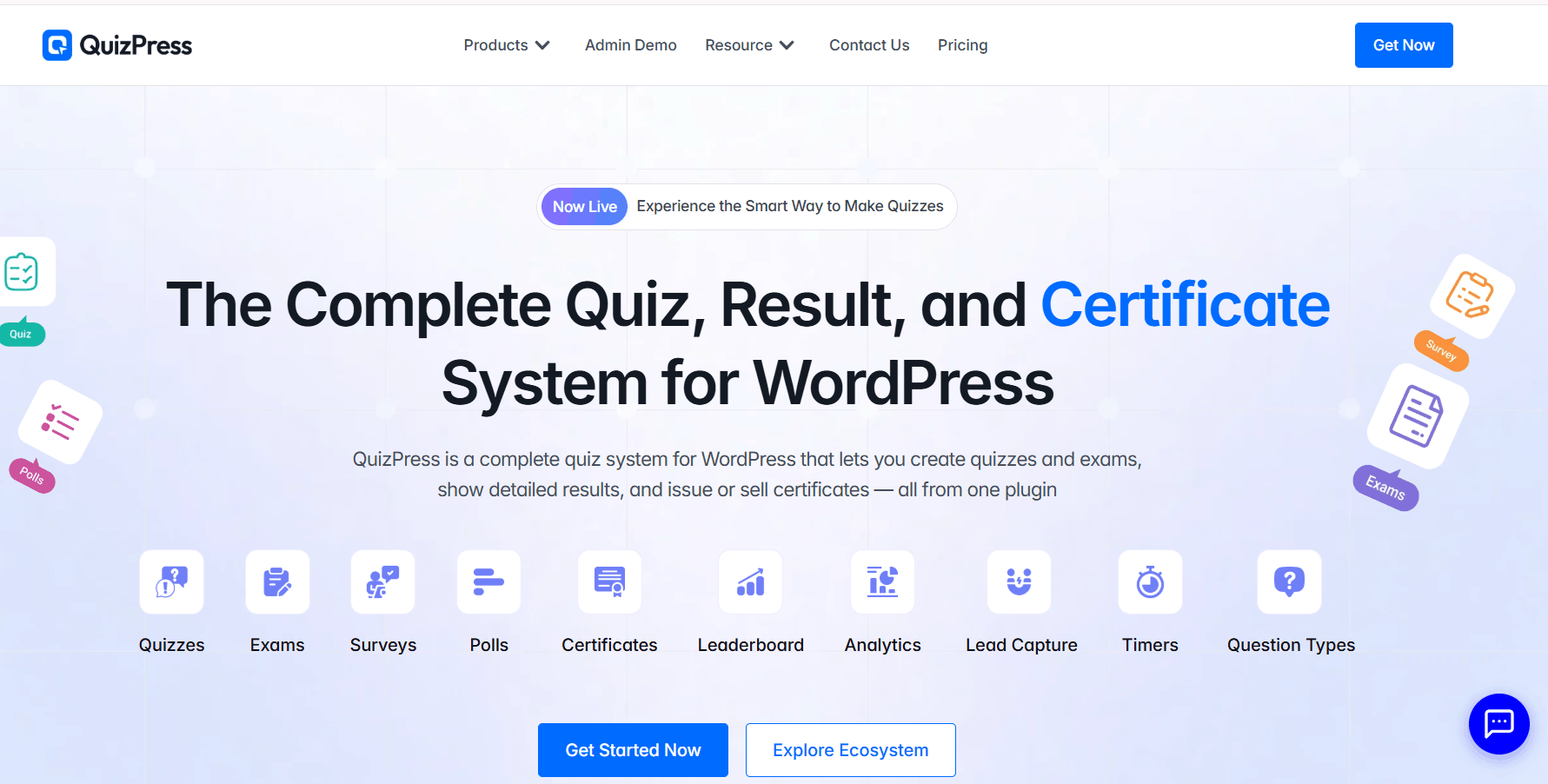
    QuizPress is a WordPress quiz plugin that lets you create quizzes, exams, surveys, polls, and personality assessments directly inside WordPress. Built for the Gutenberg block editor, it provides a native WordPress experience for creating, managing, and publishing interactive quizzes without relying on a separate page builder.

    Key Features

    • Native Gutenberg block-based quiz builder
    • 20+ question types, including multiple choice, true/false, fill-in-the-blank, short answer, file upload, and image-based questions
    • Automatic scoring, grading, and detailed result pages
    • Customizable certificate generation with automatic issuance after passing
    • WooCommerce integration for selling premium quizzes and certificates
    • Built-in analytics, question bank, and import/export tools

    Ideal Users

    QuizPress is ideal for educators, online course creators, training providers, businesses, and marketers who want to create interactive quizzes, certification exams, surveys, polls, or lead-generation quizzes on WordPress.

    Strengths

    • Built specifically for the WordPress Gutenberg editor
    • Supports quizzes, exams, surveys, polls, and personality tests in one plugin
    • Automatic certificate generation with customizable templates
    • WooCommerce integration for monetizing quizzes and certificates
    • Built-in analytics and a centralized question bank for easier quiz management

    What Is Thrive Quiz Builder?

    Thrive Quiz Builder

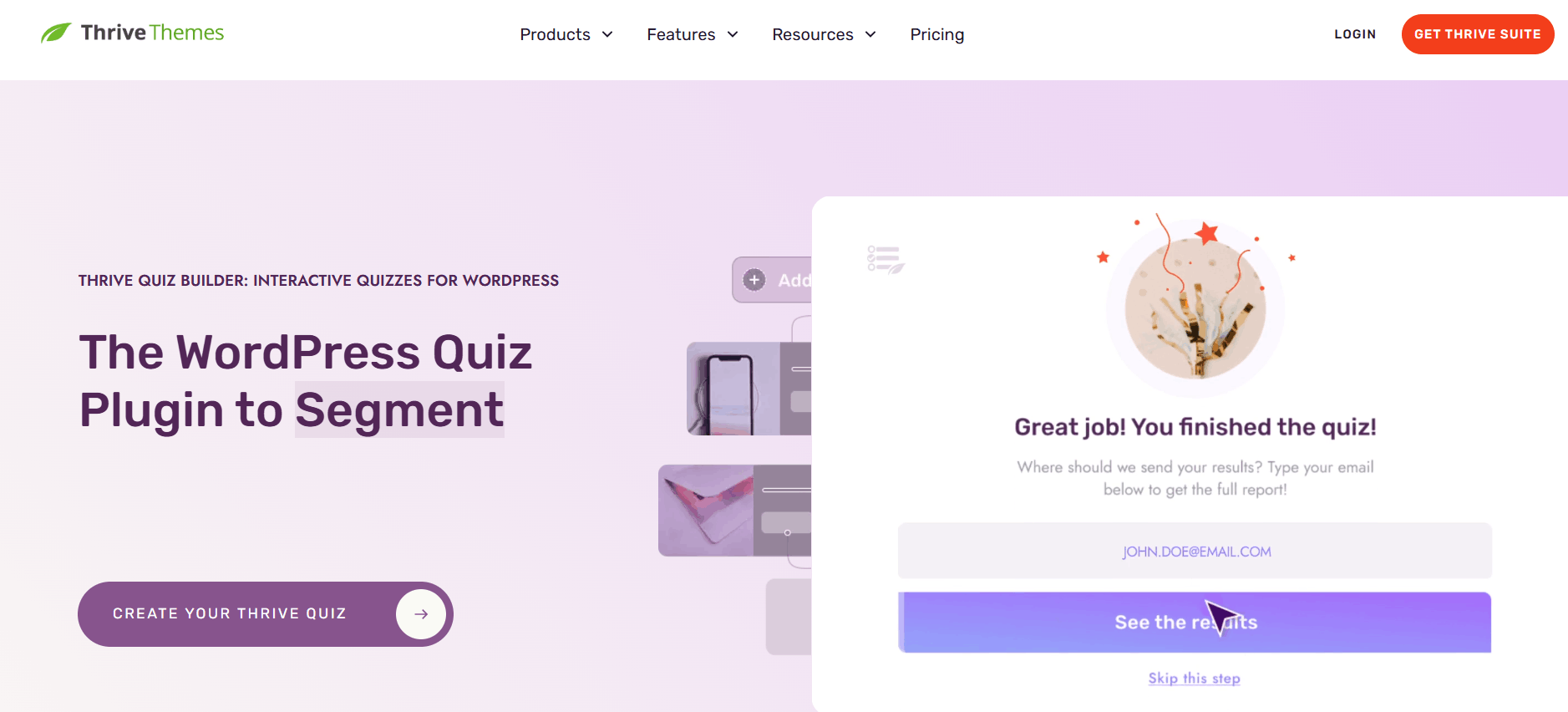
    Thrive Quiz Builder is a WordPress quiz plugin developed by Thrive Themes and available as part of the Thrive Suite. It is designed primarily for marketers who want to create interactive quizzes that generate leads, segment audiences, and improve conversions. With its visual drag-and-drop builder and conversion-focused features, users can create quizzes without coding.

    Key Features

    • Visual drag-and-drop quiz builder
    • Five quiz types, including scored, percentage, category, and survey quizzes
    • Advanced branching logic for personalized quiz paths
    • Opt-in Gate for capturing email subscribers
    • Dynamic results pages based on quiz outcomes
    • Email marketing integrations and audience tagging
    • Built-in A/B testing and quiz analytics
    • Ready-made quiz templates and customization options

    Ideal Users

    Thrive Quiz Builder is ideal for marketers, bloggers, agencies, and businesses that use quizzes to generate leads, grow email lists, segment audiences, and increase conversions. It is especially valuable for users already using other Thrive Suite products.

    Strengths

    • Powerful branching logic and personalized quiz experiences
    • Conversion-focused features like Opt-in Gates and audience segmentation
    • Built-in A/B testing to optimize quiz performance
    • Seamless integration with the Thrive Suite ecosystem
    • Beginner-friendly visual quiz builder with customizable templates

    Comparison Table 

    Feature

    QuizPress

    Thrive Quiz Builder

    Ease of Use

    Beginner-friendly, Gutenberg-native interface

    Visual builder with a moderate learning curve

    Quiz Builder

    Native Gutenberg block builder

    Visual drag-and-drop quiz builder

    Question Types

    20+ question types

    Multiple-choice questions with multiple quiz types (Category, Number, Percentage, Right/Wrong, Survey)

    Personality Quizzes

    Supported

    Core feature with advanced branching logicCore feature with advanced branching logic

    Certificates

    Certificate support

    Not natively supported

    WooCommerce Integration

    Native WooCommerce integration

    No native WooCommerce integration

    Gutenberg Support

    Fully Gutenberg-native

    Supports embedding via shortcode; integrates with Thrive Architect

    Analytics

    Quiz reporting and results

    Quiz reporting, conversion tracking, and A/B testing

    Pricing

    Standalone plugin plans

    Included with Thrive Suite membership

    Best For

    Education, certification, online exams, and WordPress-native quizzes

    Lead generation, audience segmentation, and marketing-focused quizzes

    Feature-by-Feature Comparison 

    Ease of Use

    Setup process: QuizPress installs like a standard WordPress plugin and lets you build quizzes directly with the Gutenberg block editor, providing a familiar WordPress editing experience. Thrive Quiz Builder also installs as a WordPress plugin but uses its own visual quiz builder, separate from the native block editor.
    User interface: QuizPress follows the Gutenberg interface, making it feel like a natural extension of WordPress. Thrive Quiz Builder offers a polished drag-and-drop builder with a workflow designed specifically for creating marketing and lead-generation quizzes.

    Learning curve: Users already familiar with Gutenberg may find QuizPress easier to learn since it uses the native WordPress editor. Thrive Quiz Builder has a slightly higher learning curve because it introduces its own interface, although it remains beginner-friendly once you become familiar with its workflow.

    Winner: QuizPress — for its seamless Gutenberg integration and familiar WordPress-native editing experience.
    Quiz Builder Experience

    Drag-and-drop builder: Thrive Quiz Builder includes a dedicated visual drag-and-drop builder for creating quiz flows, branching paths, and result pages. QuizPress uses the native Gutenberg block editor, allowing users to build quizzes with WordPress blocks.

    Block editor compatibility: QuizPress is built specifically for Gutenberg, providing a seamless WordPress-native editing experience. Thrive Quiz Builder uses its own visual builder and allows quizzes to be embedded using shortcodes or integrated with Thrive Architect.
    Quiz organization: Both plugins let you create and manage multiple quizzes from a central dashboard. QuizPress keeps quiz management within the familiar WordPress workflow, while Thrive Quiz Builder organizes quizzes inside its dedicated interface.

    Winner: Tie — QuizPress excels with its native Gutenberg integration, while Thrive Quiz Builder offers a powerful visual builder for creating advanced quiz experiences.

    Question Types

    QuizPress supports a broad range of question types designed for educational quizzes, online exams, and certification tests. It includes Multiple Choice, True/False, Fill in the Blank, Short Answer, File Upload, Image Choice, and several other question formats.

    Thrive Quiz Builder primarily uses multiple-choice questions to create interactive quizzes. Its strength lies in creating different quiz experiences—such as Category, Number, Percentage, Right/Wrong, and Survey quizzes—rather than offering a wide variety of academic question types.

    Winner: QuizPress — for providing a broader selection of question types suitable for education, assessments, and certification exams.

    Personality Quizzes

    Branching logic: Thrive Quiz Builder offers advanced branching logic, allowing quiz paths to change dynamically based on a user’s answers. QuizPress also supports personality quizzes, enabling users to create outcome-based quiz experiences.

    Outcome-based quizzes: Both plugins support personality quizzes with customized results based on quiz responses.

    Result pages: Thrive Quiz Builder provides highly customizable result pages with features designed to support audience segmentation, lead generation, and conversions. QuizPress also allows customized quiz results tailored to different outcomes.

    Winner: Thrive Quiz Builder — for its advanced branching logic and conversion-focused personality quiz features.

    Scoring and Grading

    Automatic scoring: Both QuizPress and Thrive Quiz Builder support automatic scoring for eligible quiz types, allowing users to receive instant results after completing a quiz.

    Passing score: QuizPress lets you define passing criteria, making it well suited for online exams and certification quizzes. Thrive Quiz Builder focuses more on quiz outcomes, audience segmentation, and marketing-oriented result pages than certification-based assessments.

    Quiz results: Both plugins provide customizable result pages, but QuizPress emphasizes educational assessments, while Thrive Quiz Builder is designed to deliver personalized results that support engagement and lead generation.

    Winner: QuizPress — for its education-focused scoring system and support for certification-style assessments.

    Certificates

    Certificate support: QuizPress includes certificate functionality, allowing users to issue certificates for successful quiz completion. This makes it a strong choice for certification programs, online training, and educational assessments.

    Customization: QuizPress provides options to customize certificates to match your branding and certification requirements.

    Certification workflows: QuizPress is designed to support certification-based quizzes, while Thrive Quiz Builder does not include native certificate functionality.

    Winner: QuizPress — for its built-in certificate support, making it better suited for educational and certification-focused websites.

    WooCommerce Integration

    Selling premium quizzes: QuizPress integrates with WooCommerce, allowing you to sell access to premium quizzes and online assessments directly from your WordPress website.

    Certification exams: QuizPress also supports monetizing certification quizzes through WooCommerce, making it suitable for training providers and online educators.

    Monetization: While Thrive Quiz Builder can be used alongside eCommerce solutions through custom workflows, it does not offer native WooCommerce integration for selling quizzes.

    Winner: QuizPress — for its native WooCommerce integration and built-in support for monetizing quizzes and certification exams.

    Gutenberg & WordPress Integration

    Native block editor support: QuizPress is built specifically for the Gutenberg block editor, allowing users to create and manage quizzes within the native WordPress editing experience.
    Embedding quizzes: Thrive Quiz Builder uses its own visual builder and allows quizzes to be embedded using shortcodes. It also integrates well with other Thrive Suite products, including Thrive Architect.

    WordPress experience: QuizPress provides a seamless Gutenberg-based workflow, while Thrive Quiz Builder offers a dedicated interface designed for building and managing marketing-focused quizzes.

    Winner: QuizPress — for its native Gutenberg integration and WordPress-first editing experience.
    Reporting & Analytics

    Quiz reports: Both QuizPress and Thrive Quiz Builder provide reporting features to help you monitor quiz activity and results.

    Performance tracking: QuizPress emphasizes quiz scores, completion, and assessment results, making it well suited for educational and certification use cases. Thrive Quiz Builder focuses on engagement, quiz performance, audience segmentation, and conversion-related insights for marketing campaigns.

    Analytics focus: QuizPress is designed to help educators evaluate learner performance, while Thrive Quiz Builder provides analytics that help marketers optimize lead generation and quiz conversions.

    Winner: Depends on your goals — choose QuizPress for educational reporting and learner assessments, or Thrive Quiz Builder for marketing-focused analytics and audience insights.

    Performance

    Architecture: QuizPress is built around the native WordPress block editor, while Thrive Quiz Builder uses its own visual quiz builder as part of the Thrive Suite.

    Resource usage: The overall performance impact of either plugin depends on factors such as your hosting environment, WordPress theme, caching setup, and the number of active plugins on your site.

    Real-world performance: Both plugins are designed for WordPress, but actual loading speed and resource usage should be evaluated on your own website based on your specific configuration and requirements.

    Winner: No clear winner — performance depends on your website’s setup and optimization. If you prefer a Gutenberg-native workflow, QuizPress may be a better fit. If you already use the Thrive Suite, Thrive Quiz Builder integrates well within that ecosystem.

    Pricing

    Free version: Check each plugin’s current pricing page, as free/trial tiers and included features change over time.

    Premium plans: QuizPress is generally available as a standalone plugin purchase. Thrive Quiz Builder is most commonly accessed through the Thrive Suite bundle, which includes multiple other tools.

    Overall value for money: If you only need quiz functionality, QuizPress can be more cost-effective since you’re not paying for a broader suite. If you already use or plan to use other Thrive tools, Thrive Quiz Builder’s bundled pricing may offer better overall value.

    Winner: QuizPress — for standalone value if quizzes are your only need.

    Pros and Cons

    QuizPress Pros

    • Native Gutenberg and WordPress integration
    • Certificate support for certification quizzes
    • WooCommerce integration for selling premium quizzes
    • Beginner-friendly interface
    • Supports a wide range of quiz and assessment types

    QuizPress Cons

    • Some advanced marketing and conversion-focused features available in dedicated marketing quiz plugins are not its primary focus.
    • Best suited for educational and assessment-based use cases rather than complex marketing funnels.

    Thrive Quiz Builder Pros

    • Advanced branching logic for personalized quiz experiences
    • Strong lead-generation and audience segmentation features
    • Conversion-focused result pages and Opt-in Gates
    • Flexible visual quiz builder with customizable templates

    Thrive Quiz Builder Cons

    • Native certificate functionality is not available.
    • Included as part of the Thrive Suite rather than offered as a standalone plugin.
    • Built primarily for marketing use cases rather than educational assessments and certification exams.

    QuizPress vs Thrive Quiz Builder: Which Should You Choose?

    Choose QuizPress if you:

    • Create educational quizzes, online exams, or assessments
    • Need certificate support for certification quizzes
    • Want to sell premium quizzes with WooCommerce
    • Prefer the native WordPress Gutenberg editor
    • Need a WordPress-native quiz-building experience

    Choose Thrive Quiz Builder if you:

    • Use quizzes for lead generation and audience engagement
    • Build marketing and conversion-focused quiz funnels
    • Need advanced branching logic and audience segmentation
    • Already use other Thrive Suite products
    • Want personalized quiz results with email marketing integrations

    Final Verdict

    Both QuizPress and Thrive Quiz Builder are excellent WordPress quiz plugins, but they are designed for different purposes. QuizPress is a strong choice for educators, course creators, and businesses that need online exams, certification quizzes, WooCommerce integration, and a native Gutenberg editing experience. Thrive Quiz Builder, on the other hand, is built primarily for marketers who want to create lead-generation quizzes, segment audiences, and optimize conversions through advanced branching logic and marketing-focused features.
    If your goal is to create educational quizzes, certification programs, or premium assessments within WordPress, QuizPress is likely the better fit. However, if you’re focused on growing your email list, building marketing funnels, and already use the Thrive Suite, Thrive Quiz Builder is an excellent option for creating conversion-driven quizzes.

    Frequently Asked Questions

    Is QuizPress better than Thrive Quiz Builder?

    It depends on your goals. QuizPress is better suited for educational quizzes, online exams, certification programs, and a native WordPress editing experience. Thrive Quiz Builder is better suited for lead generation, audience segmentation, and marketing-focused quiz funnels.
    Which plugin is easier for beginners?

    QuizPress is generally easier for users already familiar with the WordPress Gutenberg block editor, while Thrive Quiz Builder has its own visual builder that may require a short learning period.

    Can both plugins create personality quizzes?

    Yes. Both plugins support personality-style quizzes with customized outcomes. However, Thrive Quiz Builder offers more advanced branching logic and conversion-focused features for this type of quiz.

    Does QuizPress support certificates?

    Yes. QuizPress includes certificate support, allowing you to issue certificates for certification quizzes and online assessments.

    Can I sell quizzes with WooCommerce using QuizPress?

    Yes. QuizPress integrates with WooCommerce, allowing you to sell premium quizzes and certification exams directly from your WordPress website.

  • How to Create a Quiz in WordPress Without Coding (Step-by-Step)

    How to Create a Quiz in WordPress Without Coding (Step-by-Step)

    Interactive quizzes have become one of the most effective ways to engage website visitors. Whether you run a blog, an online learning platform, a business website, or a membership site, quizzes encourage users to spend more time on your site while helping you collect valuable insights.

    Years ago, creating a quiz in WordPress required custom PHP, JavaScript, or hiring a developer. Fortunately, that’s no longer the case. Today, no-code quiz builders allow anyone to create professional quizzes directly from the WordPress dashboard.

    In this guide, you’ll learn how to create a quiz in WordPress without coding using QuizPress. We’ll cover everything from installing the plugin to publishing your first quiz, making this tutorial suitable for beginners and experienced WordPress users alike.

    Why Add Quizzes to Your WordPress Website?

    Quizzes are no longer limited to schools or online courses. Businesses, bloggers, coaches, HR teams, and marketers all use quizzes for different purposes.

    For example, educators can create online exams to evaluate student progress. Marketing teams often use personality or product-recommendation quizzes to generate leads. HR departments can build employee assessments for onboarding or skills evaluation, while bloggers can publish fun trivia quizzes to encourage readers to stay on the site longer.

    Some of the most common benefits include:

    • Increasing visitor engagement
    • Reducing bounce rates
    • Collecting customer feedback
    • Generating qualified leads
    • Testing knowledge through online exams
    • Creating surveys and opinion polls
    • Delivering personalized experiences through personality quizzes

    Because quizzes encourage interaction, they often perform better than traditional articles when your goal is to increase participation and user engagement.

    Why Choose QuizPress?

    There are many WordPress quiz plugins available, but QuizPress is designed as a complete assessment platform rather than a basic quiz builder.

    According to the official feature list, QuizPress allows you to create:

    • Knowledge quizzes
    • Timed exams
    • Surveys
    • Polls
    • Personality tests
    • Certificates
    • Leaderboards

    It also includes a Question Bank, Automatic Grading, User Answer Tracking, Analytics, Timers, Lead Capture, Import & Export, and Gutenberg support. These features make it suitable for schools, training organizations, online course creators, businesses, and digital marketers alike.

    Step-by-Step How to Create a Quiz in WordPress 

    Step 1: Install and Activate QuizPress

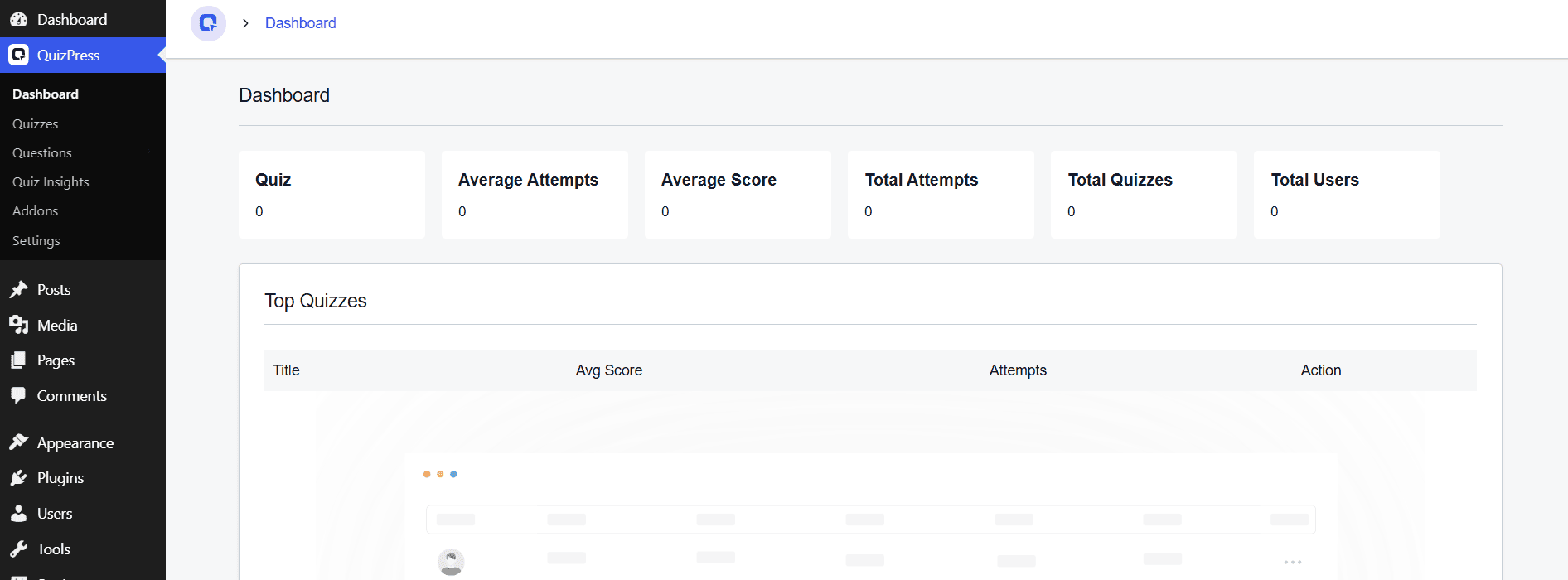
    Start by installing QuizPress on your WordPress site. Once it’s activated, you’ll see a new QuizPress menu appear in your dashboard sidebar, giving you access to: 

    dashboard

    Everything lives in one place, so you can manage the entire quiz-building process without ever opening a code editor. 

    Step 2: Create Your First Quiz

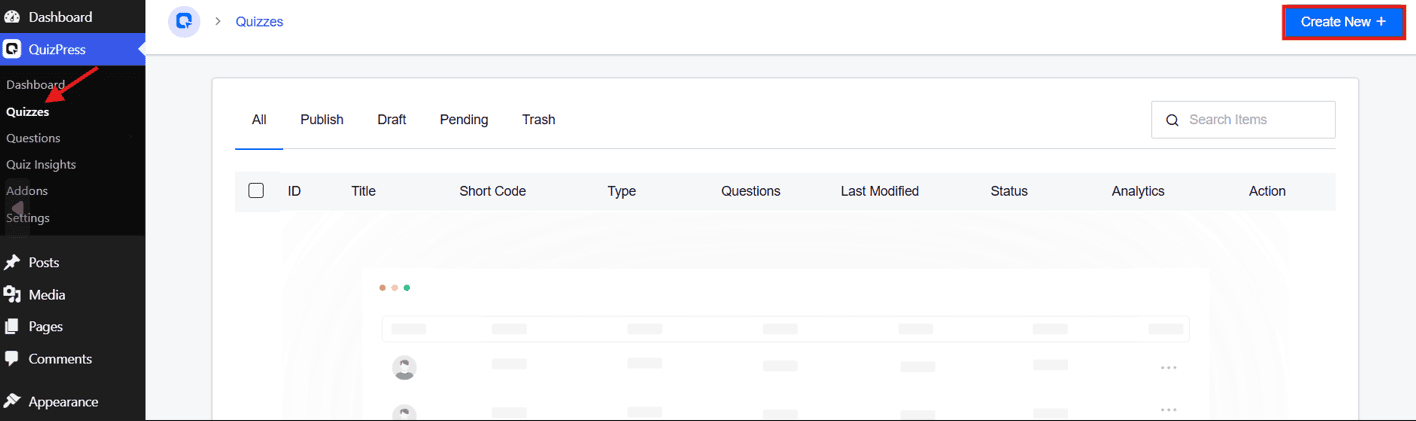
    From the sidebar, click QuizPress → Quizzes, then click the Create New + button in the top-right corner.

    Create New

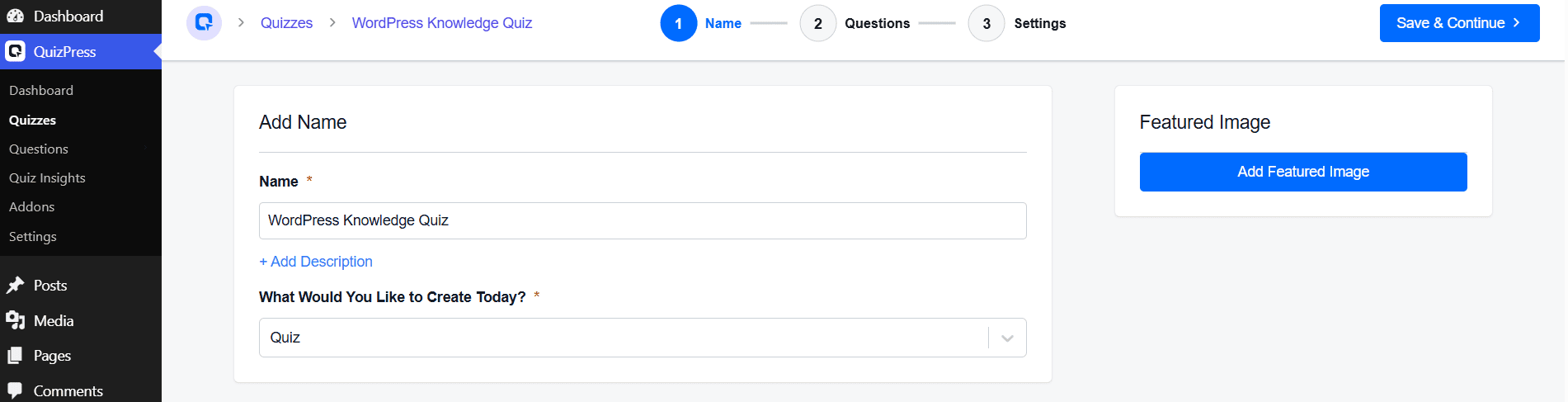
     On the New Quiz page, enter a name for your quiz, optionally add a description, and choose your quiz type from the dropdown — Quiz,

    Exam, Survey, Poll, or Personality Test.

    featured image

    You can also add a featured image from the panel on the right. Once done, click Save & Continue to move on to adding questions. 

    Step 3: Add Questions to Your Quiz

    This is the heart of the quiz-building process.

    From the quiz editor, click Add Question. QuizPress lets you choose from several question types — including Single Choice, Multiple Choice, True/False, and more — depending on how you want participants to answer.

    quizpress question

    This flexibility means you can design quizzes for education, recruitment, customer feedback, product recommendations, and many other use cases. 

    Step 4: Configure Results

    Once your questions are in place, move to the Settings tab to decide how QuizPress should run and grade the quiz — things like passing grade, time limit, question order, and feedback mode.

    settings
    quiz feedback mode

    The plugin’s automatic grading calculates a score the moment someone submits their answers — no manual grading needed. This makes QuizPress a good fit for online exams, employee assessments, and certification tests where consistent grading matters. 

    Step 5: Customize Design & Layout

    QuizPress provides design customization tools to ensure your quiz matches your website’s visual identity:

    • Choose between a single-page layout (all questions displayed at once) or a multi-step layout (one question per screen).
    • A visually consistent quiz greatly enhances user trust and significantly boosts completion rates.

    Step 6: Set Up Results & Feedback

    Once the quiz is submitted, QuizPress can display a rich results page that includes:

    • Instant score display showing the user’s result immediately.
    • Correct and incorrect answer review with detailed feedback for each question.
    • Performance breakdown showing which topics or sections the user performed well or poorly on.
    • Time taken to complete the entire quiz.

    This level of detail transforms a simple quiz into a genuinely useful learning and feedback tool.

    Step 7: Add Certificates (Optional but Highly Valuable)

    One of QuizPress’s most powerful features is its built-in certificate system. Once a user successfully passes a quiz, QuizPress can automatically generate a professionally designed, branded certificate.

    certificate addon

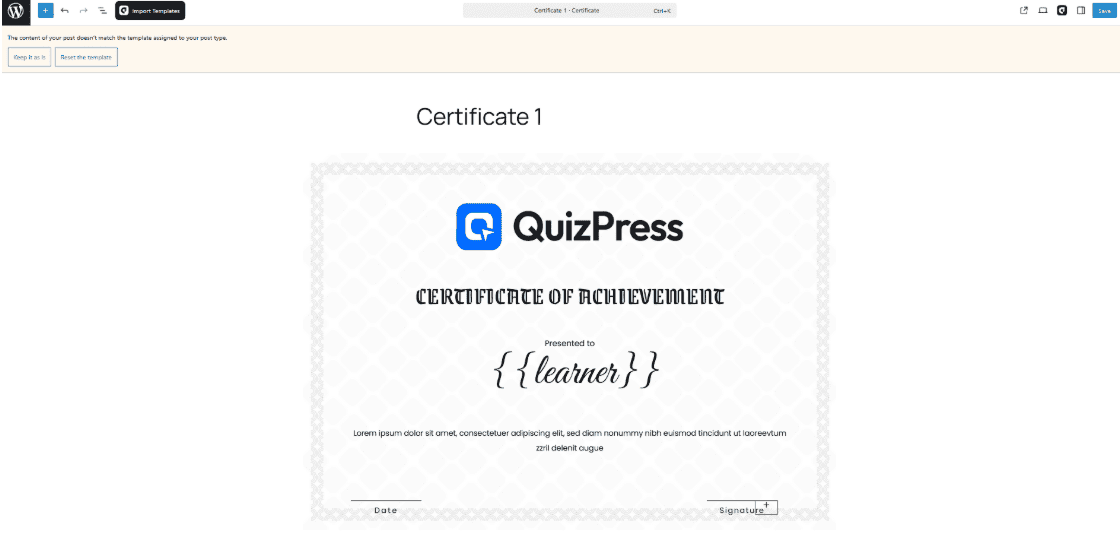
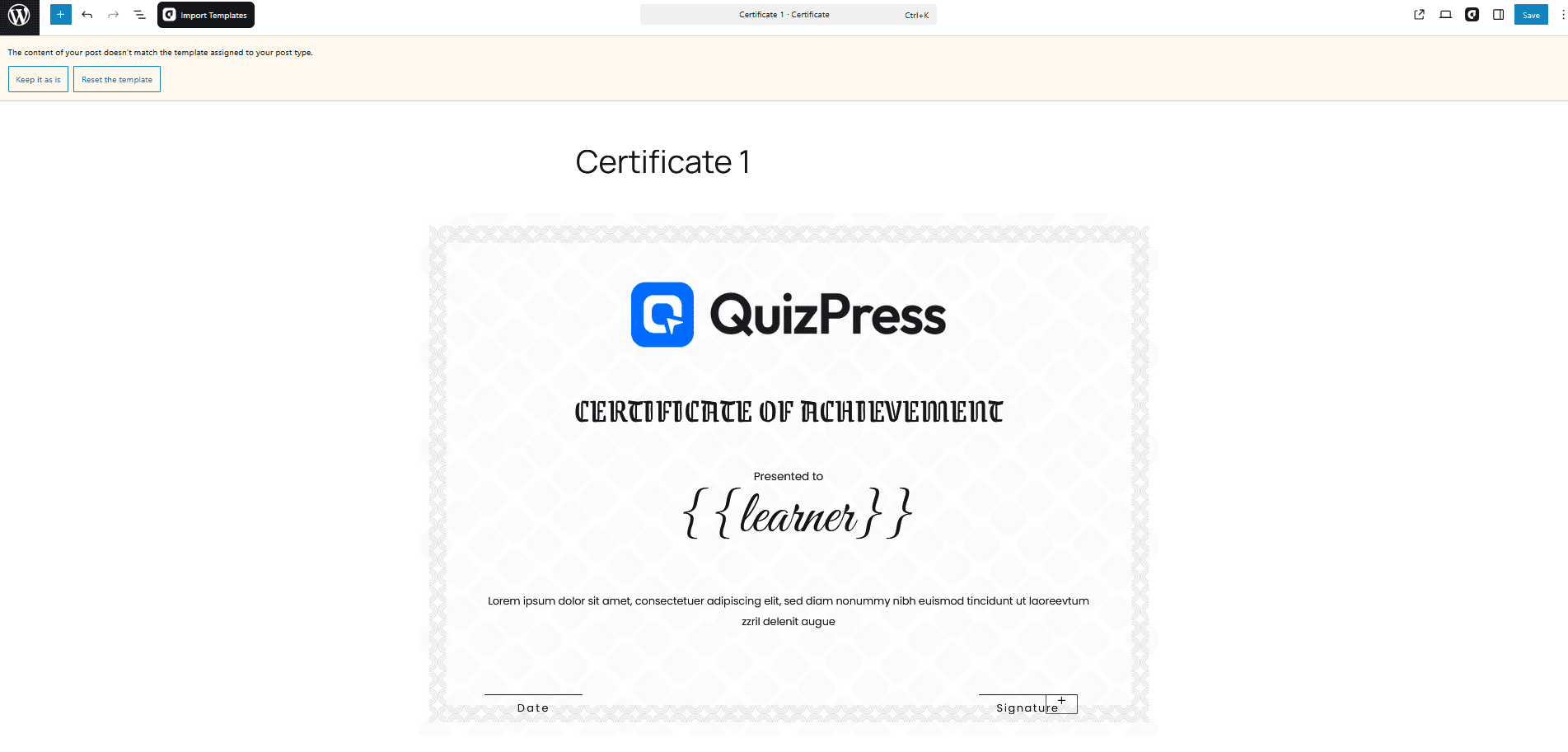
    To fully customize certificates, QuizPress integrates with aBlocks, allowing you to design visually rich, flexible certificate templates without coding. 

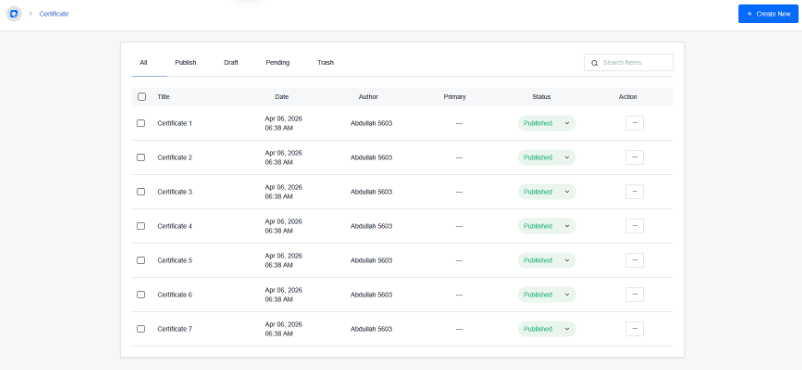
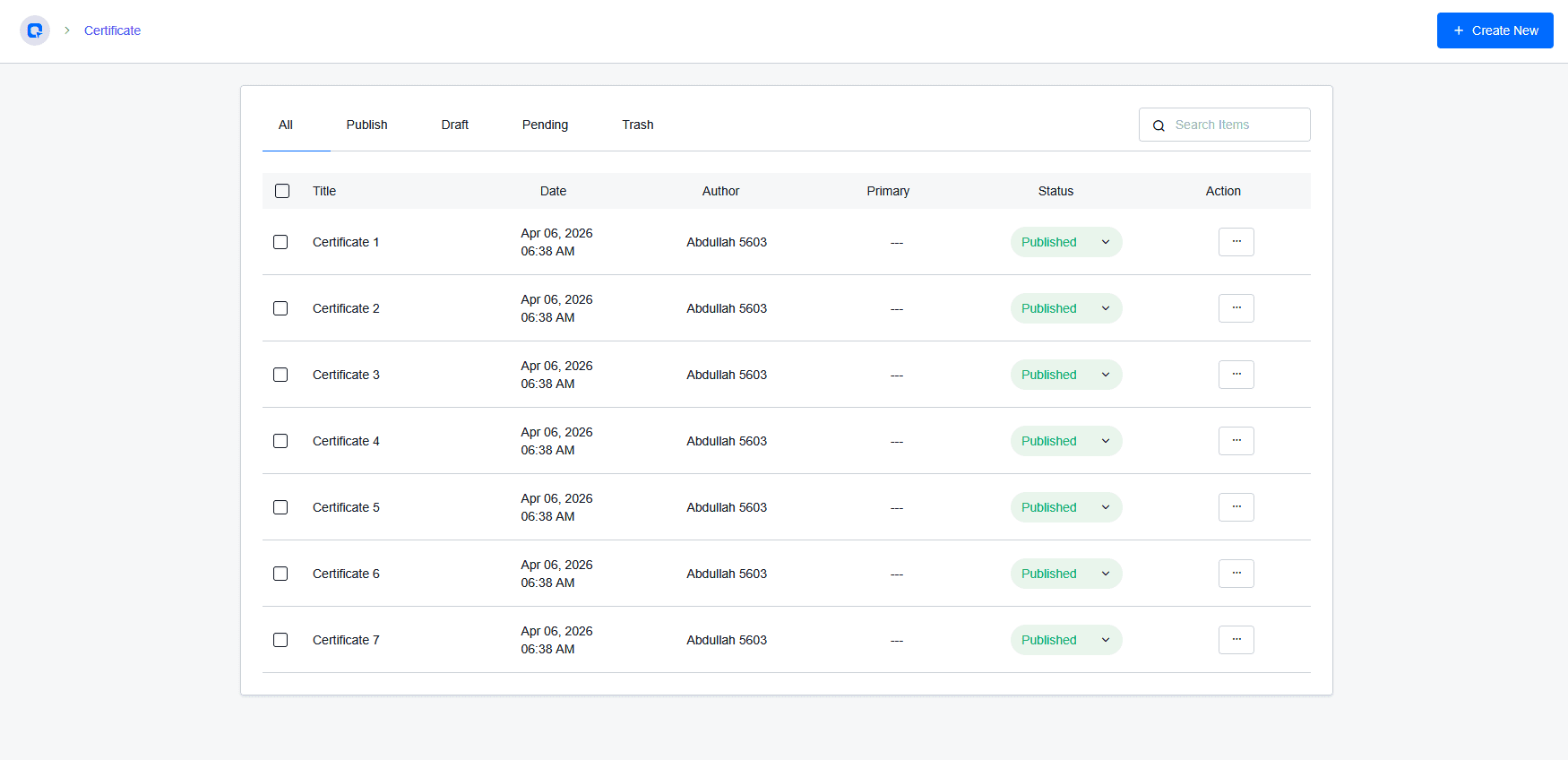
    certificates list

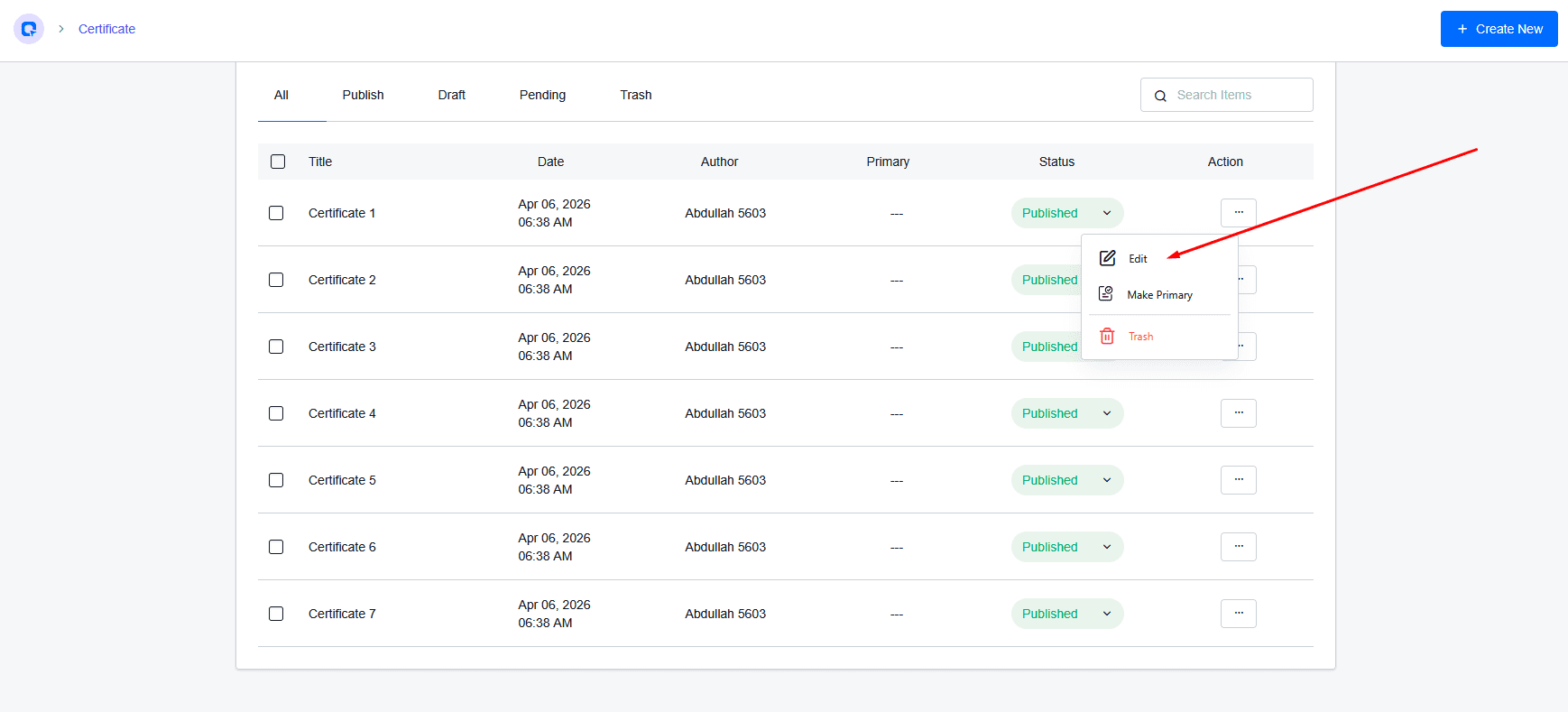
    With this setup, you can: 

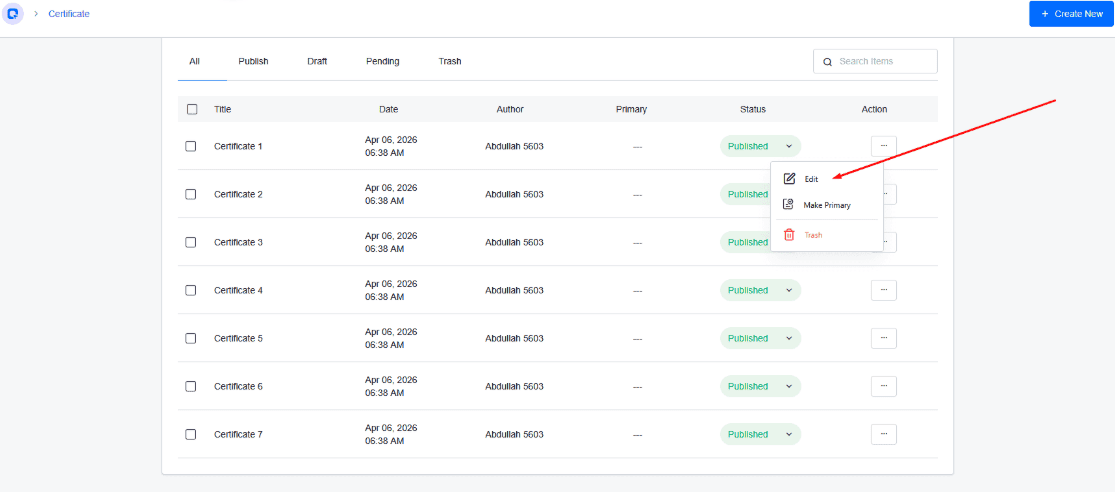
    click the edit button

    Customize certificate templates using aBlocks (add logo, colors, typography, layout, and dynamic fields like username or score).

    Customize certificate

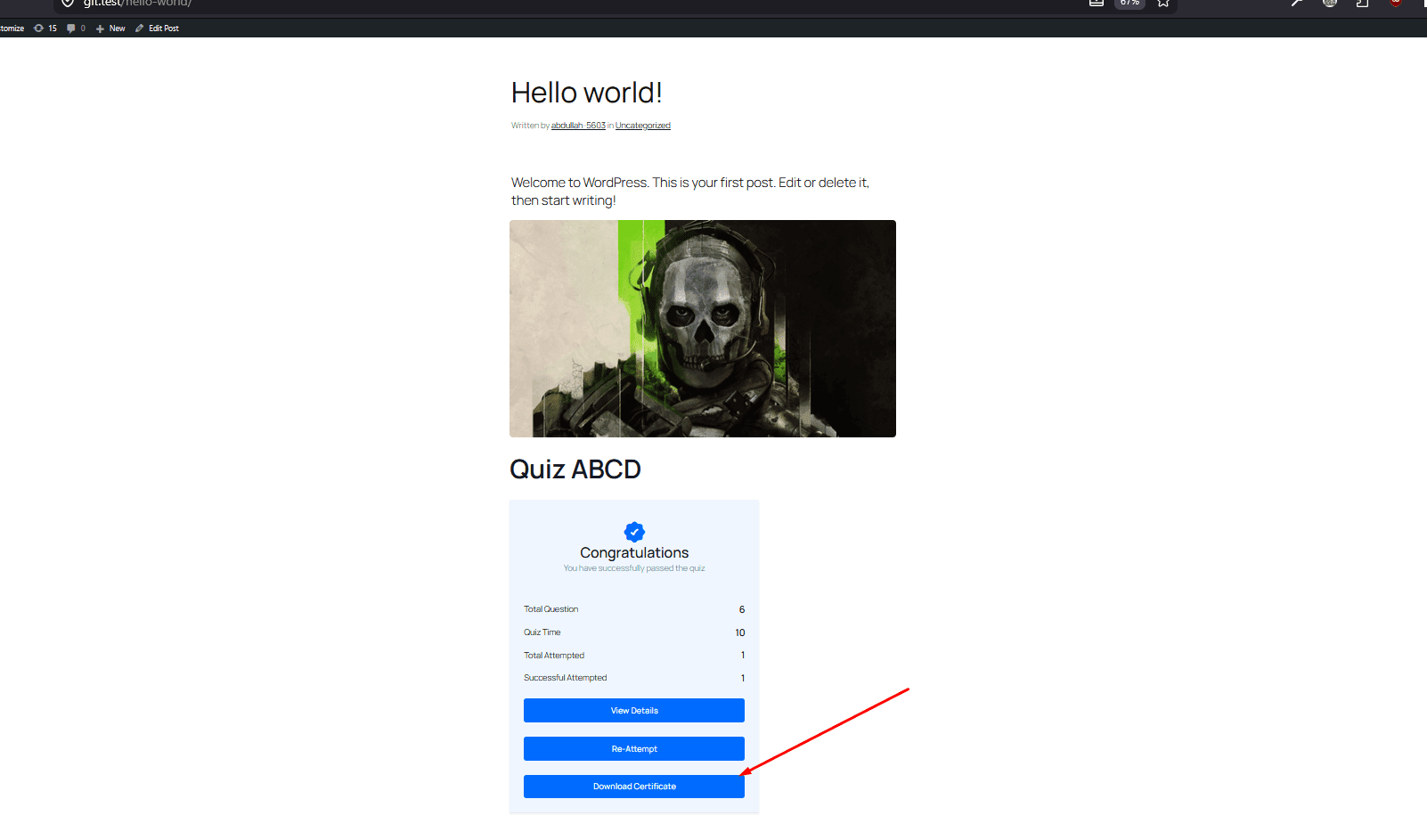
    Set conditional certificate issuance (e.g., only award certificates if the user meets a minimum score). 

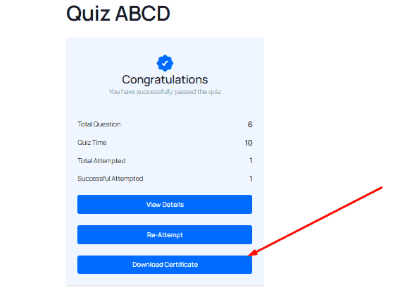
    download certificate

    Step 8: Publish Your Quiz

    When your quiz is ready, click Publish. QuizPress will generate a shortcode that you can paste into any WordPress page, post, or widget area:

    [quizpress id=”YOUR_QUIZ_ID”]

    Alternatively, use the QuizPress Gutenberg block to embed your quiz directly within the block editor without needing to copy and paste shortcodes manually. 

    Step 9: Test Your Quiz

    Always run through your quiz completely before making it available to your audience. Specifically:
    • Test every question and verify that the correct answers are marked accurately.
    • Confirm the scoring calculation produces expected results.
    • Preview the quiz on a mobile device to check layout and usability.
    • Verify that the results page, feedback messages, and certificates display correctly after submission.

    Taking 10 minutes to test your quiz thoroughly will prevent a poor first impression with real users.

    Organize Questions with the Question Bank

    If you regularly create quizzes, you don’t need to rewrite questions every time.

    QuizPress includes a Question Bank, allowing you to save, organize, reuse, and randomize questions from a central library. This is especially useful for teachers, training organizations, and businesses that create multiple assessments throughout the year.

    For example, if you already have 200 WordPress questions stored in your Question Bank, you can quickly reuse them when creating a new certification exam instead of starting from scratch.

    Best Practices for Creating Better WordPress Quizzes

    A well-designed quiz is about more than just asking questions. The overall experience should be engaging, easy to follow, and valuable for participants.

    Here are a few best practices to keep in mind:

    Keep Questions Simple

    Use clear, straightforward language. Avoid unnecessary technical terms unless your audience is already familiar with them.

    Choose the Right Question Type

    Different question formats serve different purposes. Multiple-choice questions work well for knowledge tests, while surveys and opinion questions are better for collecting feedback.

    Don’t Make Quizzes Too Long

    Most users are more likely to complete quizzes that contain around 10–20 meaningful questions. If your quiz is longer, consider breaking it into separate sections.

    Write Helpful Feedback

    Instead of simply displaying a score, explain why answers are correct or provide suggestions for improvement. This creates a better learning experience.
    Optimize for Mobile

    Many visitors will complete your quiz using a smartphone. Always preview your quiz on different screen sizes before publishing.

    Common Mistakes to Avoid

    Avoid these common mistakes when creating your first quiz:

    • Writing confusing questions.
    • Using too many questions without a clear purpose.
    • Forgetting to preview the quiz before publishing.
    • Setting unrealistic time limits.
    • Ignoring mobile responsiveness.
    • Publishing without testing the results page.

    Taking a few extra minutes to review your quiz can help prevent a poor user experience and reduce participant frustration.

    Tips for Creating Engaging Quizzes

    Before publishing your quiz, keep these practical tips in mind:

    • Write clear and concise questions.
    • Keep quizzes focused on one topic.
    • Use a mix of question types to maintain engagement.
    • Include images where they improve understanding.
    • Set realistic time limits for assessments.
    • Review your quiz before publishing.
    • Test the quiz on both desktop and mobile devices.
    • Update older quizzes regularly to keep information accurate.

    These small improvements can increase completion rates and provide a better experience for your audience.
    Final Thoughts

    Creating a quiz in WordPress is easier than ever with QuizPress. You can build interactive quizzes, exams, surveys, and polls without writing any code, making it a great choice for beginners and experienced WordPress users alike.
    By following the steps in this guide, you can create, customize, and publish engaging quizzes that improve user interaction and support your website’s goals. Whether you’re teaching students, collecting feedback, or increasing engagement, QuizPress provides a simple and efficient way to get started.
    Frequently Asked Questions (FAQs)

    Can I create a quiz in WordPress without coding?

    Yes. With a plugin like QuizPress, you can create quizzes, exams, surveys, and polls directly from your WordPress dashboard without writing any code. The visual interface makes it easy for beginners to build and publish interactive quizzes.

    Can I create different types of quizzes with QuizPress?

    Yes. QuizPress supports multiple quiz formats, including knowledge quizzes, online exams, surveys, polls, and personality quizzes. This flexibility makes it suitable for educators, businesses, marketers, and content creators.

    Can I add a timer to my quiz?

    Yes. QuizPress includes quiz settings that allow you to create timed assessments where participants must complete the quiz within a specified time limit.

  • Free vs Paid WordPress Quiz Plugins Compared: Which One Should You Choose?

    Free vs Paid WordPress Quiz Plugins Compared: Which One Should You Choose?

    Quizzes are a popular way to engage visitors on WordPress websites. They can increase user interaction, encourage social sharing, generate leads, and help educators or course creators evaluate learning progress.

    When adding quizzes to a WordPress site, users usually choose between free and paid quiz plugins. Free plugins are great for creating simple quizzes, while paid plugins provide advanced features, better customization, integrations, and professional support.

    Choosing the right quiz plugin depends on your website goals, the type of quizzes you want to create, and your budget. In this article, we’ll compare free and paid WordPress quiz plugins, discuss their benefits and limitations, and help you decide which option is the best fit for your website.

    Who Should Use Free Quiz Plugins?

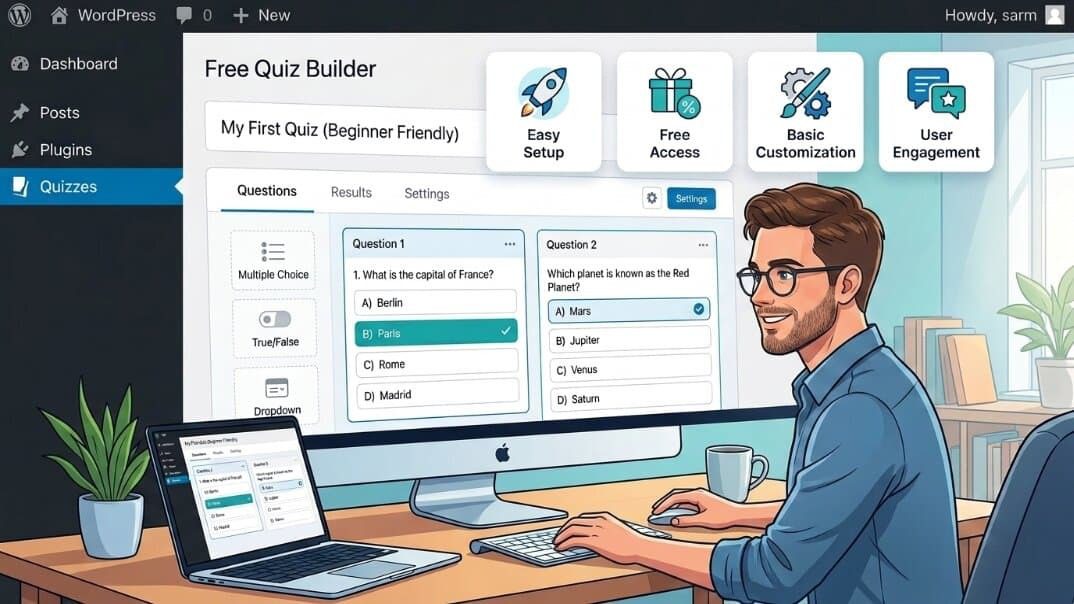
    Free quiz builder

    Free quiz plugins are a good choice for users who need simple quiz functionality without investing in premium tools.

    • Beginners who are just getting started with WordPress and want to create quizzes without any upfront cost.
    • Bloggers who want to add engaging content such as personality quizzes, trivia, or simple interactive posts.
    • Small websites that don’t require advanced features like detailed analytics, certificates, or complex integrations.
    • Basic educational websites that need simple assessments or practice quizzes without advanced grading and reporting systems.

    Advantages of Free Quiz Plugins

    • No upfront cost – Free quiz plugins allow you to add quiz functionality to your WordPress website without any initial investment. This makes them a great option for beginners, hobby websites, students, or anyone who wants to test a quiz idea before spending money on premium tools.
    • Easy to install and use – Many free quiz plugins are built with simplicity in mind, offering beginner-friendly interfaces that help non-technical users create and manage basic quizzes without much difficulty.
    • Suitable for basic quizzes – Free plugins are often enough for creating simple multiple-choice quizzes, trivia tests, knowledge checks, or personality quizzes. They provide the essential features needed for users who don’t require advanced functionality.
    • Good for testing quiz ideas – Free plugins allow you to experiment with different quiz formats, question types, and audience responses. This helps you understand what works for your website before upgrading to a paid solution.

    Limitations of Free Quiz Plugins

    • Limited advanced features – Many free quiz plugins focus on basic quiz creation, while advanced features such as branching logic, timed quizzes, advanced scoring rules, and automation options may require a premium upgrade.
    • Fewer customization options – Free plugins often provide limited design and layout controls, which may make it difficult to fully match the quiz appearance with your website’s branding and style.
    • Basic analytics and reporting – Free versions usually offer simple results and basic performance information. More detailed analytics, user insights, and reporting features are often available in paid versions.
    • Limited integrations and support – Free quiz plugins may have fewer integrations with tools like email marketing platforms, payment gateways, or LMS solutions. Support is often provided through community forums rather than dedicated customer support.

    These limitations are not necessarily deal-breakers. For many WordPress websites — especially blogs, hobby projects, and small informational sites — a free quiz plugin may provide all the essential features they need. The important thing is to understand your goals and requirements from the beginning, so you can choose a plugin that fits your needs and avoid running into limitations as your quiz project grows.

    Best Free WordPress Quiz Plugins 

    1. QuizPress (Free)

    Best for: beginners, bloggers, educators, and website owners who want to create quizzes in WordPress easily. 

    Key Features:

    • Easy quiz creation – QuizPress makes it simple to create quizzes without requiring advanced technical knowledge, making it suitable for users who are new to WordPress quiz building.
    • Beginner-friendly interface – The plugin provides an easy-to-use interface that helps users create and manage quizzes with minimal setup.
    • Built for WordPress websites – QuizPress works within the WordPress environment, allowing website owners to add quiz functionality directly to their sites.
    • Suitable for basic quizzes and assessments – The free version is a good option for creating simple quizzes, knowledge tests, and basic assessments.

    Limitations:

    Some advanced features and additional functionality may require upgrading to the premium version.

    2. HD Quiz

    Best for: Simple knowledge quizzes, trivia quizzes, and bloggers who want to add interactive content to their websites.


    Key Features:

    • Lightweight plugin – HD Quiz is designed to provide quiz functionality without adding unnecessary complexity, making it suitable for websites that need a simple quiz solution.
    • Easy setup – The plugin offers a straightforward setup process, allowing users to create quizzes and add them to their WordPress website using simple tools like shortcodes and Gutenberg blocks.
    • Basic quiz customization – Users can customize quizzes with essential options to create engaging knowledge tests, trivia quizzes, and interactive content.

    3. Quiz and Survey Master (Free)

    Best for: Website owners who want to create quizzes, surveys, and interactive assessments in WordPress. 

    Key Features:

    • Multiple question types – Quiz and Survey Master supports different question formats, allowing users to create more flexible quizzes and assessments for different purposes.
    • Quiz and survey creation – The plugin lets users build both quizzes and surveys, making it suitable for educational websites, feedback forms, and interactive content.
    • Extendable through add-ons – Users can expand the plugin’s functionality with additional add-ons that provide extra features and integrations as their needs grow.

    4. Forminator

    Best for: Users who need forms, surveys, polls, and quizzes in one WordPress plugin. 

    Key Features:

    • Drag-and-drop builder – Forminator provides a beginner-friendly drag-and-drop builder that makes it easy to create forms, quizzes, and surveys without coding.
    • Quiz functionality – The plugin allows users to create interactive quizzes with different question formats and scoring options for various use cases.
    • Form and survey options – Along with quizzes, Forminator supports contact forms, polls, and surveys, making it a versatile solution for websites that need multiple types of interactive content

    What Are Paid WordPress Quiz Plugins?

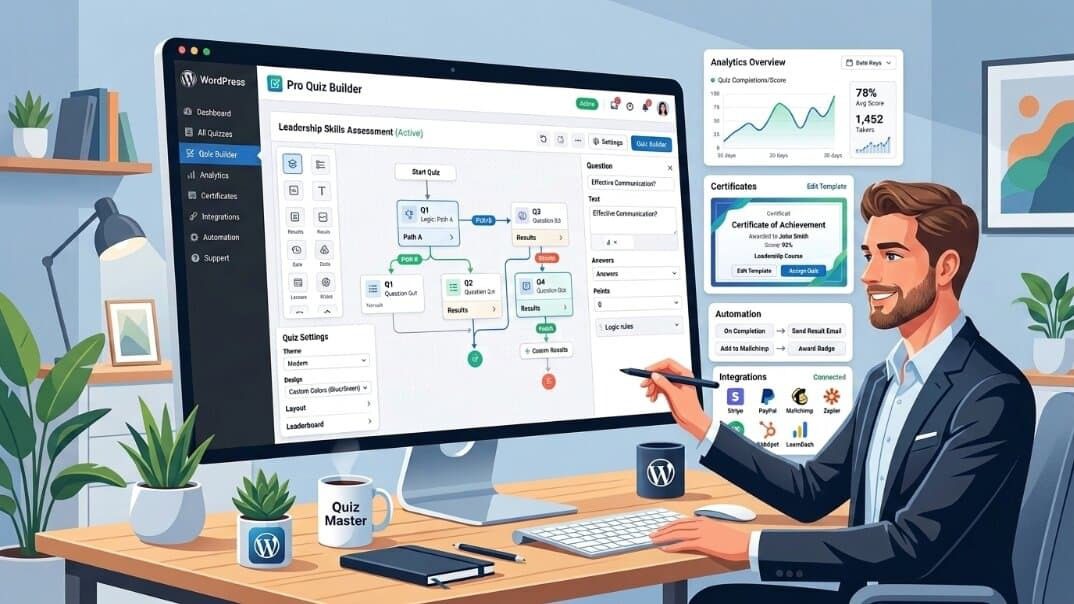
    pro quiz builder

    Paid, or premium, quiz plugins are designed for users who need more advanced functionality than basic quiz creation. These plugins often provide additional features such as advanced quiz-building options, more customization controls, integrations, analytics, and dedicated support.

    Premium quiz plugins are a good choice for businesses, educators, marketers, and course creators who use quizzes for more than simple engagement. They can help with tasks such as lead generation, student assessments, knowledge testing, and certification-based learning.

    The difference between free and paid quiz plugins is not only about adding extra features — it is also about having more flexibility and control over your quiz experience. While a free plugin may be enough for creating simple quizzes and showing results, a premium plugin can provide advanced tools for creating more interactive, customized, and goal-focused quiz experiences.

    Advantages of Paid Quiz Plugins

    • Advanced quiz-building features – Many paid quiz plugins offer advanced tools such as branching logic, question randomization, timed quizzes, and conditional questions, allowing users to create more interactive and complex quiz experiences.
    • More customization options – Premium plugins usually provide greater control over quiz design, including layouts, styling options, and branding elements, helping quizzes match the overall look of a website.
    • Better analytics and reporting – Paid solutions often include detailed reports and insights, such as quiz completion rates, user performance, scores, and engagement data.
    • Certificates and advanced scoring options – These features are especially useful for educational platforms, training websites, and certification-based assessments that require structured evaluation.
    • Marketing and automation integrations – Many premium quiz plugins can connect with email marketing tools, CRMs, and automation platforms to help businesses collect and manage leads more effectively.
    • WooCommerce and payment integrations – Some paid quiz plugins support eCommerce integrations, allowing users to sell access to quizzes, courses, assessments, or related products.
    • Premium customer support – Paid plugins usually provide dedicated support from the development team, offering faster assistance compared to relying only on community forums.

    Limitations of Paid Quiz Plugins

    • Requires investment – Premium quiz plugins require a financial investment, whether through a one-time purchase or a recurring subscription. This cost may not be suitable for beginners, small websites, or users with limited budgets.
    • May include a learning curve – Because paid plugins offer more advanced features and customization options, new users may need some time to understand the tools and make the most of their available functionality.

    Best Paid WordPress Quiz Plugins 

    1. QuizPress Pro

    Best for: Online courses, certification websites, educators, and professional quiz platforms that need more advanced quiz features. 

    Key Features:

    • Advanced quiz functionality – Create more flexible and engaging quizzes with features designed for professional assessments and interactive learning experiences.
    • Premium features and add-ons – Access additional tools and functionality that help expand quiz capabilities as your website grows.
    • Better customization options – Customize quiz experiences to better match your website’s design and specific requirements.
    • Professional quiz management tools – Manage quizzes more effectively with features suitable for educational platforms, businesses, and content creators.

    2. Thrive Quiz Builder

    Best for: Marketing-focused quizzes, lead generation campaigns, and businesses that want to use quizzes to understand their audience.

    Key Features:

    • Branching quizzes – Create personalized quiz experiences where questions and results change based on users’ previous answers.
    • Audience segmentation – Use quiz responses to better understand visitors and group audiences based on their interests or preferences.
    • Conversion-focused features – Built with marketing goals in mind, helping businesses use quizzes to increase engagement and collect valuable leads.

    3. Formidable Forms Quiz Maker

    Best for: Businesses that need advanced forms and quiz functionality in one WordPress solution.

    Key Features:

    • Drag-and-drop form builder – Create forms and quizzes easily with a visual builder without needing coding skills.
    • Conditional logic – Build smarter quizzes by showing or hiding fields based on users’ answers and responses.
    • Advanced calculations – Create quizzes with scoring rules, calculations, and dynamic results for more complex use cases.

    Free vs Paid WordPress Quiz Plugins: Comparison Table

    Feature

    Free Quiz Plugins

    Paid Quiz Plugins

    Basic Quiz Creation

    Available

    Available

    Multiple Question Types

    Limited

    Advanced

    Customization Options

    Basic

    Extensive

    Analytics & Reports

    Limited

    Advanced

    Certificates

    Limited / Rare

    Available

    Integrations

    Limited

    More Options

    Support

    Community Support

    Premium Support

    Monetization Features

    Limited

    Advanced

    Free vs Paid Quiz Plugins: Which One Should You Choose?

    Choosing between a free and paid quiz plugin depends on your website’s goals, required features, and plans. Instead of focusing only on price, consider which plugin provides the functionality you actually need. Start by listing your must-have features and choose the option that best matches your requirements.

    Choose Free Quiz Plugins If:

    • You are a beginner just starting with WordPress.
    • You need simple quizzes without advanced logic or complex features.
    • You want to test a quiz idea before investing in a premium solution.
    • You have a limited budget and want to avoid additional costs.

    Choose Paid Quiz Plugins If:

    • You run an online course platform and need advanced assessment features.
    • You require certificates, detailed scoring, or professional evaluations.
    • You want advanced analytics to better understand quiz performance and user behavior.
    • You need integrations with marketing tools, CRMs, or other platforms.
    • You want a more customized and professional quiz experience.

    Why Upgrade From a Free Quiz Plugin to a Paid Solution?

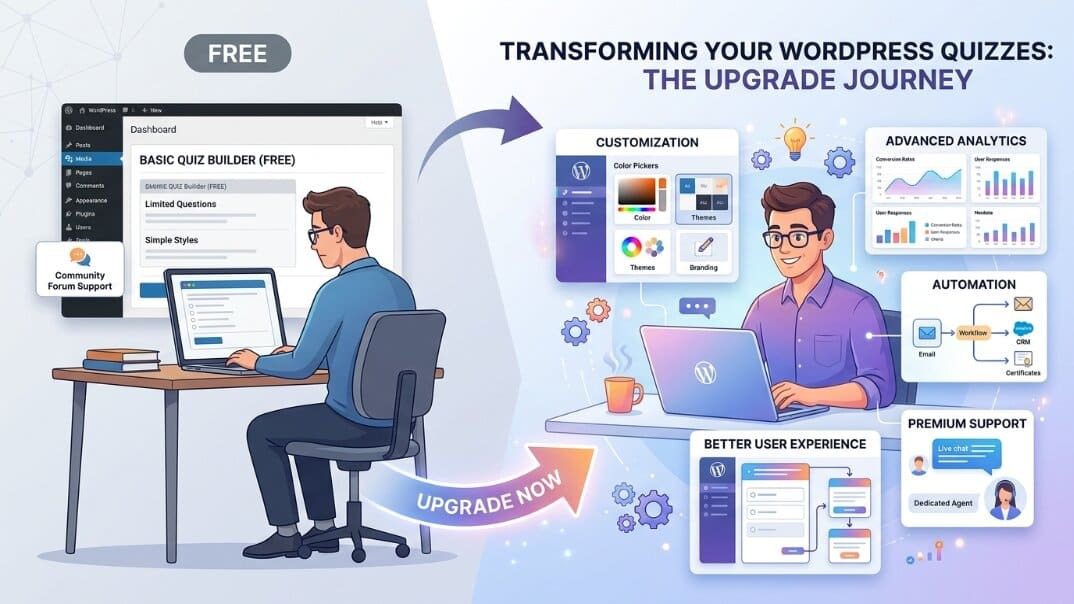
    transform your wordpress quizzes

    Many website owners start with a free quiz plugin and upgrade later as their website grows and their requirements become more advanced. A premium solution can provide more flexibility, control, and support when basic quiz features are no longer enough.

    • Growing website requirements – As your audience and content grow, you may need more advanced quiz types, better management options, and additional functionality.
    • Need for advanced features – Features like branching logic, timed assessments, advanced scoring, and automation tools can become important for more complex quiz projects.
    • Better user experience – Premium plugins often provide more customization options and tools to create a smoother experience for quiz participants.
    • More customization and control – Paid plugins typically offer greater flexibility to customize quizzes according to your brand and specific goals.
    • Access to premium support – Dedicated support can help you solve technical issues faster compared to relying only on community resources.

    Final Verdict

    Both free and paid WordPress quiz plugins have their own advantages. Free quiz plugins are a great choice for beginners, bloggers, and small websites that need simple and engaging quizzes without an upfront investment. They are also useful for testing ideas before moving to a more advanced solution.

    Paid quiz plugins are better suited for users who need advanced features such as customization options, analytics, certificates, integrations, and professional support. They are especially valuable for businesses, educators, and course creators who use quizzes as an important part of their website strategy.

    Ultimately, the best quiz plugin depends on your goals, audience, and future plans. Starting with a free plugin can be a smart choice, while upgrading to a premium solution makes sense when your website requires more advanced functionality.

    FAQs

    Are free WordPress quiz plugins good enough?

    Yes, free WordPress quiz plugins are often enough for basic use cases such as simple quizzes, trivia, and personality tests. However, users may need a premium plugin to access advanced features such as certificates, detailed analytics, and integrations.

    What is the difference between free and paid quiz plugins?

    Free quiz plugins usually offer basic quiz creation features with limited customization, analytics, and integration options. Paid plugins offer more advanced functionality, including better customization, reporting, automation options, and additional tools.

    Is a paid WordPress quiz plugin worth it?

    A paid quiz plugin can be a worthwhile investment if your website depends on quizzes for education, assessments, lead generation, or business growth. Premium features and support can provide more flexibility as your needs increase.

    Which quiz plugin is best for beginners?

    Free plugins like QuizPress (Free) or HD Quiz can be good starting options for beginners because they are simple to use and suitable for creating basic quizzes.

    Can I upgrade from a free quiz plugin later?

    Yes, many quiz plugins offer free versions with the option to upgrade to premium plans when you need additional features and functionality. QuizPress also provides a path for users to expand their quiz capabilities as their requirements grow.

  • How to Make an Online Exam in WordPress With a Timer

    How to Make an Online Exam in WordPress With a Timer

    Meta Description: Learn how to make an online exam in WordPress with a timer using QuizPress. Create timed exams, add questions, configure exam settings, and publish professional online assessments without coding. 

    Online exams are widely used for education, employee training, certification programs, and online learning. If you’re running a WordPress website, QuizPress makes it easy to create professional online exams without coding.

    With QuizPress, you can build quizzes using multiple question types, set a countdown timer, define passing scores, limit attempts, randomize questions, display results, and award certificates for successful participants. These features help you create structured assessments directly from your WordPress dashboard.

    In this step-by-step guide, you’ll learn how to make an online exam in WordPress with a timer using QuizPress.

    Why Create a Timed Online Exam?

    Adding a timer to your online exam creates a more structured and consistent assessment experience for both instructors and learners.

    Some of the key benefits include:

    • Creates a realistic examination environment.
    • Encourages participants to manage their time effectively.
    • Helps reduce opportunities for cheating by limiting the time available for each attempt.
    • Ensures fairness by giving every participant the same amount of time to complete the exam.
    • Supports more consistent assessments for certifications and training programs.
    • Helps participants stay focused throughout the exam.

    Whether you’re assessing students, evaluating employee skills, or delivering certification tests, timed exams can improve the overall assessment experience and provide more consistent results.

    Why Choose QuizPress?

    QuizPress is a WordPress quiz plugin that helps you create everything from simple quizzes to timed online exams without coding.

    Some of its key features include:

    • Countdown timer for timed exams
    • Multiple question types
    • Pass/fail score settings
    • Attempt limits
    • Question randomization
    • Instant quiz results
    • Certificate support
    • Quiz score tracking
    • Easy-to-use WordPress interface

    Since QuizPress works directly inside your WordPress dashboard, you can create, manage, and publish online exams without relying on a separate quiz platform.

    Before You Start

    Before creating your online exam, make sure you have:

    • A WordPress website
    • QuizPress installed and activated
    • Your exam questions prepared
    • User accounts configured (optional), if you want participants to log in before taking the exam

    Once everything is ready, you can start building your first timed online exam with QuizPress.

    Step-by-Step How to Make a Timed Online Exam in WordPress 

    Step 1: Create a New Quiz

    Log in to your WordPress dashboard, then head to:

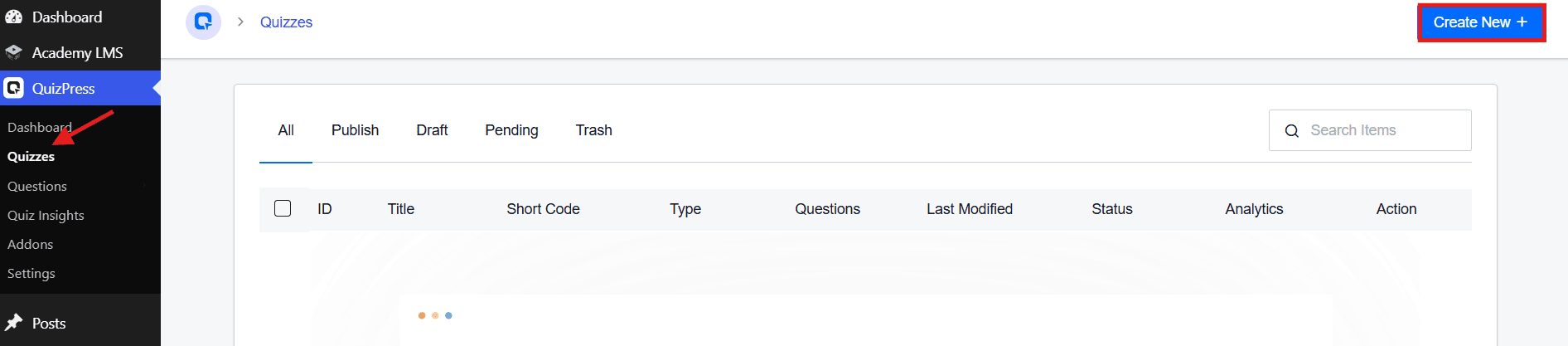
    QuizPress → Quizzes

    On the Quizzes page, click the Create New button in the top-right corner.

    Click the Create New Quizzes

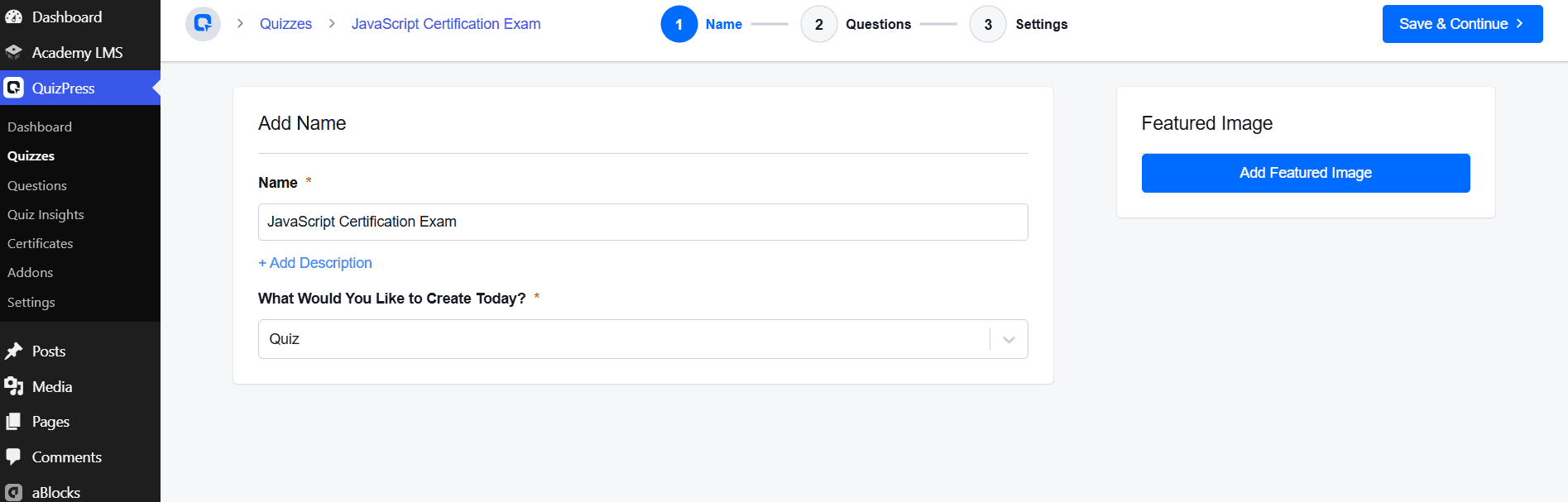
    This launches the quiz builder, which walks you through three steps: Name → Questions → Settings. You’ll land on the Name step first, where you’ll fill in:

    Three Steps

    Once you’ve filled in the name and selected “Quiz” as the content type, click Save & Continue in the top-right corner to move on to the Questions step. 

    Step 2: Add Exam Questions

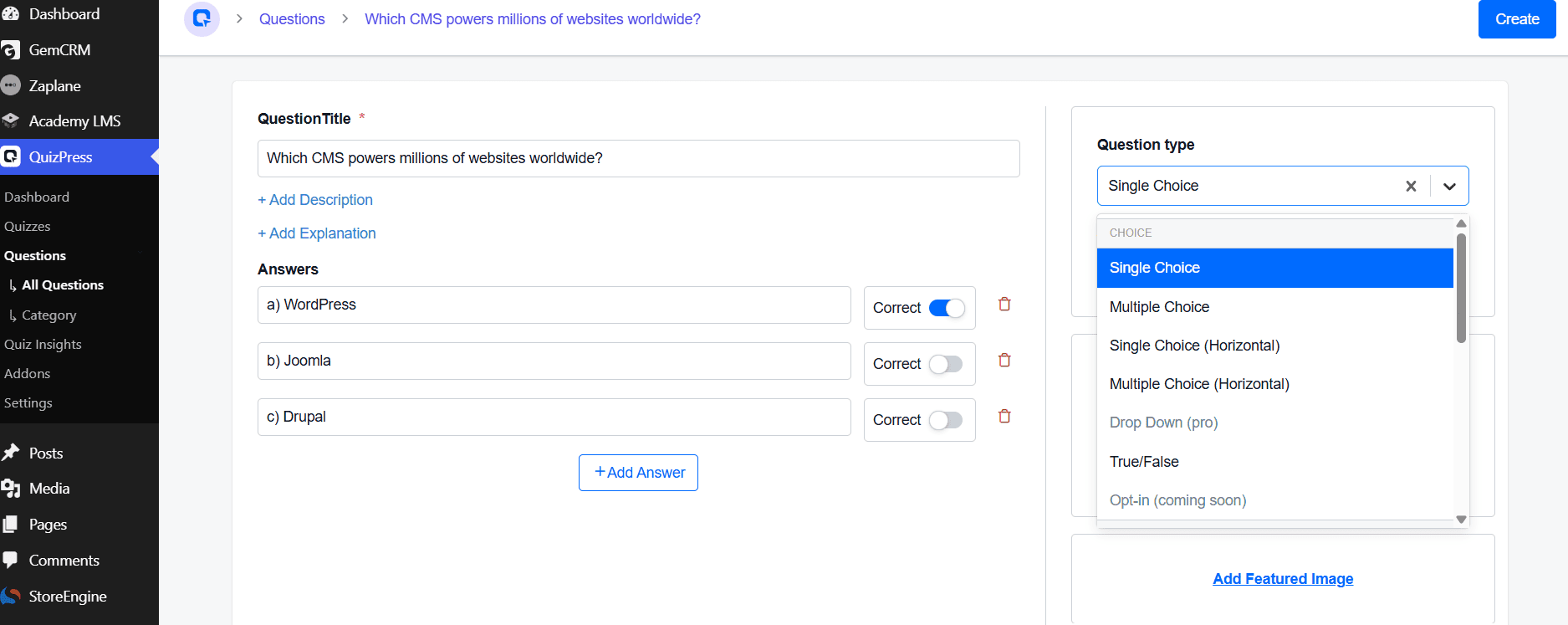
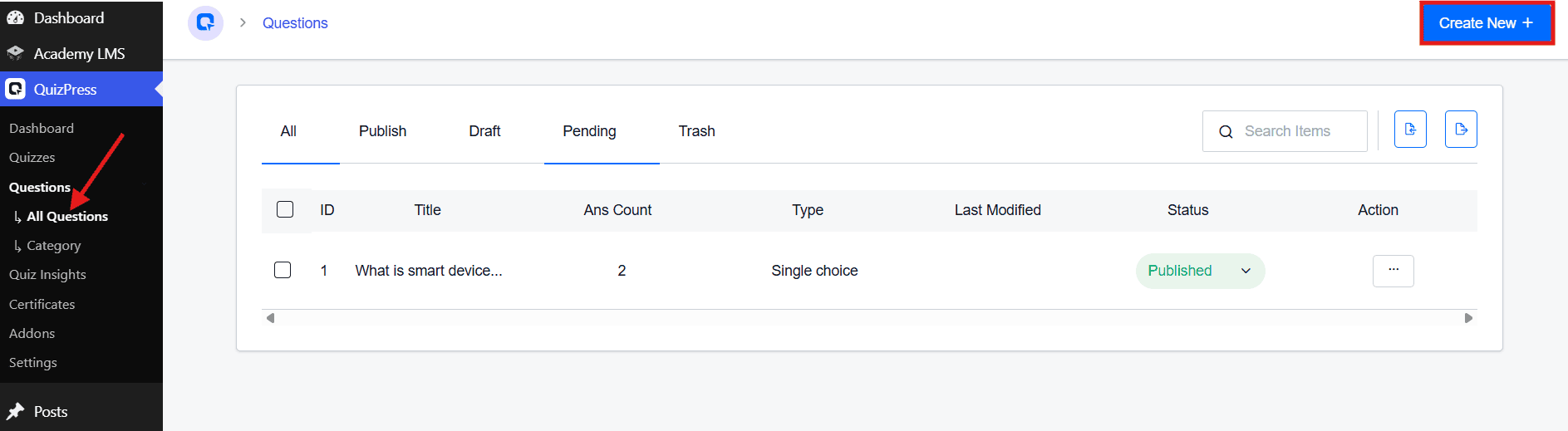
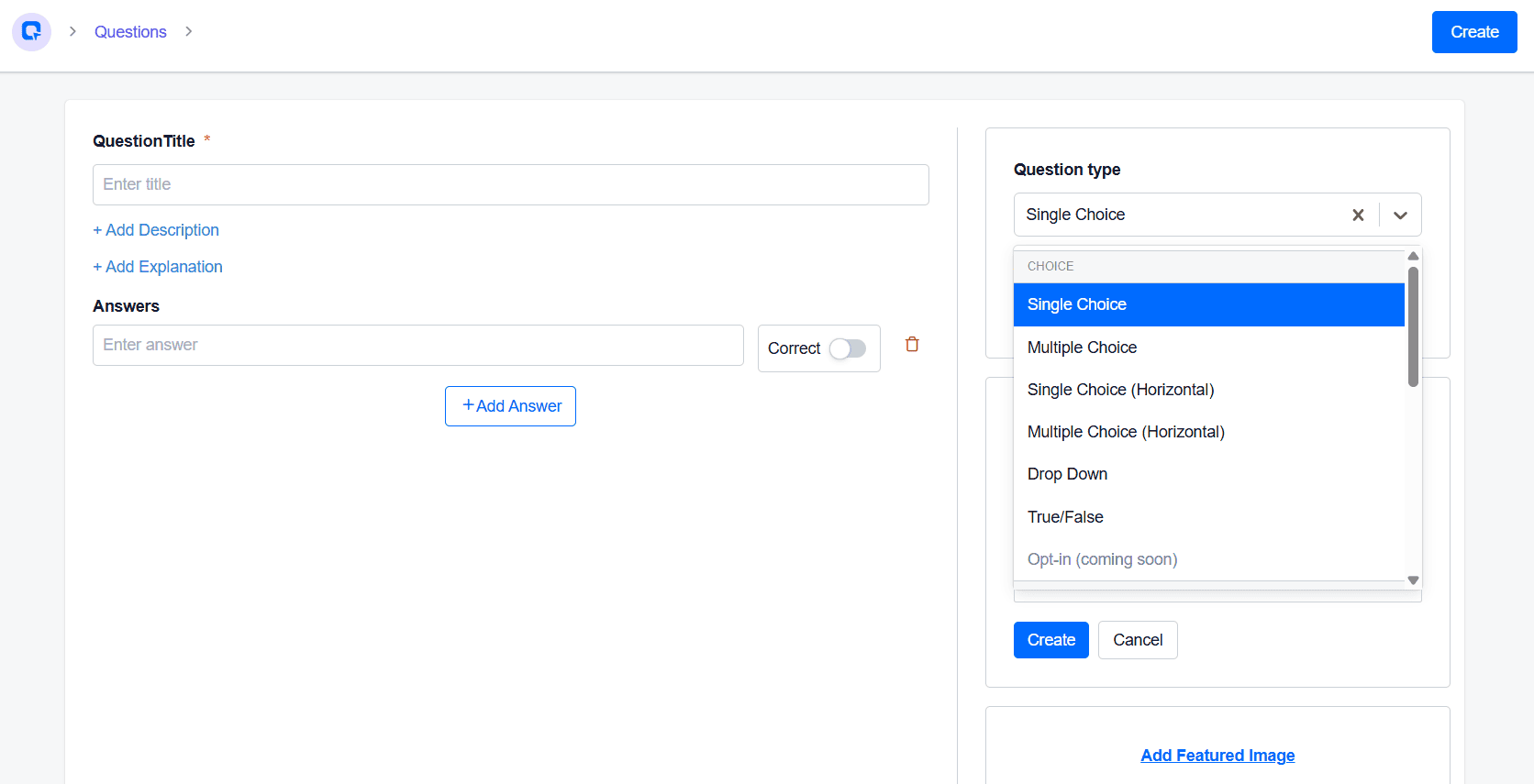
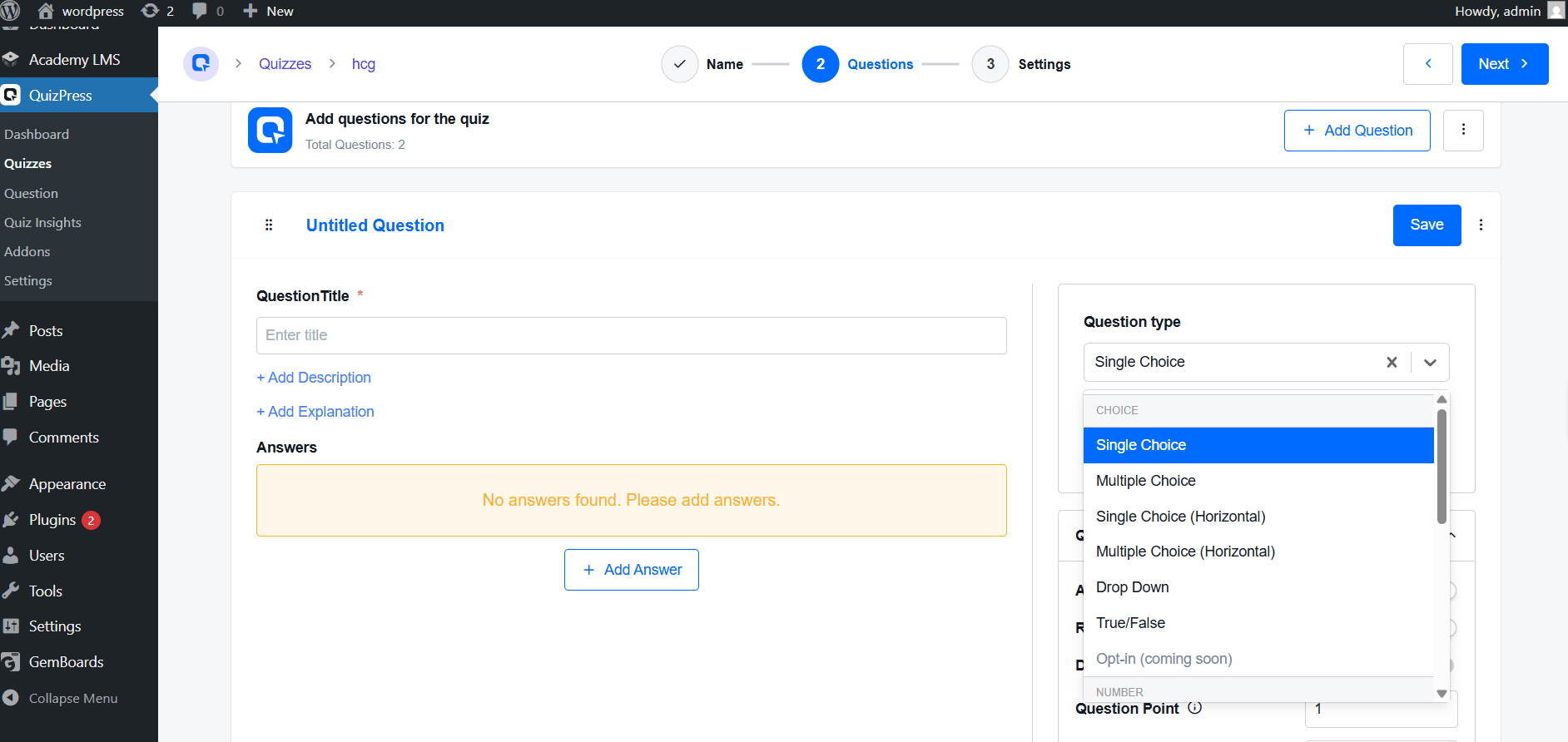
    Questions live in a central bank: QuizPress → Questions → All Questions, where you’ll see every question’s ID, title, type, and status. Click Create New to add one.

    Click Create New

    Fill in:

    • Question Title, plus optional + Add Description and + Add Explanation
    • Answers — add options with + Add Answer and toggle Correct on the right one(s)
    • Question Type — Single Choice, Multiple Choice, Single/Multiple Choice (Horizontal), Drop Down, True/False, or Opt-in (coming soon)
    Question Type

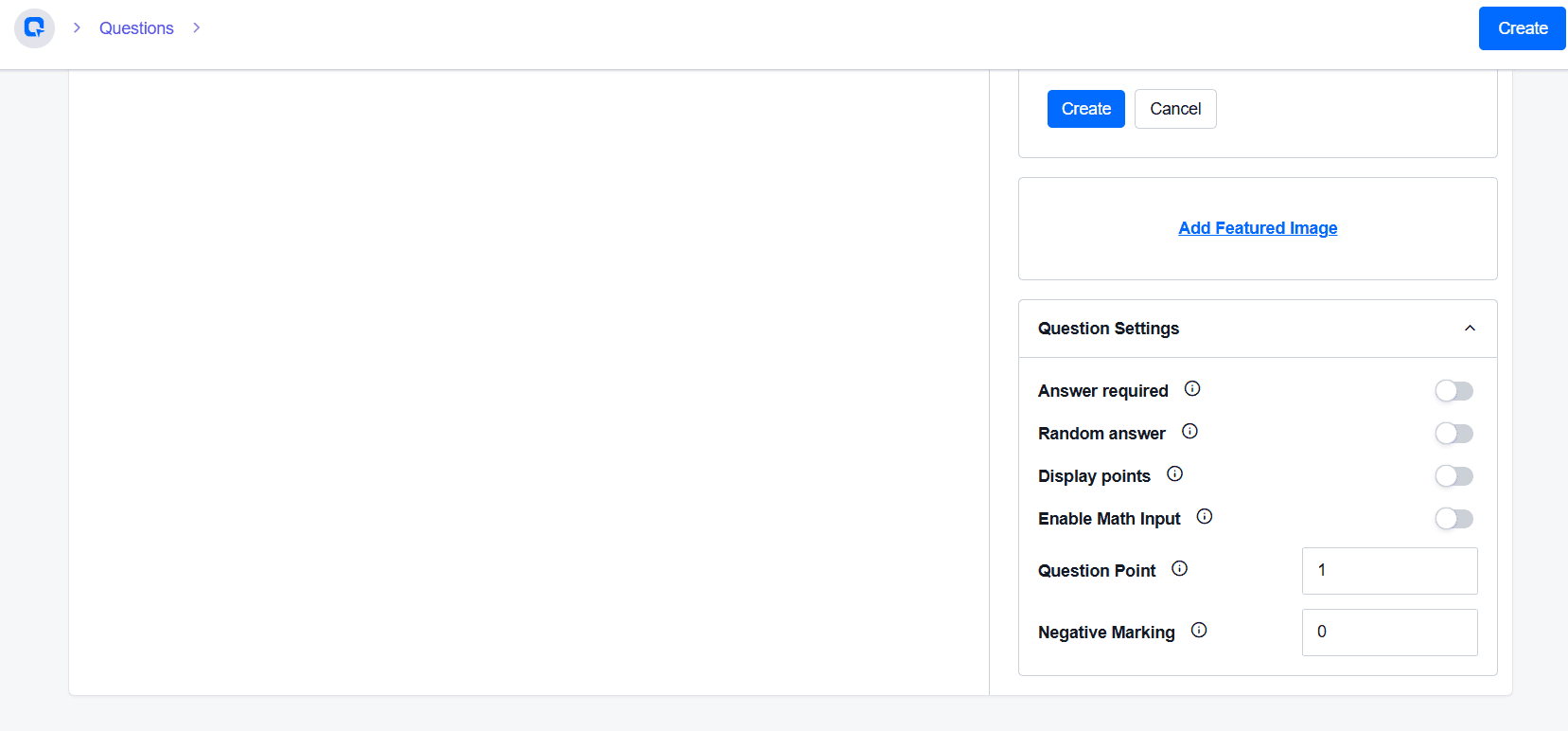
    Under Question Settings, configure:

    • Answer Required, Random Answer, Display Points, Enable Math Input (toggles)
    • Question Point — assign points by difficulty (e.g., Easy: 1, Medium: 2, Hard: 5)
    • Negative Marking — deduct points for wrong answers, if desired
    Question Point

    Click Create to save. Repeat for each question, and double-check for typos or mismarked answers before moving on.

    Step 3: Set the Exam Timer

    This is where the exam becomes timed.

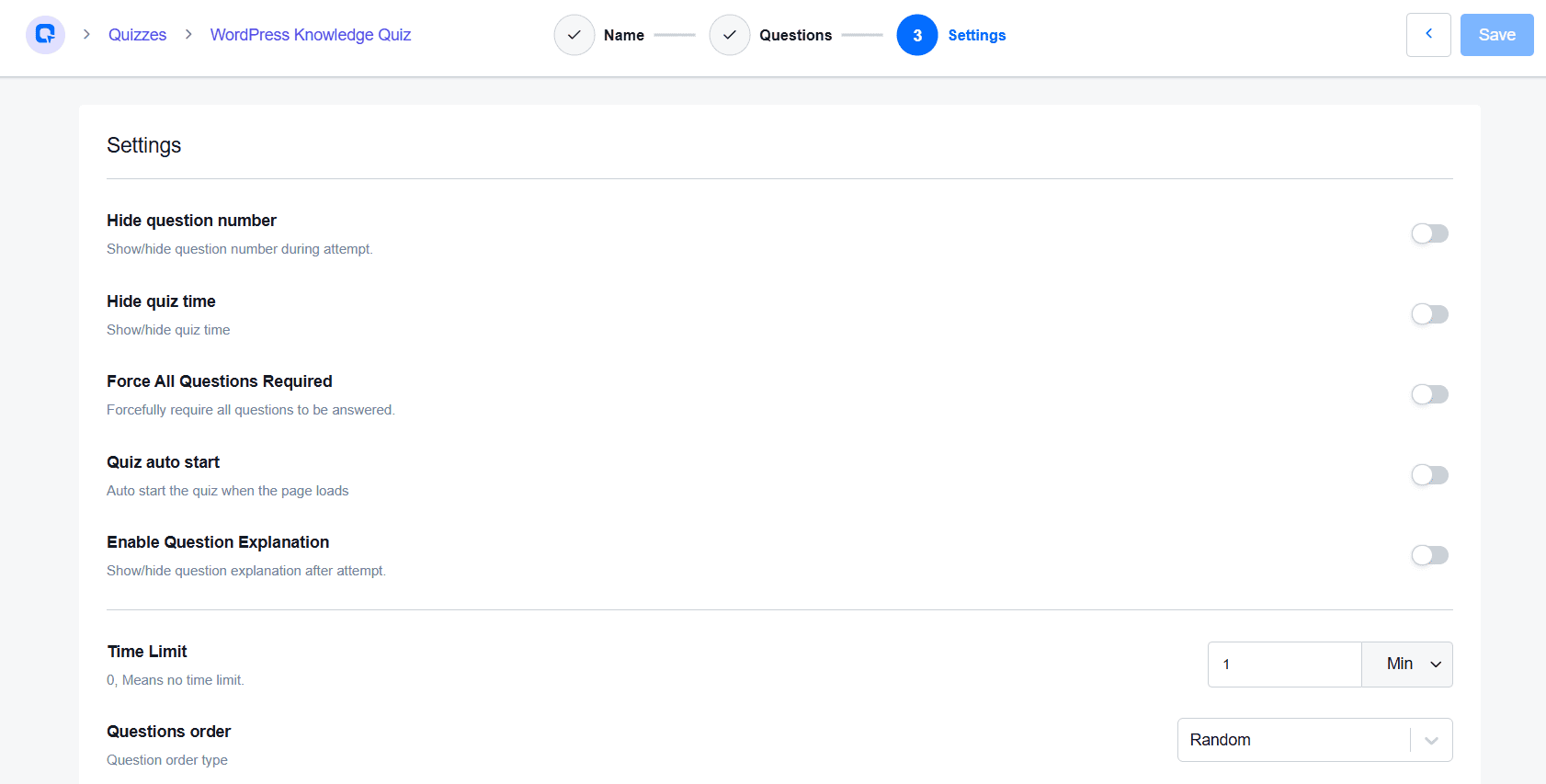
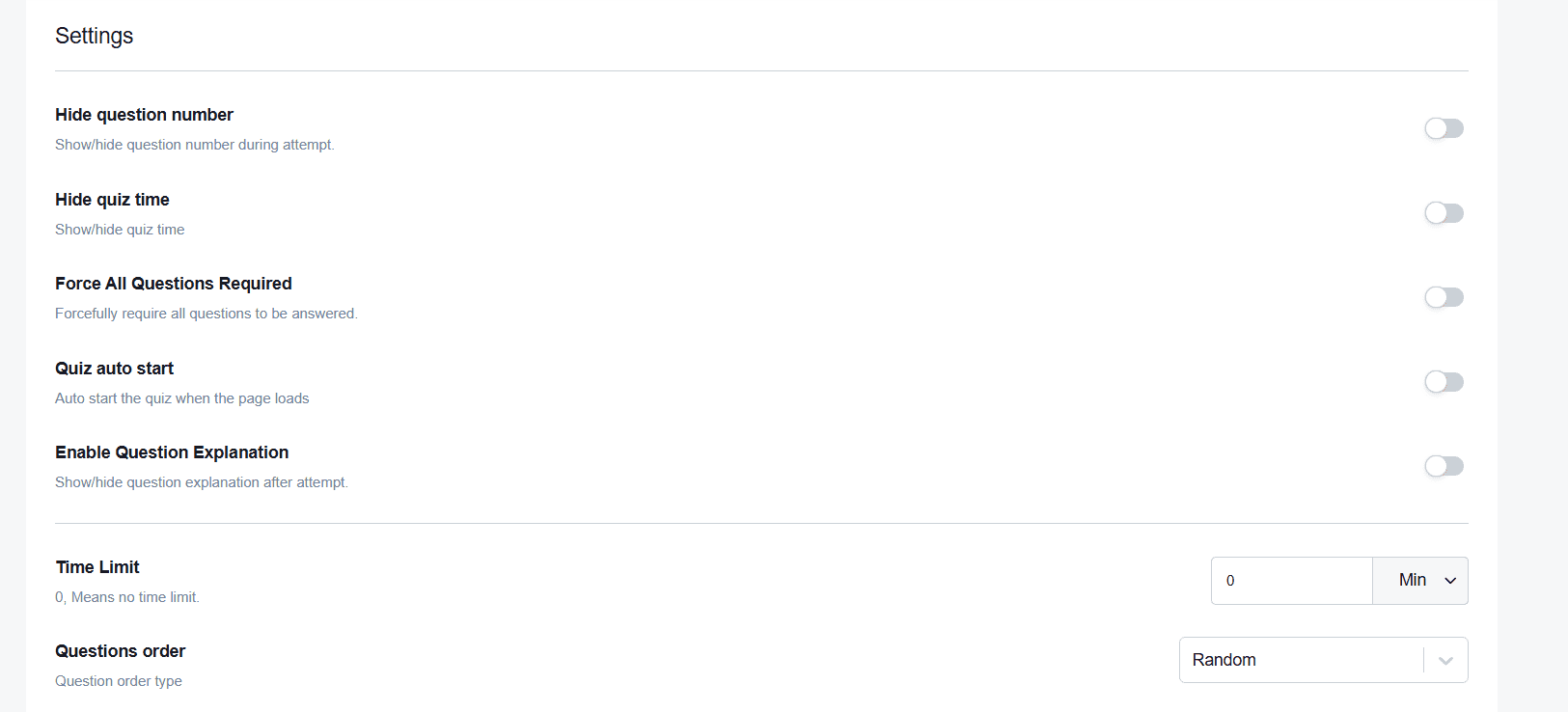
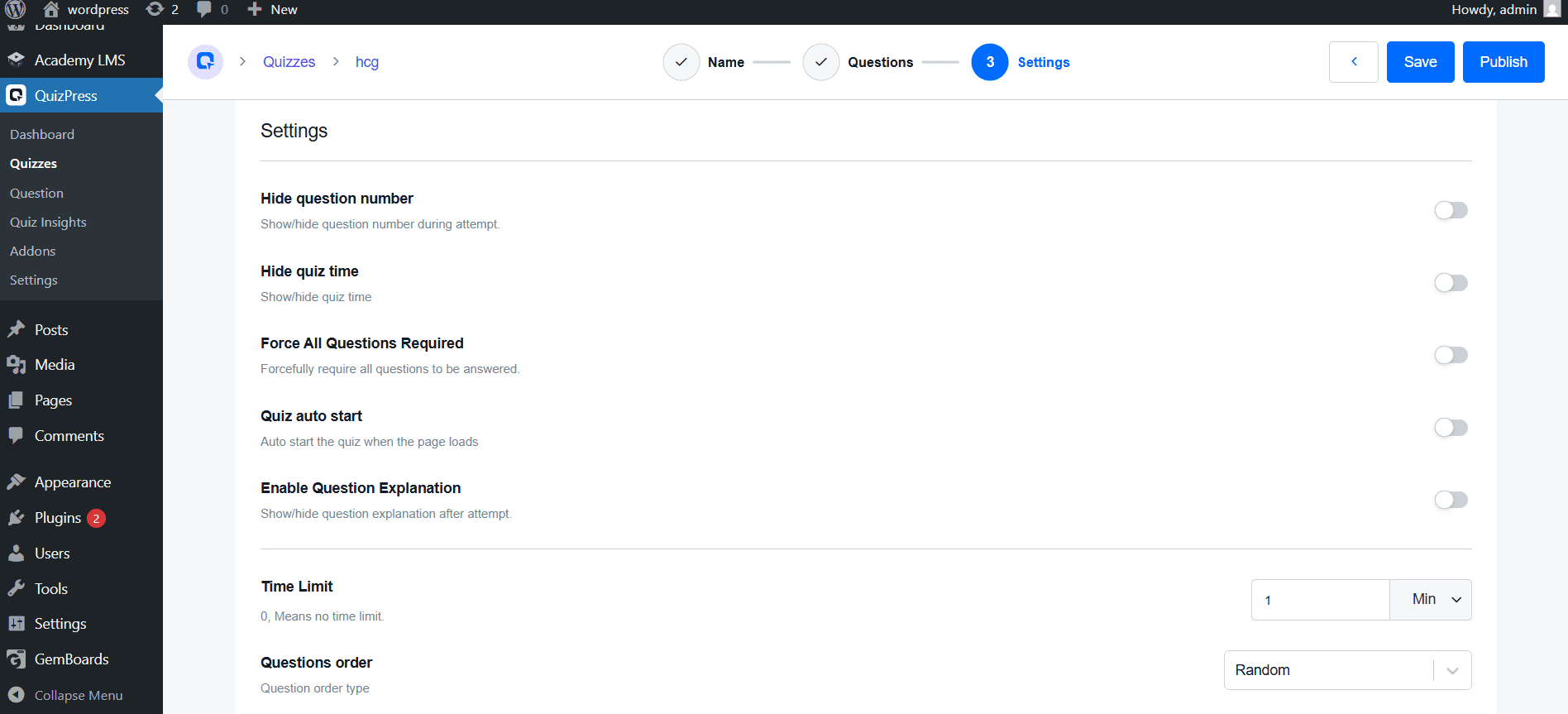
    In the quiz builder’s Settings step, you’ll find a set of toggles: Hide Question Number, Hide Quiz Time, Force All Questions Required, Quiz Auto Start, and Enable Question Explanation — use these to control what participants see and how the quiz behaves.

    Quiz builder's Settings

    Below these, find Time Limit. It defaults to 0 (no time limit) — enter a number and pick a unit (e.g., Min) to set your duration:

    • 10–15 minutes for a short practice quiz
    • 30–45 minutes for a standard assessment
    • 60–90 minutes for a certification or final exam

    Once the exam starts, participants see a live countdown, and QuizPress can auto-submit their answers when time runs out. Right next to Time Limit is Questions Order (Random, Ascending, or Descending) — worth setting now, since it ties into the randomization covered in Step 4.

    Step 4: Set the Passing Grade, Feedback Mode, and Extra Settings 

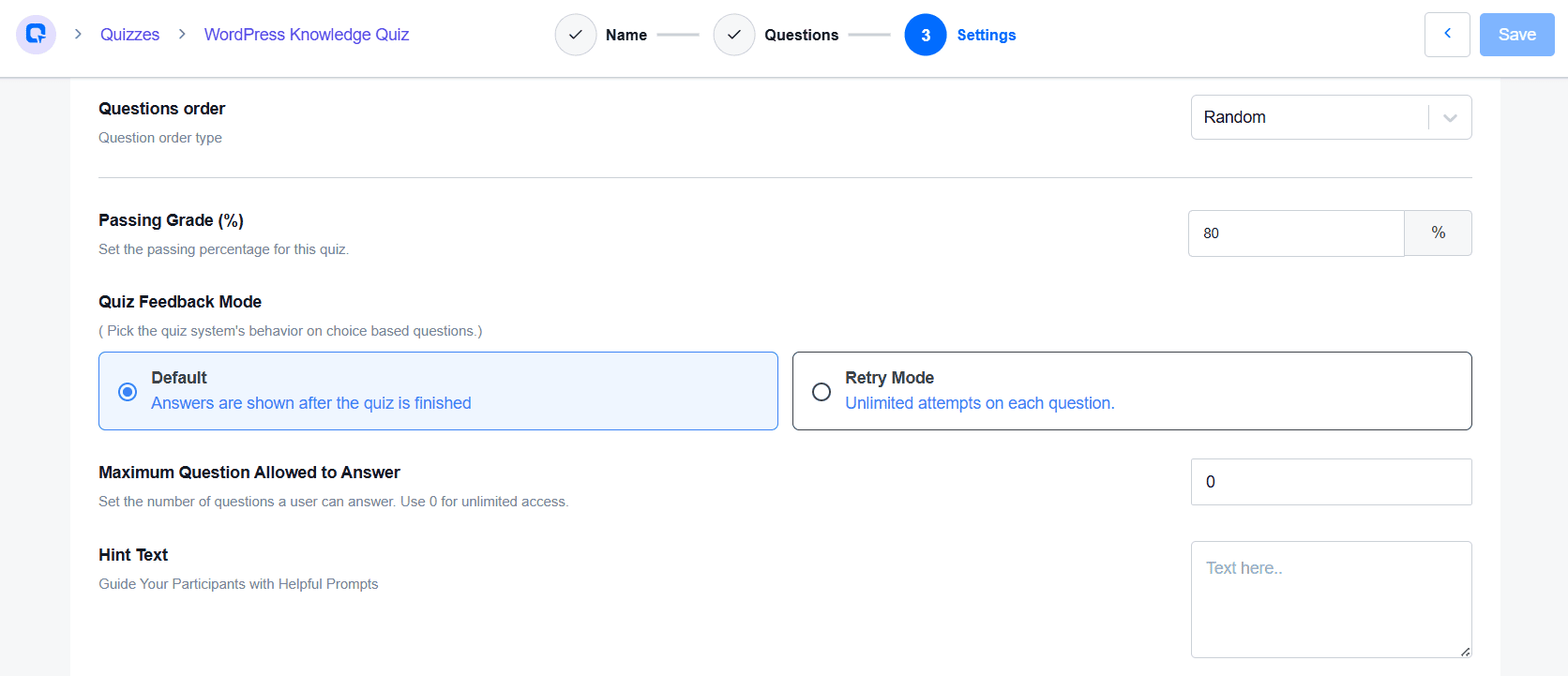
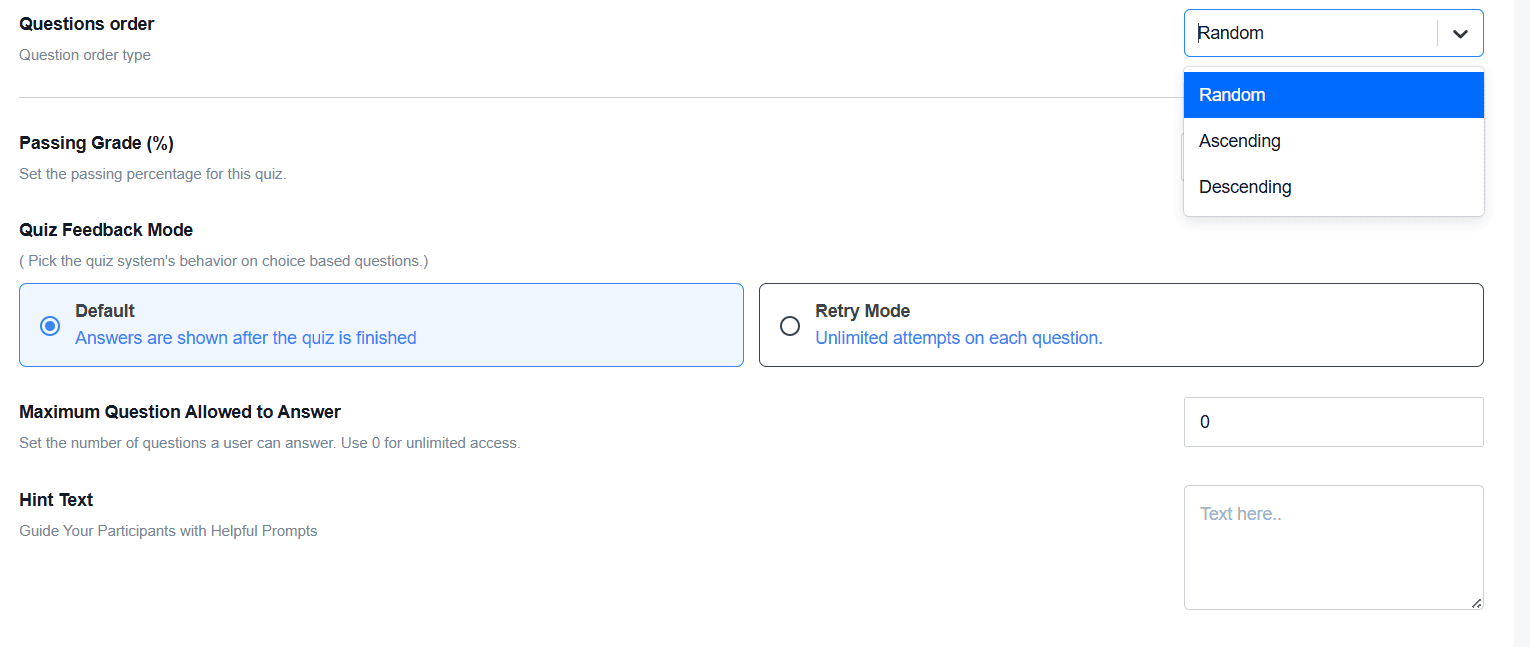
    Continuing down the Settings step, set Passing Grade (%) — the minimum percentage needed to pass (e.g., 60% for practice, 70% for course completion, 80–90% for certifications).

    Below it, Quiz Feedback Mode controls choice-based question behavior: Default (answers shown after the quiz finishes) or Retry Mode (unlimited attempts per question).

    Maximum Questions Allowed to Answer sets how many questions a participant can answer — 0 means unlimited access, or cap it for a more controlled exam.

    You’ll also find Hint Text (optional prompts to guide participants) and Questions Order (Random, Ascending, or Descending — Random shuffles the sequence per attempt to reduce answer-sharing).

    Questions Order

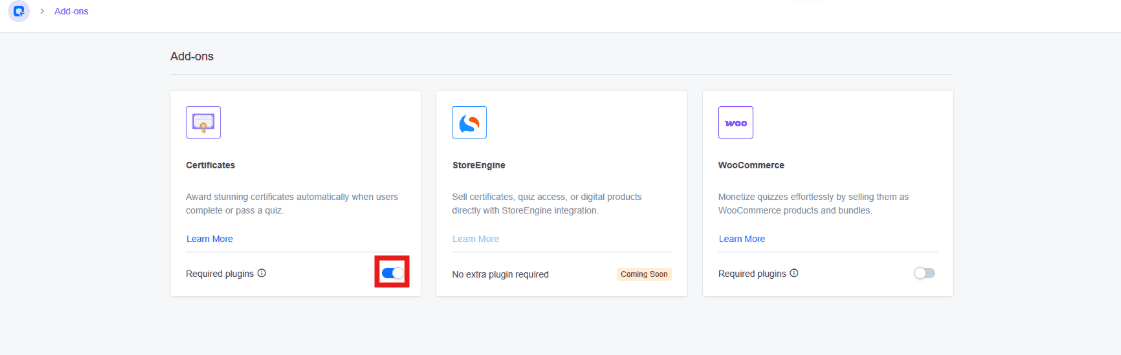
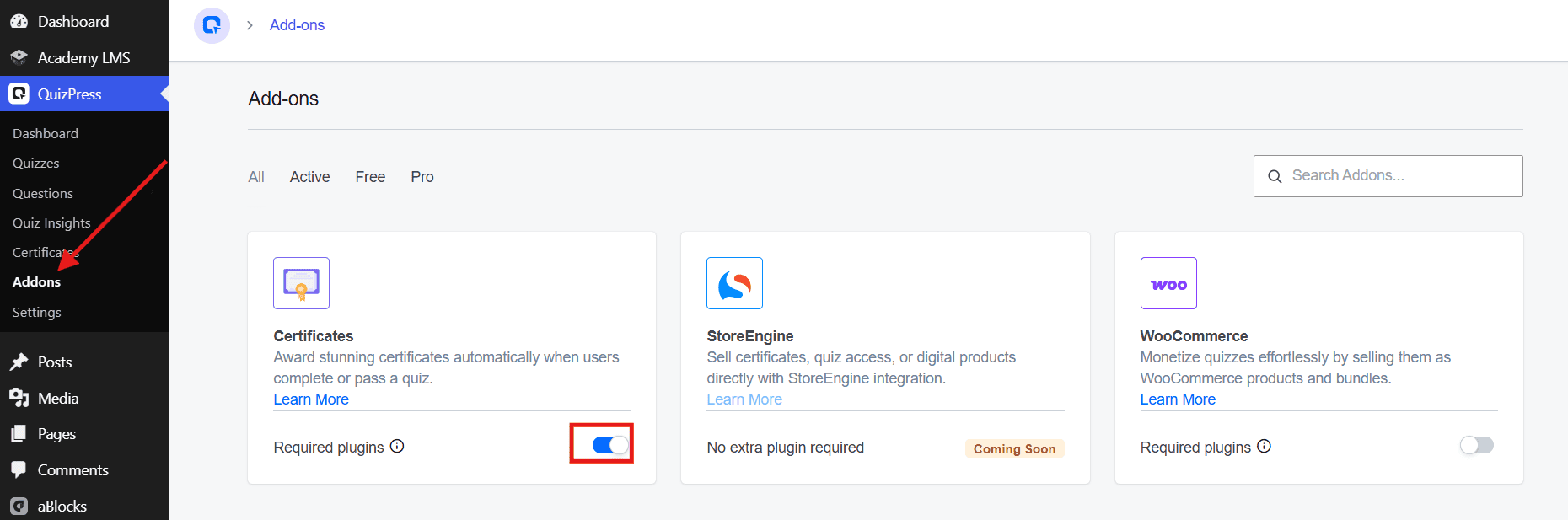
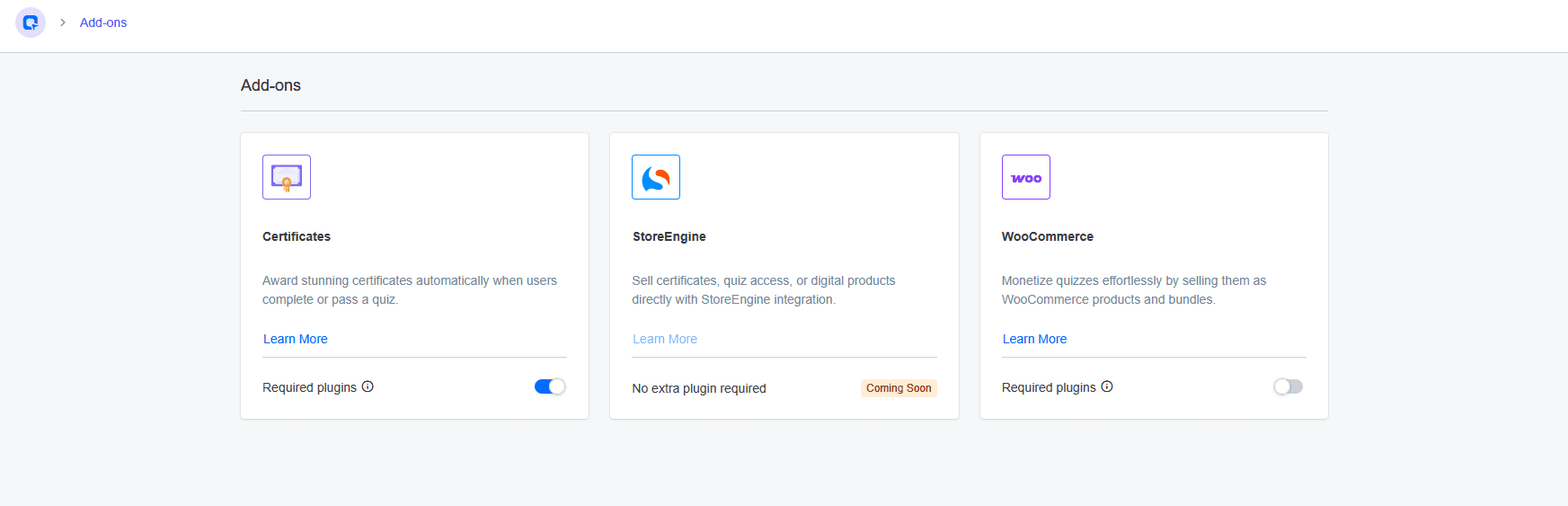
    Certificates work a little differently — they’re a separate add-on rather than a Settings toggle. Head to QuizPress → Addons, find the Certificates card, and switch it on. Once enabled, QuizPress can automatically award a certificate to anyone who clears the passing grade — a nice touch for online courses, employee training, certifications, and workshops.

    Enabled Certificates Add-on

    Step 5: Publish and Test Your Online Exam

    Before sending it out to real participants, test it yourself. Click Publish, then take the exam from the front end.

    Test Your Online Exam

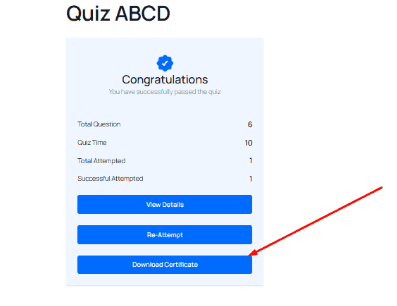
    On finishing, QuizPress shows a results screen with a pass/fail message and a quick summary (Total Question, Quiz Time, Total Attempted, Successful Attempted), along with View Details and Re-Attempt buttons — and if the Certificates add-on is enabled, a Download Certificate button too.

    View Details

    While testing, check that the timer starts on cue, questions and answers load correctly, the passing score calculates accurately, the exam auto-submits on time-out, the results screen shows the right status, and certificates generate (if enabled). This matters most for certification exams or employee evaluations, where a broken setting could affect real outcomes.  

    Once everything checks out, your timed exam is ready to share. 

    Best Practices for Creating Timed Online Exams

    A timer alone doesn’t guarantee a great assessment experience. Following these best practices can help you create online exams that are more effective, fair, and user-friendly.

    Choose a Realistic Time Limit

    Set a time limit that matches the number and difficulty of your questions. A realistic timer gives participants enough time to complete the exam while maintaining a structured assessment experience.

    Write Clear Instructions

    Before participants begin, clearly explain:

    • The total exam duration
    • The passing score
    • The number of attempts allowed
    • Whether correct answers will be shown after submission
    • Any rules participants should follow during the exam

    Providing clear instructions helps reduce confusion and creates a smoother exam experience.

    Test the Exam Before Publishing

    Before sharing your exam, complete a test attempt yourself and verify that:

    • The timer starts correctly.
    • All questions display properly.
    • The scoring and pass/fail settings work correctly.
    • Results display correctly after submission.

    Testing your exam helps identify issues before participants take the assessment.

    Use Question Randomization

    If appropriate, enable question and answer randomization to provide a different question order or answer choice order for each attempt. This can create a more varied assessment experience for participants.

    Keep Questions Relevant

    Write questions that align with your learning objectives and accurately measure participants’ knowledge. Well-designed questions lead to more meaningful assessment results.

    Common Mistakes to Avoid

    When creating a timed online exam with QuizPress, avoid these common mistakes:

    • Setting a time limit that doesn’t match the number or difficulty of the questions.
    • Publishing the exam without testing the timer, scoring, and results.
    • Forgetting to configure the pass/fail threshold.
    • Allowing too many attempts when creating certification or assessment exams.
    • Not enabling question or answer randomization when exam security is important.
    • Showing correct answers immediately if you want to reduce answer sharing between attempts.

    Before publishing, review your quiz settings carefully to ensure the timer, scoring system, attempt limits, and result options work as intended. A few minutes of testing can help provide a smoother experience for both administrators and participants.

    Final Thoughts

    Creating a timed online exam in WordPress doesn’t have to be complicated.

    With QuizPress, you can create professional online exams using features like countdown timers, 20+ question types, pass/fail thresholds, attempt limits, question randomization, detailed results, and automatic certificate generation—all without writing a single line of code.

    Whether you’re an educator, course creator, training manager, or business owner, QuizPress makes it easy to create, manage, and publish online assessments directly from your WordPress dashboard.

    Start by creating your first quiz, configure your exam settings, test the quiz thoroughly, and publish it with confidence.

    Frequently Asked Questions

    Can I create a timed online exam in WordPress without coding?

    Yes. QuizPress lets you create timed online exams through an intuitive WordPress interface, so you don’t need any coding knowledge.

    Can I limit the number of exam attempts?

    Yes. QuizPress allows you to configure attempt limits, giving you control over how many times participants can take an exam.

    Does QuizPress support different question types?

    Yes. QuizPress supports 20+ question types, allowing you to create engaging quizzes and comprehensive online exams for different assessment needs.

    Can participants see their results immediately?

    Yes. QuizPress supports instant result feedback, allowing participants to view their quiz results immediately after submitting the exam, depending on your quiz settings.

  • How to Create a Quiz in WordPress (Step-by-Step Guide)

    How to Create a Quiz in WordPress (Step-by-Step Guide)

    Quizzes are among the most effective interactive tools you can add to your WordPress website. Whether you manage an e-learning platform, a corporate training portal, a marketing blog, or a membership community, quizzes dramatically increase user engagement, extend time-on-site, and serve as powerful lead generation tools. In this comprehensive guide, you will learn exactly how to create a quiz in WordPress — with a focused look at QuizPress, a modern, all-in-one quiz, exam, and certificate management system built specifically for WordPress.

    Why Add Quizzes to Your WordPress Site?

    Create a Quiz

    Interactive content consistently outperforms static content. According to research published by the Content Marketing Institute, interactive elements such as quizzes generate approximately twice as much engagement as traditional articles or blog posts. They capture visitor attention, encourage social sharing, reduce bounce rates, and keep users on your site longer — all of which send strong positive signals to search engines, ultimately improving your SEO performance.

    Beyond engagement, quizzes serve a wide variety of real-world purposes:

    • Educators and trainers use quizzes to test student knowledge and track learning progress.
    • HR professionals use assessment quizzes during employee onboarding, performance evaluations, and skills testing.
    • Marketers and content creators use personality quizzes and product recommendation quizzes as powerful tools for generating leads.
    • Coaches and consultants use diagnostic tests to recommend the right services or programs to prospective clients.
    • E-commerce businesses use product quizzes to guide customers toward the best purchase decisions.

    With a capable WordPress quiz plugin, you can handle all of these use cases from a single, easy-to-manage dashboard — no developer required.

    What Is QuizPress? 

    QuizPress is a complete quiz, results, and certificate management system for WordPress, developed by Kodezen. Unlike lightweight quiz plugins that only support basic multiple-choice questions, QuizPress is a fully standalone assessment platform built to handle everything from casual polls to high-stakes graded exams — complete with automatic scoring, detailed results pages, and instant certificate issuance — all without writing a single line of code.

    QuizPress supports five core content formats under one roof: quizzes, surveys, polls, exams, and personality tests. This versatility makes it suitable for educators, online course creators, HR professionals, digital marketing agencies, and SaaS product teams alike. It also integrates natively with Academy LMS, making it an excellent choice for anyone running a full-featured online learning platform on WordPress.

    Key Features of QuizPress

    Here is a detailed overview of what makes QuizPress stand out from competing WordPress quiz plugins:

    20+ Question Types: From standard multiple choice and true/false to image-based answers, short text responses, file uploads, and opinion polls. This variety ensures you can build any type of assessment you can imagine.

    Auto-Grading and Scoring: Quizzes are scored automatically the moment a user submits. You can configure pass/fail thresholds, assign different point values to different questions, and display detailed results pages without any manual intervention.

    Automatic Certificate Issuance: QuizPress can generate and deliver branded certificates automatically upon completion of a quiz or exam. Certificate templates are fully customizable.

    Sell Certificates via WooCommerce: Unlike most quiz plugins, QuizPress allows you to monetize your assessments by selling certificates through WooCommerce or StoreEngine integration.

    Real-Time Analytics Dashboard: Track quiz completion rates, average scores, response trends, time-on-quiz data, and individual user performance metrics from a centralized analytics panel.

    Question Bank: Store, organize, reuse, and randomize questions from a central library. This is especially valuable for educators who need to build varied assessments from a shared pool of questions.

    Import and Export: Move your entire quiz — questions, results, settings, and configurations — with a single click: no messy CSV errors or manual re-entry.

    Fully Responsive Design: QuizPress uses a mobile-first layout that renders cleanly on desktops, tablets, and smartphones without any additional configuration.

    Gutenberg Block Support: Embed quizzes directly into the WordPress block editor using the dedicated QuizPress Gutenberg block.

    Step-by-Step Guide to Create a Quiz in WordPress

    Step 1 – Install QuizPress

    Getting QuizPress up and running on your WordPress site takes only a few minutes.

    For the Pro Version:

    1. Visit quizpress.pro/pricing and purchase your preferred plan.
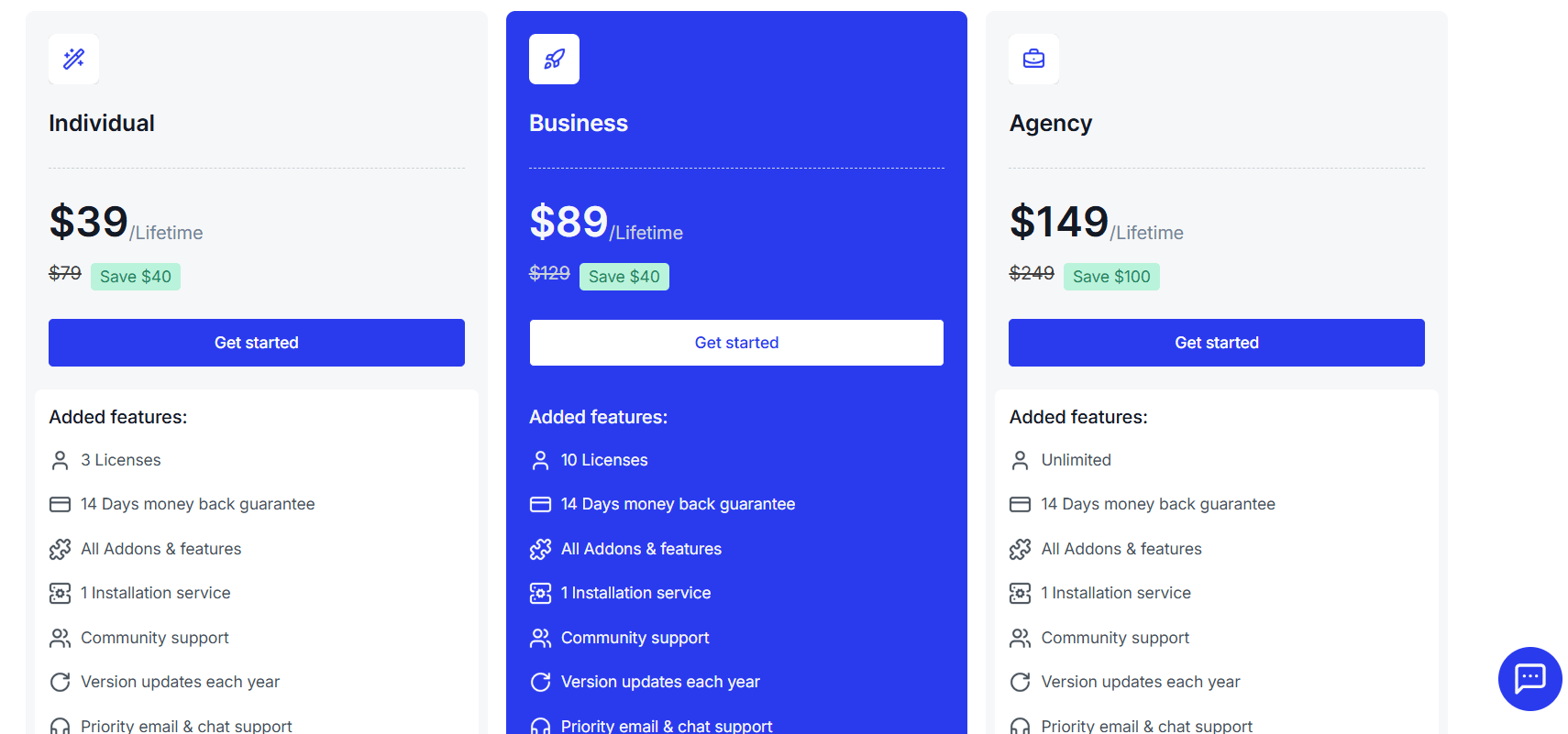
    Quizpress pricing

    2. Download the plugin .zip file from your account dashboard.

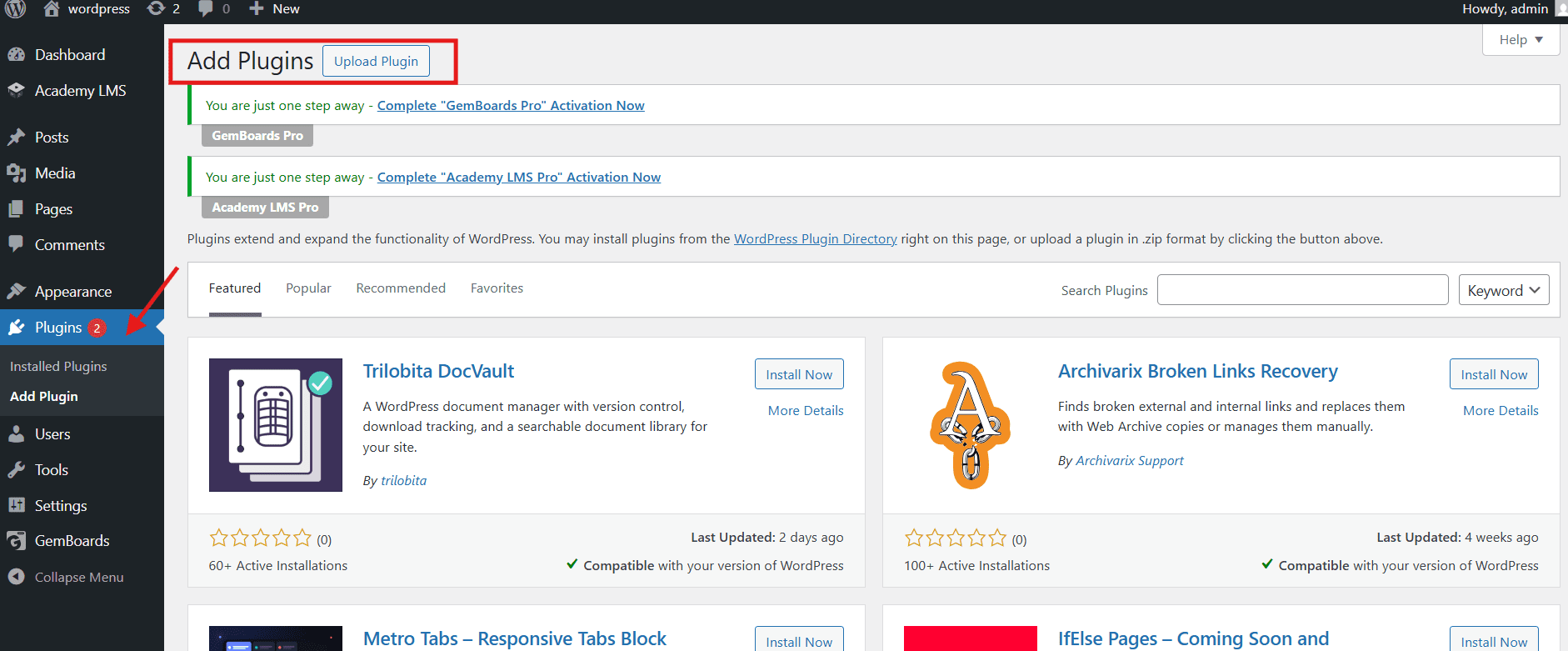
    3. In your WordPress admin panel, go to Plugins → Add New → Upload Plugin.

    quizpress installation

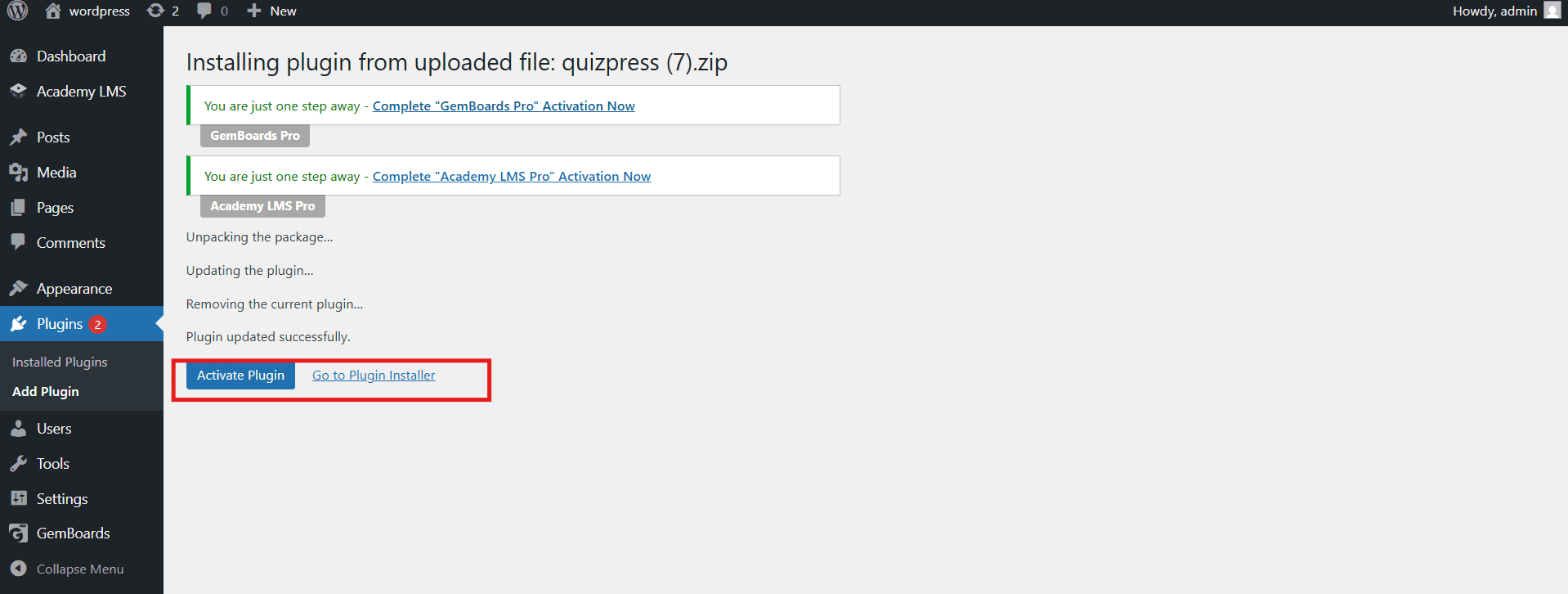
    4. Select the downloaded .zip file and click Install Now, then Activate.

    Activate

    A free version is also available in the WordPress plugin repository for users who want to explore basic features before upgrading.

    Step 2 – Create Your First Quiz

    Once QuizPress is activated, navigate to QuizPress → Add New Quiz from your WordPress dashboard.

    Create Your First Quiz
    1. Enter a descriptive quiz title.
    2. Select your quiz type from the available options:
    • Quiz — Standard knowledge-based assessment with right and wrong answers.
    • Exam — Formal, timed assessment with strict pass/fail criteria.
    • Survey — Opinion-gathering tool with no scoring.
    • Poll — Single-question quick vote.

    Each quiz type comes with its own dedicated settings, scoring logic, and results display options tailored to its specific purpose.

    Step 3 – Add Questions

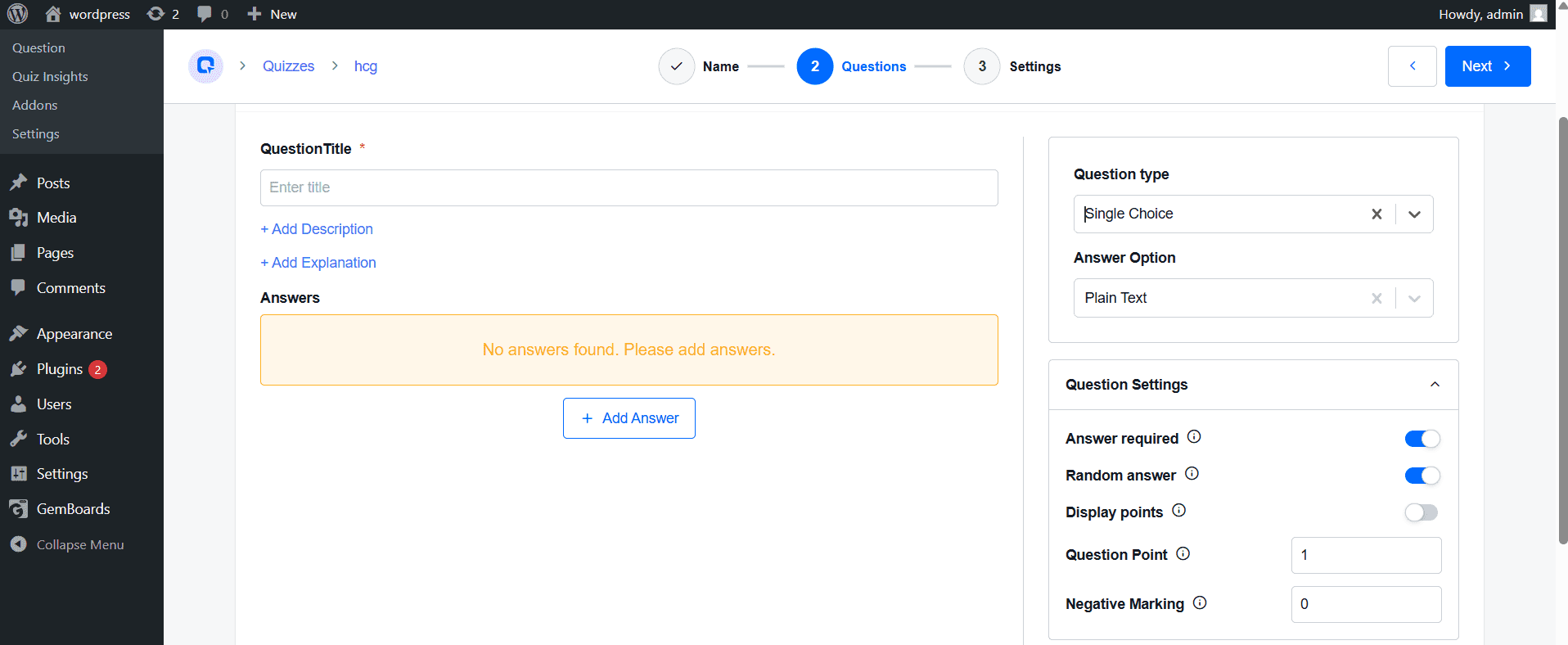
    This is the core of the quiz creation process. Click Add Question and choose from QuizPress’s library of 20+ question types:

    Add Questions
    • Multiple Choice (Single Answer) — The classic MCQ format where only one answer is correct.
    • Multiple Choice (Multiple Answers) — Allows users to select more than one correct option using checkboxes.
    • True / False — Quick binary questions, ideal for factual recall testing.
    • Image-Based Answers — Users select their answer by clicking on an image, perfect for visual quizzes and product recommendations.
    • Short Answer / Open Text — Users type a free-form written response.
    • File Upload — Users attach a file as their answer, useful for assignments and HR assessments.
    • Poll / Opinion — Collects data without marking answers as right or wrong.

    For each question, you can:

    • Write an explanation that appears after the answer is submitted, turning each question into a mini-lesson.
    • Assign individual point values for weighted scoring.
    • Attach images or media to enrich the question prompt.
    • Set a per-question time limit (available in the Pro version).

    Step 4 – Configure Results

    Before publishing, fine-tune your quiz behavior by navigating to the Settings panel:

    Configure Results
    • Time Limit — Set an overall countdown timer for the entire quiz.
    • Scoring System — Choose between percentage-based or point-based scoring.
    • Pass/Fail Threshold — Define the minimum score required to pass.
    • Question Randomization — Shuffle questions and/or answer choices for each attempt.
    • Show Correct Answers — Decide whether users see the correct answers after submission, or only their final score.
    • Attempt Limits — Restrict how many times a user can retake the quiz.

    Step 5: Customize Design & Layout

    QuizPress provides design customization tools to ensure your quiz matches your website’s visual identity:

    • Choose between a single-page layout (all questions displayed at once) or a multi-step layout (one question per screen).

    A visually consistent quiz greatly enhances user trust and significantly boosts completion rates.

    Step 6: Set Up Results & Feedback

    Once the quiz is submitted, QuizPress can display a rich results page that includes:

    • Instant score display showing the user’s result immediately.
    • Correct and incorrect answer review with detailed feedback for each question.
    • Performance breakdown showing which topics or sections the user performed well or poorly on.
    • Time taken to complete the entire quiz.

    This level of detail transforms a simple quiz into a genuinely useful learning and feedback tool.

    Step 7: Add Certificates (Optional but Highly Valuable)

    One of QuizPress’s most powerful features is its built-in certificate system. Once a user successfully passes a quiz, QuizPress can automatically generate a professionally designed, branded certificate.

    Certificates

    To fully customize certificates, QuizPress integrates with aBlocks, allowing you to design visually rich, flexible certificate templates without coding.

    customize certificates

    With this setup, you can:

    Certificates  setup

    Customize certificate templates using aBlocks (add logo, colors, typography, layout, and dynamic fields like username or score).

    quizpress Certificates

    Set conditional certificate issuance (e.g., only award certificates if the user meets a minimum score).

    download Certificates

    Sell certificates as premium add-ons through WooCommerce integration.

    This feature is especially valuable for online course platforms, corporate training programs, professional certification providers, and any use case where proof of completion or achievement matters.

    Step 8: Publish Your Quiz

    When your quiz is ready, click Publish. QuizPress will generate a shortcode that you can paste into any WordPress page, post, or widget area:

    [quizpress id="YOUR_QUIZ_ID"]

    Alternatively, use the QuizPress Gutenberg block to embed your quiz directly within the block editor without needing to copy and paste shortcodes manually.

    Step 9: Test Your Quiz

    Always run through your quiz completely before making it available to your audience. Specifically:

    • Test every question and verify that the correct answers are marked accurately.
    • Confirm the scoring calculation produces expected results.
    • Preview the quiz on a mobile device to check layout and usability.
    • Verify that the results page, feedback messages, and certificates display correctly after submission.

    Taking 10 minutes to test your quiz thoroughly will prevent a poor first impression with real users.

    QuizPress vs Other Popular WordPress Quiz Plugins

    Feature

    QuizPress Pro

    Quiz Maker (AYS)

    QSM

    Question Types

    20+

    10+ (Free: ~7–8, Pro: 10+)

    12+

    Certificate Issuance

    ✔ Yes

    ✔ Pro only

    ✘ No (requires Certificate Addon)

    Sell Certificates

    ✔ Yes

    ✘ No

    ✘ No

    Question Bank

    ✔ Yes (built-in, reusable & randomizable)

    ✘ No (basic categories in Pro)

    ✔ Pro / Addon (advanced question bank)

    Real-Time Analytics

    ✔ Yes

    ✔ Pro only

    ✔ Pro / Addon only

    WooCommerce Integration

    ✔ Yes

    ✔ Pro only

    ✔ Pro / Addon only

    Import / Export

    ✔ Yes

    ✔ Yes

    ✔ Yes

    LMS Integration

    ✔ Academy LMS

    ✘ No

    ✘ No

    Gutenberg Block

    ✔ Yes

    ✔ Yes

    ✔ Yes

    Pro Tips for Creating Better Quizzes in WordPress

    1. Keep It Focused

    The ideal quiz length is 5–15 questions. Longer quizzes see significantly higher abandonment rates – split large topic areas into multiple shorter quizzes instead of one giant assessment.

    2. Use Images in Questions

    QuizPress supports image-based answers. Visual questions increase engagement by up to 40% and are especially effective for product recommendation quizzes, geography tests, and design challenges.

    3. Write Meaningful Feedback

    For each question, write a short explanation that appears after the answer is submitted. This transforms your quiz from a testing tool into a teaching tool — far more valuable and shareable.

    4. Gate Results with Email Capture

    Enable QuizPress’s built‑in lead capture so visitors must enter their name and email address before viewing their quiz results. Combine it with Mailchimp for an automated nurture sequence.

    5. Randomize Questions for Exams

    Enable question randomization and set a maximum question count drawn from a larger pool. This ensures each attempt is unique and prevents cheating in educational or HR contexts.

    6. Test on Mobile Before Publishing

    QuizPress renders responsively, but always preview on a real mobile device before going live. Pay special attention to image-based questions and file-upload interactions on iOS and Android.

    Conclusion

    Adding a quiz to your WordPress website is one of the highest-impact actions you can take to increase engagement, collect leads, and deliver real value to your audience. With QuizPress, the entire process — from installation to a fully live, auto-graded quiz complete with certificates and analytics — can be completed in under 30 minutes, with no coding required.

    Whether you need a simple, fun poll, a professional exam system for your online course, or a lead-generating personality quiz for your marketing funnel, QuizPress provides the features and flexibility to handle it all from a single plugin. Install it, explore the settings, and experience firsthand the difference that well-designed interactive content can make on your WordPress site.

    Frequently Asked Questions

    Is QuizPress free to use?

    QuizPress offers a free version for basic quiz creation. The Pro plan unlocks advanced features, including certificates, in-depth analytics, WooCommerce selling, and the full question bank. Visit quizpress.pro/pricing for details on the current plan.

    Can QuizPress issue certificates automatically?

    Yes. QuizPress auto-generates branded certificates immediately when a user successfully passes a quiz. The certificate template is fully customizable, and you can even sell certificates as premium products through WooCommerce.

    Does QuizPress support multiple quiz formats?

    Yes — Quiz, Exam, Survey, Poll, and Personality Test are all natively supported. Each format has its own dedicated settings, scoring logic, and result display options.

    Does QuizPress work with LMS platforms?

    Yes. QuizPress integrates natively with Academy LMS, making it a natural choice for WordPress-based online learning platforms that need a robust, standalone assessment system.

  • Top Online Quiz Makers in 2026 (Compared for Beginners)

    Top Online Quiz Makers in 2026 (Compared for Beginners)

    Interactive content has exploded across the digital landscape. Static text and generic images no longer capture attention the way they once did. Today’s audiences crave participation, personalization, and instant feedback—exactly what quizzes deliver.

    The Shift in 2026 has brought three major transformations to quiz-making. Artificial intelligence now generates questions from any content source in seconds. Gamification elements like leaderboards turn assessments into addictive experiences. Live audience participation tools have become essential for classrooms and conferences.

    What is an Online Quiz Maker? Simply put, it is software that enables anyone—regardless of technical skill—to create, design, and distribute interactive quizzes. These tools handle everything from question formatting to scoring and analytics.

    What This Guide Covers: This resource compares the top tools for education, marketing, live events, AI-powered creation, and developer-focused solutions. Written specifically for beginners with no technical experience, this guide will help you select the perfect quiz maker.

    What Makes a Great Online Quiz Maker in 2026? (Evaluation Criteria)

    • Ease of Use: The best quiz makers require no coding. Drag-and-drop interfaces, pre-made templates, and intuitive navigation matter most for beginners.
    • Question Type Variety: Great tools support multiple choice, true/false, open-ended, matching, drag-and-drop, and image-based questions with multimedia support.
    • AI-Powered Features: Top platforms offer automatic question generation from text, URLs, or documents, plus smart grading with personalized feedback.
    • Branching & Adaptive Logic: Advanced quiz makers show different questions based on previous answers, creating personalized paths for each user.
    • Live Audience Interaction: Real-time polling and leaderboards transform passive viewers into active participants for classrooms and conferences.
    • Analytics & Reporting: Quality tools provide detailed performance reports, drop-off rates, and exportable data for deeper analysis.
    • Pricing: Free tiers offer great starting points, but watch for response caps, question limits, and hidden fees.

    Top Online Quiz Makers at a Glance 

    Tool

    Best For

    Free Version?

    Starting Price

    AI-Powered?

    Quizizz

    Gamified Learning at Scale

    Yes

    $0 (Freemium)

    Yes

    Quiz Maker by AYS

    Advanced exams and fun quizzes

    Yes

    $49/onetime

    Yes

    Kahoot!

    Live Classroom Engagement

    Yes

    $0 (Freemium)

    Yes

    Mentimeter

    Free Classroom Quizzes

    Yes

    $0 (Freemium)

    Yes

    Typeform

    Conversational Quizzes & Lead Gen

    Yes (Limited)

    $28/month

    Yes

    Google Forms

    Free Classroom Quizzes

    Yes (Full)

    $0

    No

    Jotform

    Vocabulary & Spaced Repetition

    Yes (Limited)

    $19.5/month

    Yes

    ProProfs Quiz Maker

    Corporate Training & Exams

    Yes (Limited)

    $19.5/month

    No

    Quizlet

    Versatile Form & Quiz Builder

    Yes

    $0 (Freemium)

    Yes

    QuizPress

    Developers & Custom Post Types

    Yes (Limited)

    $39/year

    Yes

    Riddle

    Viral Marketing Quizzes

    Yes (Limited)

    $199/month

    Yes

    Detailed Reviews of the Best Online Quiz Makers for Beginners

    Quizizz – Best for Self-Paced Gamified Learning at Scale

    Quizizz

    Quizizz combines serious learning with playful elements that keep participants coming back. Memes appear after each answer for lighthearted feedback. Power-ups allow students to boost scores. Leaderboards create friendly competition. Asynchronous play means students complete quizzes at their own pace. AI-generated questions help teachers create content faster.

    • Best For: Teachers managing large classrooms, students preferring self-paced learning, and corporate trainers seeking high engagement.
    • Pricing: Free tier includes unlimited quizzes and basic reporting. 
    • Pros: Engaging gamification, millions of pre-made quizzes, and self-paced mode.
    • Cons: Fun elements distract during formal assessments; advanced reporting requires Pro.

    Quiz Maker by AYS – Best for Advanced Exams and Fun Quizzes

    quiz-maker-by-ays

    Quiz Maker by AYS stands out from other WordPress quiz plugins thanks to its extensive feature set, allowing you to create professional exams, fun quizzes, trivia quizzes, product recommendation quizzes, personality quizzes, etc.

    It is suitable for beginners as it has an easy to navigate interface despite its many advanced features and 70+ customizable options.

    Best For: Businesses, educators, marketers, and content creators looking for a versatile WordPress quiz plugin to create lead generation assessments without coding. 

    Pricing: Free tier supports unlimited quizzes. The pro version starts at $49/onetime.

    Pros: Supports a wide variety of quiz types, offers extensive customization options, and includes powerful features for lead generation, analytics, and assessments.

    Cons: Some advanced features and integrations are only available in the Pro version, and the large number of settings may require some time for beginners to explore and master.

    Kahoot! – Best for Live, Gamified Training Sessions

    Kahoot

    Kahoot! pioneered the live quiz format. Its energetic, music-filled sessions create unforgettable learning experiences. Real-time quizzes display questions on a shared screen while participants answer on devices. Points reward speed and accuracy. Team mode allows collaborative play.

    • Best For: Live classrooms, team-building events, conferences, and synchronous participation.
    • Pricing: Free tier supports up to 10 participants. Paid plans start at $3/month.
    • Pros: High energy, minutes to set up, beloved by students.
    • Cons: Requires synchronous participation; limited question types.

    Mentimeter – Best for Real-Time Audience Interaction

    Mentimeter

    Mentimeter focuses on making presentations interactive. Live polling and Q&A features transform passive audiences into active contributors. Word clouds visualize audience sentiment. Attendees submit and upvote questions. Interactive presentations keep viewers engaged.

    • Best For: Conferences, webinars, and internal meetings seeking better feedback.
    • Pricing: Free tier supports up to 50 audience members. 
    • Pros: Beautiful interface, anonymous responses, seamless PowerPoint integration.
    • Cons: Quiz features are less strong than dedicated tools; not ideal for graded assessments.

    Typeform – Best for Conversational Quizzes & Lead Generation

    Typeform

    Typeform pioneered the one-question-at-a-time format that dramatically increases completion rates. Its conversational approach feels like chatting with a friend. Logic jumps create personalized paths. Beautiful templates require no coding. Native integrations connect with thousands of apps.

    • Best For: Marketing agencies building lead funnels, businesses collecting feedback, and brands creating personality quizzes.
    • Pricing: Free tier allows 10 responses/month. Pro starts at $28/month.
    • Pros: Conversion rates exceed 40%, professional branding, strong integrations.
    • Cons: Expensive for high volume; not designed for exam-style testing.

    Google Forms – Best Free Quiz Tool for Classroom Use

    Google Forms remains the go-to for educators needing reliable, zero-cost assessments. Multiple question types include multiple choice, checkboxes, and dropdowns. Automatic grading saves teachers hours. Integration with Google Classroom streamlines distribution. Unlimited quizzes and responses come at no cost.

    • Best For: Teachers on budgets, schools using Google Workspace, and anyone needing simple quizzes.
    • Pricing: Completely free with any Google account.
    • Pros: Zero cost, familiar interface, unlimited quizzes.
    • Cons: Basic design, limited analytics, no gamification.

    Jotform – Best Versatile Form & Quiz Builder

    Jotform

    Jotform offers unparalleled flexibility with over 10,000 templates and a massive widget library. PDF generation creates downloadable results. Payment integrations collect fees for paid quizzes. AI quiz generator builds assessments from URLs or uploaded documents in seconds.

    • Best For: Small businesses needing versatility, non-profits, and educators requiring specific functionality.
    • Pricing: Free tier allows 100 submissions/month. Paid starts at $19.5/month.
    • Pros: Incredible versatility, HIPAA-compliant options, extensive widget library.
    • Cons: Steeper learning curve; many features require paid plans.

    ProProfs Quiz Maker – Best for Corporate Training & Exams

    ProProfs

    ProProfs delivers professional-grade assessment tools for serious testing environments. Question banks store thousands of questions. Certificate generation automatically issues completion credentials. Timed tests enforce strict limits. Detailed reporting reveals performance trends.

    • Best For: HR departments, training managers, and schools administering standardized exams.
    • Pricing: Free tier supports limited quizzes. Paid starts at $19.99/month.
    • Pros: Professional exam environment, certificate automation, robust security.
    • Cons: Less visually engaging; not ideal for viral or personality quizzes.

    Quizlet – Best for Vocabulary, Recall, and Spaced Repetition

    Quizlet

    Quizlet focuses on memorization rather than formal assessment. Flashcards present information for rapid recall. Practice tests simulate exam conditions. Games make studying feel like play. AI-powered study tools adapt to individual learning needs.

    • Best For: Language learners, medical students, and anyone needing to retain large amounts of information.
    • Pricing: Free tier includes basic flashcards. 
    • Pros: Excellent for self-study, spaced repetition algorithm, and a large user-generated library.
    • Cons: Not for formal assessments; limited question customization.

    QuizPress  – Best for Developers & Custom Post Type Integration

    QuizPress

    QuizPress, built by Kodezen, stands apart by catering to developers and WordPress professionals. This plugin transforms quiz results into Custom Post Types (CPTs), enabling endless possibilities for displaying and managing quiz data. Mathematical equation support allows formula-based scoring. REST API readiness enables headless WordPress implementations. GDPR compliance comes built-in. Save and resume functionality lets users complete quizzes across multiple sessions.

    • Best For: WordPress developers building custom quiz applications, agencies creating portfolio-driven experiences, and organizations needing deep WordPress integration.
    • Pricing: The free version supports three quizzes. Pro starts at $39/year.
    • Pros: Unmatched flexibility, live leaderboards with WebSocket, export/import functionality.
    • Cons: Not for absolute beginners; requires understanding of CPTs; documentation caters to developers.

    Riddle – Best for Viral Marketing Quizzes

    Riddle

    Riddle specializes in quizzes designed to spread across social media. AI-powered generation creates content from any source. Lead capture forms collect email addresses. Detailed analytics track engagement and conversions. Beautiful templates require no design skills.

    • Best For: Bloggers building email lists, media companies driving traffic, and affiliate marketers.
    • Pricing: Free tier includes limited quizzes. Paid starts at $199/month.
    • Pros: High engagement templates, easy embedding, robust analytics.
    • Cons: Pricing may stretch small budgets; not LMS-compatible.

    Free vs. Paid Online Quiz Makers

    • What Free Quiz Makers Are Good For: Basic multiple-choice quizzes, classroom assessments with up to 30 students, and simple lead capture forms.
    • Where Free Quiz Makers Fall Short: Watermarks and forced logos appear on every quiz. Response caps and audience size restrictions force upgrades at inconvenient times. Basic reporting offers surface-level insights without export options. Free tiers receive no priority support.
    • What Paid Quiz Makers Add: White-label options remove branding. Branching, scoring, and personalization adapt to each user. Email marketing, CRM, and LMS connections automate workflows. Proctoring, encryption, and compliance (GDPR, HIPAA) become available.

    How to Choose the Right Online Quiz Maker for Your Needs

    • Scenario A: You Are a Teacher – Pick Quizizz, Kahoot!, Google Forms, or Quizlet. Gamification keeps students engaged; free tiers are generous.
    • Scenario B: You Are a Marketer – Pick Typeform or Riddle. Beautiful designs convert visitors; social sharing features amplify reach.
    • Scenario C: You Need Secure Proctored Exams – Pick ProProfs. Advanced security prevents cheating; certificate generation automates credentialing.
    • Scenario D: You Run Live Events – Pick Mentimeter or Kahoot! Real-time interaction keeps attendees engaged; live polling reveals sentiment instantly.
    • Scenario E: You Are a WordPress Developer – Pick QuizPress. Custom Post Type integration treats results as content; REST API enables headless implementations.
    • Scenario F: You Use Google Forms – Pick Examize. Generate questions instantly from any content source; hours of manual creation become minutes.

    Common Uses for Online Quiz Makers

    • Education & Training: Formative assessments, final exams, vocabulary drills, spaced repetition.
    • Marketing & Lead Generation: Personality quizzes capture leads; product recommendation quizzes guide buyers; trivia builds brand awareness.
    • Live Events & Conferences: Audience polling, icebreaker games, post-session feedback.
    • Corporate HR & Recruitment: Skills assessments, onboarding quizzes, compliance training.
    • WordPress Development: QuizPress users create result pages as portfolio entries; mathematical scoring powers interactive calculators.

    Step-by-Step: How to Create Your First Online Quiz (Beginner’s Guide)

    1. Define Your Goal: Lead generation? Knowledge assessment? Clear objectives guide decisions.
    2. Choose Your Tool: Pick based on your scenario from above.
    3. Select a Template: Pre-made templates save hours of design.
    4. Write Questions: Keep clear, concise, and engaging. Match the difficulty to the audience.
    5. Add Media: Images, GIFs, or videos boost engagement significantly.
    6. Configure Scoring: Set correct answers or map results to personality types.
    7. Set Up Lead Capture: Add email collection forms if building a list.
    8. Customize Branding: Match colors and logos to your brand.
    9. Preview & Test: Take the quiz yourself; test on multiple devices.
    10. Publish & Share: Embed via code snippets or share direct links.

    Tips to Drive Maximum Engagement with Online Quizzes

    • Keep It Short: 5–10 questions for lead generation; longer for formal exams.
    • Use Visuals: Image-based questions see significantly higher completion rates.
    • Add a Timer: Time limits create urgency for live events.
    • Show Results Immediately: Instant gratification keeps users engaged.
    • Encourage Sharing: Social media buttons amplify organic reach.
    • Follow Up: Send personalized results via email to nurture leads.

    Key Trends: The Future of Online Quiz Makers

    • The Role of AI: Automatic question generation from any content is becoming standard. Smart grading provides personalized feedback. Adaptive quizzes adjust difficulty in real time.
    • Increased Interactivity: Leaderboards, badges, and rewards motivate participation. Live audience features bring remote groups together. Drag-and-drop and interactive videos create deeper engagement.
    • Deeper Integration: Native CRM connections automate lead management. LMS compatibility enables enterprise deployment. WordPress solutions like QuizPress leverage CPT architecture for seamless integration.

    Which Online Quiz Maker Should You Choose in 2026?

    • Best for Beginners: Google Forms – simplicity and zero cost. Typeform runner-up for conversational interface.
    • Best for Educators: Quizizz for self-paced gamification. Kahoot! for live engagement.
    • Best for Marketers: Typeform for lead generation conversions. Riddle for viral social templates.
    • Best for Corporate Training: ProProfs for professional exam environments with certificate generation.
    • Best for WordPress Developers: QuizPress by Kodezen – unmatched Custom Post Type integration, REST API, and mathematical equation support.
    • Best AI-Powered: Typeform for no-code users. QuizPress for developers within WordPress.
    • Best Free Overall: Google Forms – unlimited quizzes, zero cost, reliable.

    The “best” online quiz maker depends entirely on your goals. Educators need gamification like Quizizz. Marketers require a beautiful design like Typeform. Corporate trainers need security like ProProfs. WordPress developers seeking deep integration will find unmatched flexibility with QuizPress by Kodezen. Start with a free trial, test engagement, and scale as your needs grow.

    Frequently Asked Questions (FAQs)

    Can I use a quality online quiz maker for free?

    Yes. Google Forms, Quizizz, Kahoot!, and Mentimeter offer robust free tiers. Premium features require payment.

    What is the easiest online quiz maker for beginners?

    Google Forms for simplicity; Typeform and Jotform for visual, engaging quizzes.

    How does an AI quiz generator save me time?

    AI tools generate complete quizzes from URLs, PDFs, or documents in seconds—hours become minutes.

    What quiz maker tools are recommended for live sessions?

    Mentimeter and Kahoot! excel with audience polling, leaderboards, and Q&A features.

    What’s the difference between a standalone tool and QuizPress?

    Standalone tools like Typeform focus on no-code marketing. QuizPress offers Custom Post Type integration, REST API, and mathematical equations for WordPress developers.

    What happens to my quiz data if I cancel?

    Most paid tools allow export before cancellation. QuizPress stores data as standard WordPress posts, so data remains even if deactivated.