

A quiz stuffed entirely with multiple choice questions has a quiet flaw: it rewards recognition, not knowledge. Someone can pass it by spotting the option that “looks right” without actually being able to produce the answer on their own.
That gap matters more than it seems. A trainee who can pick the correct safety step out of four options isn’t the same as one who can recall it cold when it counts. A student who recognizes a vocabulary word in a list isn’t the same as one who can retrieve it from memory.
One question format closes that gap better than almost anything else in a typical quiz builder, and it’s also one of the most searched — a fill in the blanks quiz forces someone to produce the answer themselves, with no list of options to lean on.
There’s a reason it feels harder to build than it should. Getting the answer-matching right, choosing the correct file types for a file upload question, or knowing when a dropdown beats a visible list all trip people up in ways a generic “add a question” tutorial never explains. One of these formats in particular turned out to have a much stricter matching rule under the hood than I expected — worth knowing before a quiz goes live, not after the first wrong-but-correct answer gets marked wrong.
Quick answer: a fill in the blanks quiz asks someone to type the missing word or phrase directly into a sentence, rather than picking it from a list — and it’s one of five formats worth understanding together, since they’re commonly built side by side: fill in the blank, dropdown, file upload, choose-the-correct-answer (multiple/single choice), and questions that use images. Each tests something different, and a WordPress quiz plugin like QuizPress supports all five, with three of them (dropdown, fill in the blank, and file upload) gated to its paid tier.
Why Fill in the Blank Beats Multiple Choice for Real Recall
Students generally scored lower on the free-recall format than on multiple choice. The researchers’ own reading of that gap wasn’t “less knowledge” — it was reduced cueing. Multiple choice lets recognition substitute for recall; free recall doesn’t give that shortcut. The free-recall format still showed reliability comparable to or exceeding multiple choice.
What the review couldn’t confirm was a consistent long-term retention advantage for one format over the other — the evidence there was genuinely mixed. That’s worth knowing before treating “fill in the blank is scientifically better” as settled fact. It isn’t. What is settled: a fill in the blank question measures something multiple choice structurally can’t reach, regardless of which one produces better retention scores on a delayed test.
That’s the real case for mixing formats rather than picking a “winner.” The five formats covered in this guide — fill in the blank, dropdown, file upload, choose-the-correct-answer questions, and image-based questions — cover different points on that spectrum, from pure recall to pure recognition to open-ended proof of work.
|
Format |
What It Tests |
Auto-Graded? |
Free or Pro (QuizPress) |
|
Fill in the Blank |
Exact recall inside context |
Yes |
Pro |
|
Dropdown |
Recognition (same as multiple choice, condensed) |
Yes |
Pro |
|
File Upload |
Proof of completed work |
No — manual review |
Pro |
|
Single/Multiple Choice |
Recognition of a correct fact |
Yes |
Free |
|
Image-based questions |
Visual identification or context |
Depends on setup |
Free (feature image) / Pro (Pin, Image Marking) |
That last row is worth a second look before diving into each format: “adding an image to a question” and “grading an image-based question” are two different things, covered separately later in this guide.
Fill in the Blank Quiz Questions
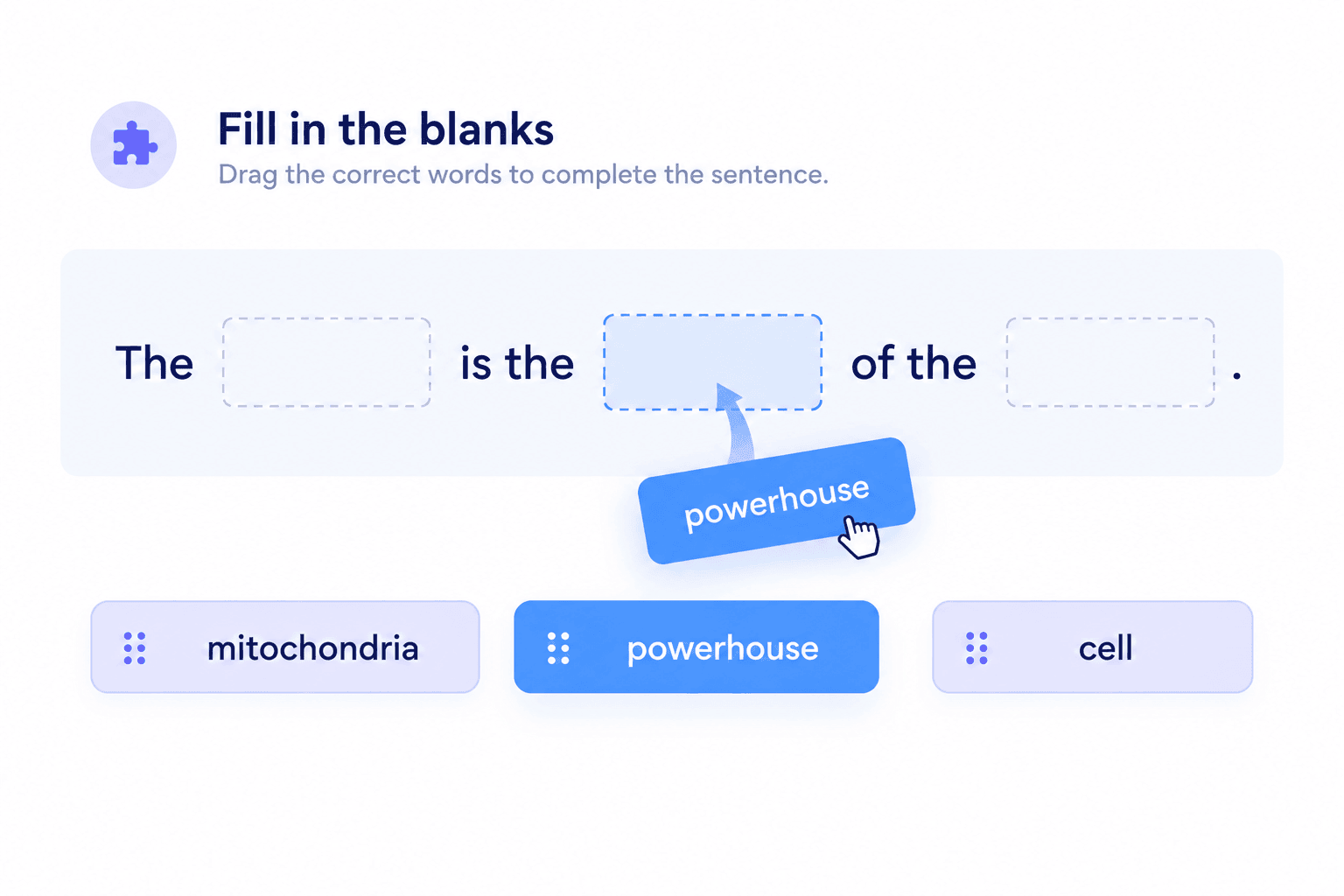
A sentence or short passage is shown with one or more words removed, and the respondent types the missing word or phrase directly into the gap. There’s no list to scan — just a blank and a blinking cursor.
Example: “The process by which plants convert sunlight into energy is called ______.” (photosynthesis)
Best for: testing exact recall inside real context, rather than recognition from a list. A fill in the blank question is a meaningfully harder skill test than multiple choice, precisely because there’s nothing to eliminate your way toward the right answer.
How the Blanks Actually Work
Most tutorials on this format stop at “type your sentence with a gap.” The mechanics underneath matter more than that once you’re actually building one.
In QuizPress, a blank isn’t drawn by hand with underscores — the question title uses a literal {dash} placeholder everywhere a blank should appear. Write “The capital of France is {dash}” and the builder renders a real inline input exactly where that placeholder sits.
A question can use more than one {dash} in the same sentence. “The {dash} orbits the {dash}” renders as two separate blanks inside one flowing sentence, not two separate questions.
Each blank gets its own answer, defined in order and separated by a vertical bar. For a two-blank question, the answer field would read something like “Moon | Earth” — the first segment answers the first blank, the second segment answers the second. That’s a positional mapping, not a list of acceptable synonyms for one blank.
That distinction is easy to miss and worth stating plainly: if you’re hoping to accept “photosynthesis,” “Photo-synthesis,” and “the process of photosynthesis” as three interchangeable correct answers to one single blank, that specific kind of multi-synonym flexibility isn’t what the pipe syntax gives you here. It’s built for multiple blanks in one sentence, not multiple acceptable phrasings of one answer.
How grading actually works: the respondent’s typed answers get joined together and compared against the stored correct answer after both sides have their spaces stripped out. In practice, that means “New York” and “NewYork” grade as the same answer, and a stray extra space anywhere won’t cost anyone the point. It also means the comparison is a substring match, not a rigid full-string equality check — which is more forgiving than it sounds, but still expects the actual wording to be right, aside from spacing. Case usually doesn’t matter either, since the vast majority of default WordPress database setups use a case-insensitive collation — worth double-checking on an unusual hosting setup, but not something to lose sleep over on a standard install.
Watch out for: this is a plain substring-and-spacing match, not AI-assisted grading. Some hosted quiz tools — ProProfs’ AI Smart Grading is one example — accept synonyms and minor spelling mistakes automatically on this exact question style. QuizPress’s fill in the blank format doesn’t do that kind of semantic matching. If a term has several genuinely acceptable phrasings, the safer move is picking the specific wording you’ll accept and stating it clearly in the question itself, rather than assuming the system will read intent the way a human grader would.
Real-world use cases: vocabulary and terminology recall, historical dates and names inside a sentence, scientific process terms, song lyrics or quotation completion, language-learning grammar drills (verb conjugation, correct preposition, correct article).
Setup consideration: keep it to short, specific answers — one word or a short phrase per blank. A fill in the blank question that expects a full sentence as the “blank” defeats the format’s own purpose and turns into a de facto short-answer question with worse UI for it.
If the same fill-in-the-blank items are going to be reused across more than one quiz — a vocabulary set used every semester, for instance — building them once in a centralized, reusable question bank saves rebuilding the same blanks by hand each time.
Ready-to-Use Fill in the Blank Quiz Examples
Since a lot of what actually ranks for this topic right now is a plain list of ready-made questions, here’s a working set across a few common categories — useful as a starting point for a real fill in the blanks quiz, or as a reference for what “good” looks like across subjects.
Vocabulary and language
Science
History and geography
Business and general knowledge
Pop culture and trivia
Building it in WordPress: Fill in the Blank is one of the ten Pro-tier question types in QuizPress, not part of the free plan — worth knowing before planning a whole quiz around it, since discovering that mid-build is a frustrating way to find out.
Dropdown Questions
A dropdown question presents its answer options inside a collapsed select menu instead of a visible list. Functionally, it’s a single choice question wearing a different interface — the respondent clicks the field, a list of options appears, and they pick one.
Example: “Select your country of residence” shown as a dropdown listing every country, instead of dozens of radio buttons stacked on the page.
How it grades: dropdown questions in QuizPress run through the exact same correctness check as a standard single-choice question. There’s no separate scoring logic for the dropdown format — the only real difference is the interface, not the grading.
Best for: long option lists — countries, states, job titles, age brackets — where showing every option on screen at once would overwhelm the layout. Dropdown Questions are also a natural fit anywhere a form-style layout matters more than a scannable list, like a registration quiz that doubles as an intake form.
Watch out for: discoverability. Because the options stay hidden until the field is clicked, a dropdown is a weaker choice than a visible list whenever you want respondents comparing every option side by side before answering. A geography question with four visible city names lets someone weigh them against each other; the same four names hidden in a dropdown don’t.
Building it in WordPress: Dropdown is a Pro-tier format, alongside Fill in the Blank and File Upload. It’s worth pairing mentally with the free-tier choice formats — single choice and multiple choice questions cover the same “pick one from a list” territory without needing the paid tier, if a visible list works fine for a given quiz.
File Upload Questions
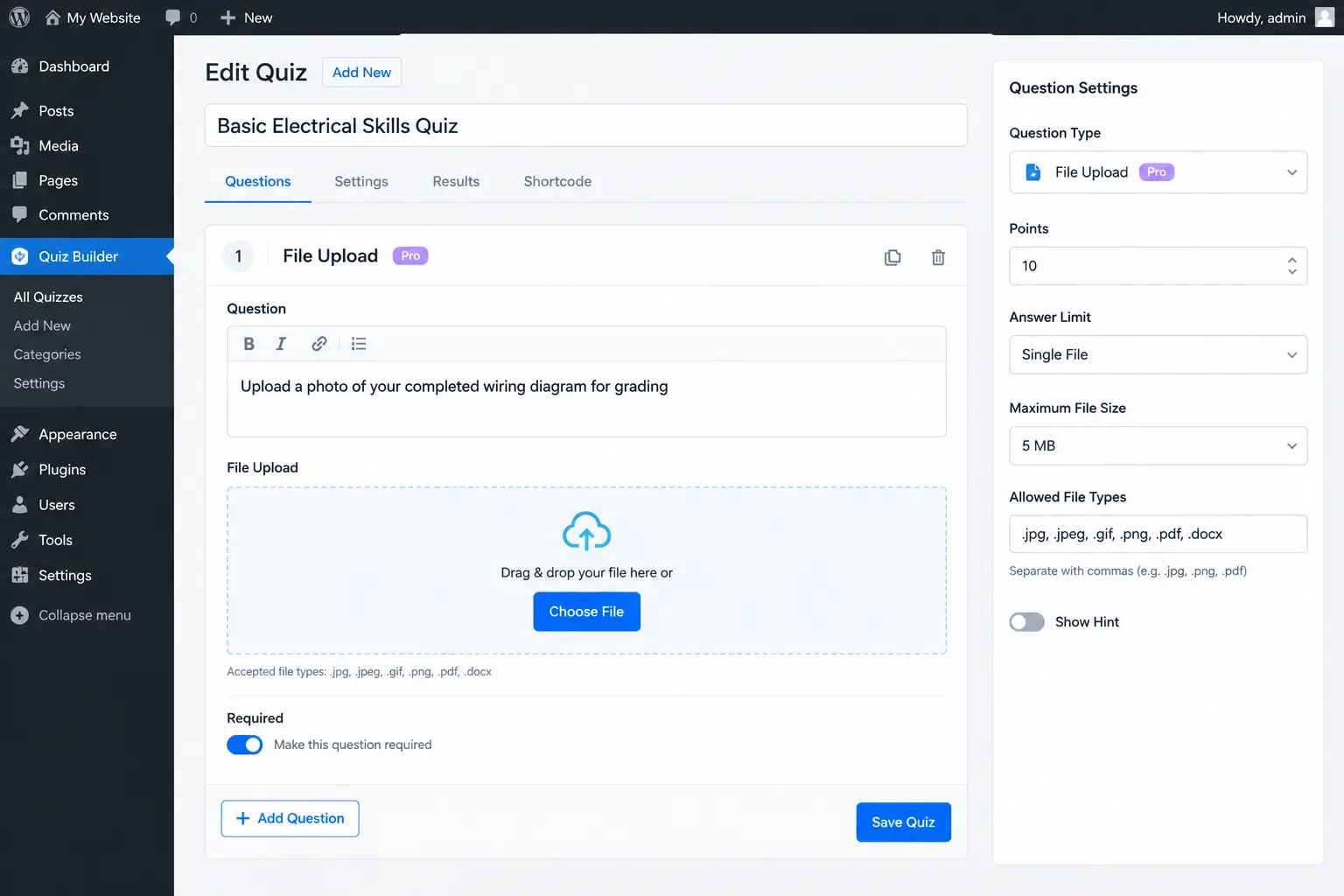
Instead of typing or selecting an answer, the respondent uploads a file as proof of completed work — a photo, a document, a spreadsheet.
Example: “Upload a photo of your completed wiring diagram for grading,” or “Attach your finished spreadsheet exercise as a .docx or .pdf file.”
Accepted file types: File Upload Questions in QuizPress accept .jpg, .jpeg, .gif, .png, .pdf, and .docx files. That’s a fixed, specific list — not “any file type” — worth checking against whatever format a specific assignment actually needs before building the question around it. A student expected to submit a .pptx presentation or a .zip folder of source code won’t be able to attach either one directly through this question type.
How grading actually works: this is the one detail most guides to this format skip entirely. A File Upload question is never auto-graded, full stop — every submission is held for manual review, the same as an essay question. There’s no partial credit, no automatic pass/fail, and no way to configure one. Whoever built the quiz has to go in and manually mark each upload correct, incorrect, or partially correct after reviewing the actual file.
That’s a deliberate design choice, not a limitation to work around — a photo of a completed task or a submitted document genuinely can’t be auto-checked against a stored “correct answer” the way a typed word can. It’s worth planning grading time into any quiz that leans on this format, the same way you’d budget time for grading essay responses.
Real-world use cases: portfolio-based assessment (design work, writing samples), certification programs that need photo proof of a completed physical task, code or spreadsheet submissions for a skills test, safety-compliance photo checks (“upload a photo of your secured work area”).
Setup consideration: set clear expectations about file size and format in the question text itself, since there’s no dedicated maximum-size setting to fall back on beyond your WordPress install’s own upload limits — a wide-open upload field on a public quiz is both a storage cost over time and a spam-abuse risk if the quiz is left publicly accessible.
Building it in WordPress: File Upload rounds out the ten Pro-tier types alongside Fill in the Blank and Dropdown. Anyone planning a whole assessment around manually-reviewed answers should treat grading time as part of the setup cost, not an afterthought discovered after the first batch of submissions comes in.
Choosing the Correct Answer: Single and Multiple Choice Questions

Not every quiz needs recall or file proof. Sometimes the goal is simple: present a few options and ask someone to choose the correct answer. This kind of choose the correct answer quiz format — single choice and multiple choice — is the fastest question type to write and the fastest for a respondent to complete.
Single choice presents several options with exactly one correct answer. Multiple choice (in QuizPress’s own naming — some other tools use “multiple choice” to mean single-answer selection, which trips people up when following a tutorial written for a different builder) asks the respondent to select every correct option among several, not just one.
Best for: fast knowledge checks, screening quizzes, timed assessments where speed matters more than depth, and any quiz where completion rate matters more than testing exact recall.
Watch out for: guessing. With four visible options, a respondent has roughly a 25% chance of guessing correctly with zero real knowledge — a single question in this format is a weak signal on its own. Pairing a handful of choice-based questions with at least one fill in the blank question or short answer question gives a much more honest read on what someone actually knows versus what they can recognize.
Both formats are part of QuizPress’s free plan, with no add-on required — unlike the three Pro formats covered above. A full breakdown of how single choice, multiple choice, and their horizontal-layout variants map onto real quiz-builder settings is covered separately in a deeper look at choice-based question types in WordPress, including that exact naming quirk between tools.
Adding Images to Your Quiz Questions
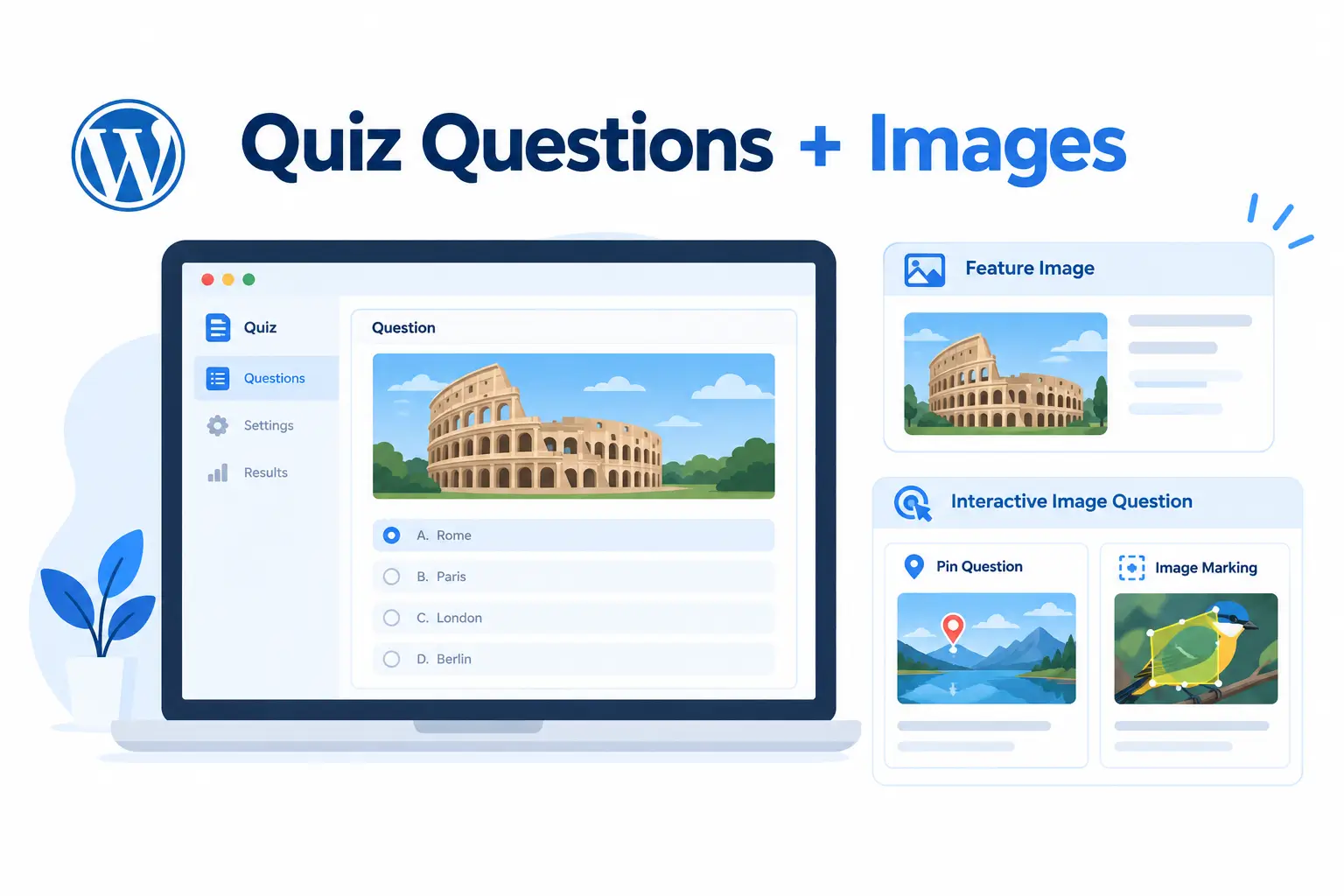
Picking the right images for a quiz can turn a dry knowledge check into something people actually want to finish — and it’s worth separating two very different things that both get called “adding an image to a quiz.”
Displaying an image alongside a question is a plain, free-tier feature in QuizPress: every question type — free or Pro, fill in the blank, dropdown, single choice, all of them — has a Question Feature Image field built into the same editor screen where the question itself gets written. It runs through WordPress’s own native media library, so any image format a given site’s media settings already accept works here without a separate upload system to learn.
That’s a genuinely useful, easy-to-miss detail: a diagram-based science question, a “identify this landmark” geography question, or a “what’s wrong with this photo” compliance question can all use a plain feature image without touching the paid tier at all.
Grading against an image is a completely different, Pro-tier capability. Pin questions ask a respondent to click a precise point on an image; Image Marking questions ask them to identify a whole region rather than one pixel. Both are graded against the image’s actual coordinates, not just displayed next to a question — a meaningfully more advanced (and more setup-intensive) use of images for a quiz than a plain feature image. A full breakdown of Pin, Image Marking, and the rest of the interactive question formats covers that second category in depth.
Setup consideration: an image only helps a question if it earns its place. A feature image that’s purely decorative slows page load without adding anything a respondent needs to answer correctly — reserve it for questions where the image genuinely carries information (a diagram, a photo to identify, a chart to read), and keep file sizes reasonable so a quiz with several image-based questions doesn’t load like a photo gallery.
Common Mistakes When Building These Question Types
A handful of setup mistakes show up over and over across fill in the blank, dropdown, and file upload questions, regardless of subject matter.
Writing a fill in the blank question that expects a full sentence. The format is built for short, specific answers — a word, a date, a short phrase. Expecting someone to type a complete sentence into a blank produces the worst of both worlds: harder to grade reliably and harder for the respondent to know what “correct” even looks like.
Assuming synonym flexibility that isn’t there. Without configuring for it directly, a stored answer of “car” won’t automatically also accept “automobile” or “vehicle” as correct. If more than one wording is genuinely acceptable, pick the one you’ll grade against and word the question so that answer is the natural response, rather than hoping the system infers intent.
Reaching for a dropdown when a visible list would serve better. Dropdowns save vertical space, but they hide options from view until clicked — a poor trade whenever comparing choices side by side is part of what the question is actually testing.
Building a file upload question with no plan for reviewing submissions. Every file upload answer needs a human to open it and mark it correct. A quiz with fifty file-upload questions sent to five hundred people creates twenty-five thousand files that someone has to look at — plan the review workload before publishing, not after the submissions start arriving.
Adding images purely for decoration. An image that doesn’t carry information a respondent actually needs just adds load time. Save images for questions where seeing something is genuinely part of answering it correctly.
Which Format Should You Use?
Testing exact recall of a specific word, date, or term? A fill in the blank question is the direct fit — there’s no list to lean on, so a correct answer actually demonstrates recall, not recognition.
Working with a long list of options — countries, job titles, age ranges? Dropdown Questions save screen space without changing how the answer gets graded underneath.
Need proof of a completed physical or creative task? File Upload Questions are the only format built for that, with the tradeoff that every submission needs a human to grade it.
Building something fast, for a screening quiz or a high-volume knowledge check? A choose the correct answer quiz — single or multiple choice — is quickest to write and quickest to complete, at the cost of being the easiest format to guess through.
Testing visual identification or giving context that words alone can’t carry? A plain feature image works for any question type at no extra tier; Pin and Image Marking are worth the extra setup only when the location or region itself is the actual thing being graded.
Most well-built quizzes end up mixing at least two or three of these rather than leaning on just one — a handful of fast choice-based questions to open, a few fill-in-the-blank questions to confirm real recall, and an image or file-upload question where the subject genuinely calls for it.
Building These Question Types in WordPress
Dropdown, Fill in the Blank, and File Upload are three of the ten Pro-tier question types in QuizPress — they sit alongside the seven interactive and visual formats (Ordering, Puzzle, Matching, Pin, Image Marking, Range, and Graph) covered separately in a deep dive on interactive quiz question types. Single choice, multiple choice, and the plain question-image feature all come with the free plan.
A full breakdown of every question format QuizPress supports — free and Pro, all nineteen of them — is covered in a complete guide to WordPress quiz question types, which is the right starting point for deciding which formats a given quiz actually needs.
If a quiz plan involves migrating a large set of existing fill-in-the-blank or dropdown questions from another platform rather than rebuilding them by hand, bulk importing and exporting quiz questions covers the faster path than typing each one in individually.
A step-by-step walkthrough of building an entire quiz from scratch — installing the plugin, adding questions, configuring settings, and publishing — is covered in a complete guide to creating a quiz in WordPress without any coding. The feature list and pricing pages cover exactly what’s included at each tier, and every plan carries a 14-day money-back guarantee, so testing whether these formats fit a specific use case doesn’t require a long-term commitment upfront. Getting a WordPress quiz plugin installed and licensed in the first place is covered in the installation and activation guide, and a broader comparison of quiz plugins for anyone still deciding on a tool is covered in a complete guide to the best WordPress quiz plugin.
Final Thoughts
Fill in the blank, dropdown, file upload, choose-the-correct-answer, and image-based questions each test something the others can’t reach on their own — exact recall, condensed recognition, proof of real work, fast screening, and visual context, in that order. None of them is the universal “best” format; the right mix depends entirely on what a specific quiz actually needs to prove.
The setup details matter more than most guides to this topic let on — how the blanks actually get matched, which file types a file upload question will accept, and which “image” feature is free versus which one needs the paid tier. Getting those right the first time saves the frustrating discovery of a wrong-but-correct answer marked wrong, or a whole lesson plan built around a format that turns out to need an upgrade. The full feature list and pricing pages have the details for anyone ready to build past the basics.
Frequently Asked Questions
What is a fill in the blanks quiz?
A fill in the blanks quiz is a question format where one or more words are removed from a sentence or short passage, and the respondent types the missing word or phrase directly into the gap instead of choosing it from a list of options. It tests recall rather than recognition, since there’s nothing to compare against or eliminate.
What are some good fill in the blanks quiz questions to use?
Short, specific-answer questions work best: exact dates (“World War II ended in ______”), single terms (“The powerhouse of the cell is the ______”), or one-word vocabulary (“The opposite of ‘arrive’ is ______”). The ready-to-use examples earlier in this guide cover vocabulary, science, history, business, and pop culture categories to start from.
Is a dropdown question the same as a multiple choice question?
Functionally, yes. A dropdown question grades exactly the same way a single-choice question does — the only difference is that the options are hidden inside a collapsed select menu instead of shown as a visible list. Dropdown Questions are a display choice, not a different scoring method.
Are file upload questions automatically graded?
No, and this is true across most quiz software, not just one tool. File Upload Questions are always held for manual review — there’s no automatic pass/fail or partial credit, since a photo or document can’t be checked against a stored text answer the way a typed word can.
What file types can be uploaded to a file upload question?
In QuizPress specifically, File Upload Questions accept .jpg, .jpeg, .gif, .png, .pdf, and .docx files. That list is fixed rather than “any file type,” so check it against what a specific assignment actually requires before building the question.
Does a fill in the blank question accept multiple correct spellings or synonyms?
Not automatically, in QuizPress. The matching ignores extra spaces around the answer but otherwise expects the specific wording that was configured as correct — it isn’t AI-assisted semantic matching the way some hosted quiz tools’ smart-grading features are. If more than one phrasing should count as correct, that needs to be planned for explicitly in how the question is worded.
Can I add an image to any type of quiz question, or only certain ones?
Any type. Displaying a plain feature image alongside a question is a free-tier feature available on every question type in QuizPress, not limited to specific formats. Grading against an image’s actual coordinates — Pin and Image Marking — is a separate, Pro-tier capability from simply showing an image.
What’s the difference between a fill in the blank question and a short answer question?
A fill in the blank question is embedded inside a sentence, with the blank appearing mid-sentence. A short answer question is freestanding — an open text box with no surrounding sentence. Both test the same kind of exact recall; the difference is presentation, not grading logic.
How many fill in the blank questions should a quiz include?
There’s no universal number, but a fill in the blanks quiz built entirely from this one format tends to fatigue respondents faster than a mixed quiz does, since typing a precise answer takes more effort than clicking an option. Three to five fill-in-the-blank questions mixed among choice-based questions is a reasonable starting ratio for a standard 15-20 question quiz — adjust based on how respondents actually perform once real data comes in.